上一篇
html文本框如何居中

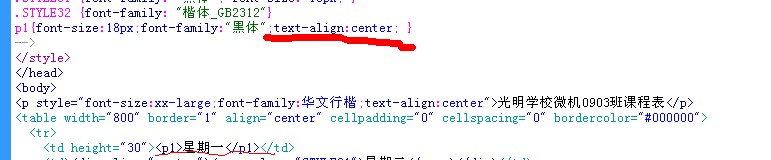
要实现HTML文本框居中,可通过父元素设置 text-align:center,或使用Flexbox布局( display:flex;justify-content:center)。
基础方法
使用 text-align: center
- 原理:通过设置父容器的 text-align: center,可使内部行内元素(如 <input> 或 <textarea>)水平居中,但需注意,此方法仅适用于块级元素或已设置为行内块的元素。
- 代码示例: <div style="text-align: center;"> <input type="text" /> </div>
- 限制:若文本框为 block 或 inline-block 元素,需额外设置 display: inline-block 或 display: block 才能生效。
调整内边距(Padding)与宽度
- 原理:通过设置文本框的固定宽度,并配合父容器的 padding 或 width 属性,可间接实现居中效果。
- 代码示例: .container { width: 50%; margin: 0 auto; / 使容器居中 / padding: 20px; } input[type="text"] { width: 100%; / 文本框宽度占满容器 / }
灵活布局方案
Flexbox 布局
- 原理:将父容器设为 display: flex,并通过 justify-content: center 实现水平居中,align-items: center 实现垂直居中。
- 代码示例: .flex-container { display: flex; justify-content: center; / 水平居中 / align-items: center; / 垂直居中 / height: 200px; } input[type="text"] { width: 300px; }
- 优势:支持单行或多行布局,且自动适应不同屏幕尺寸。
Grid 布局
- 原理:通过 display: grid 定义网格容器,利用 place-items: center 实现二维居中。
- 代码示例: .grid-container { display: grid; place-items: center; / 水平和垂直居中 / height: 100vh; } input[type="text"] { width: 200px; }
- 适用场景:复杂布局中需精准控制位置时使用。
其他实用方法
margin: auto 自动 margin
- 原理:设置文本框的 margin: auto,需确保其父容器为块级元素且有固定宽度。
- 代码示例: .auto-margin-container { width: 300px; margin: 0 auto; / 容器居中 / } input[type="text"] { width: 80%; margin: 0 auto; / 文本框居中 / }
过时的 <center>
- 说明
:HTML5 已废弃 <center> 标签,但不妨碍其在旧项目中的使用。
- 代码示例: <center> <input type="text" /> </center>
兼容性与注意事项
-
浏览器支持:
- flex 和 grid 布局在现代浏览器中均支持良好,但在 IE 等旧版浏览器中需降级处理(如使用 float 或 table 布局)。
- margin: auto 在块级元素中表现稳定,但对行内元素需谨慎。
-
响应式适配:
- 使用百分比宽度(如 width: 80%)或 max-width 避免文本框在移动设备上溢出。
- Flexbox 和 Grid 天然支持响应式,可通过媒体查询进一步优化。
实战对比:表格布局 vs CSS 布局
| 方法 | 代码简洁性 | 语义化 | 响应式支持 | 推荐场景 |
|---|---|---|---|---|
| text-align | 高 | 低 | 差 | 简单水平居中 |
| margin: auto | 中 | 中 | 中 | 定宽容器内的居中 |
| Flexbox | 中 | 高 | 优秀 | 复杂布局、垂直居中 |
| Grid | 中 | 高 | 优秀 | 二维布局、精准定位 |
| <table> | 低 | 低 | 差 | 旧项目快速排版 |
FAQs
Q1:如何让文本框内容垂直居中?
- 解答:若文本框高度固定,可通过 line-height 等于高度实现;若高度动态,建议使用 Flexbox 的 align-items: center 或 Grid 的 align-content: center。
Q2:多个文本框如何在同一行居中对齐?
- 解答:使用 Flexbox 的 justify-content: space-around 或 space-between,或通过 Grid 的列间距控制。