
上一篇
配置Linux系统仓库时遇到问题?一文教你解决配置与常见错误!
Linux配置仓库是Linux系统中用于管理软件包的核心机制,它为软件包管理系统提供软件包的来源信息,包括包的名称、版本、依赖关系、下载地址等,配置仓库是Linux发行版(如Ubuntu、CentOS、Fedora等)实现软件自动安装、更新、卸载的基础,通过配置仓库,用户可以轻松获取官方或第三方软件包,同时确保系统软件的一致性和安全性。
配置仓库的作用主要体现在以下几个方面:
- 自动管理软件包依赖:通过仓库中的元数据,系统可自动解析软件包的依赖关系,确保安装过程中所有依赖项都能被正确处理。
- 提供软件包的元数据:包含软件包的版本号、大小、发布时间、作者、描述等信息,方便用户了解和选择。
- 支持多版本共存:对于需要不同版本的软件,仓库可提供多版本包,用户可通过配置选择特定版本。
- 简化软件安装流程:用户只需通过包管理器命令(如apt install、yum install),即可完成软件的下载、安装和配置,无需手动下载和编译。
不同发行版的仓库类型与配置方式
Linux发行版根据其内核和设计理念,采用了不同的包管理系统和仓库结构,常见类型包括:
- Debian/Ubuntu:使用APT(Advanced Package Tool)作为核心包管理器,仓库配置文件通常为/etc/apt/sources.list或/etc/apt/sources.list.d/下的配置文件。
- CentOS/RHEL:使用YUM(Yellowdog Updater, Modified)或其升级版DNF(Dandified YUM)作为包管理器,仓库配置文件位于/etc/yum.repos.d/。
- Fedora:使用DNF作为默认包管理器,仓库配置文件位于/etc/dnf/repo.d/。
- Arch Linux:使用Pacman作为包管理器,仓库配置文件位于/etc/pacman.d/。
配置仓库的步骤(以Ubuntu和CentOS为例)
Ubuntu(Debian)仓库配置
以添加阿里云官方镜像源为例,步骤如下:
- 步骤1:备份原仓库配置文件 sudo cp /etc/apt/sources.list /etc/apt/sources.list.bak
- 步骤2:编辑并替换配置文件
使用文本编辑器(如nano)打开/etc/apt/sources.list替换为阿里云的Ubuntu源配置: deb http://mirrors.aliyun.com/ubuntu/ focal main restricted deb-src http://mirrors.aliyun.com/ubuntu/ focal main restricted deb http://mirrors.aliyun.com/ubuntu/ focal universe deb-src http://mirrors.aliyun.com/ubuntu/ focal universe deb http://mirrors.aliyun.com/ubuntu/ focal multiverse deb-src http://mirrors.aliyun.com/ubuntu/ focal multiverse deb http://mirrors.aliyun.com/ubuntu/ focal-updates main restricted deb-src http://mirrors.aliyun.com/ubuntu/ focal-updates main restricted deb http://mirrors.aliyun.com/ubuntu/ focal-updates universe deb-src http://mirrors.aliyun.com/ubuntu/ focal-updates universe deb http://mirrors.aliyun.com/ubuntu/ focal-updates multiverse deb-src http://mirrors.aliyun.com/ubuntu/ focal-updates multiverse deb http://mirrors.aliyun.com/ubuntu/ focal-security main restricted deb-src http://mirrors.aliyun.com/ubuntu/ focal-security main restricted deb http://mirrors.aliyun.com/ubuntu/ focal-security universe deb-src http://mirrors.aliyun.com/ubuntu/ focal-security universe deb http://mirrors.aliyun.com/ubuntu/ focal-security multiverse deb-src http://mirrors.aliyun.com/ubuntu/ focal-security multiverse
- 步骤3:更新仓库索引 sudo apt update
- 步骤4:验证更新
查看可升级的软件包:
apt list --upgradable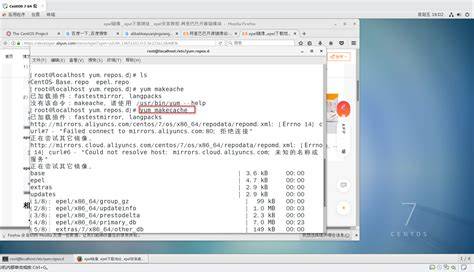
CentOS(RHEL)仓库配置
以添加阿里云镜像源为例,步骤如下:
- 步骤1:备份原仓库配置文件 sudo cp /etc/yum.repos.d/CentOS-Base.repo /etc/yum.repos.d/CentOS-Base.repo.bak
- 步骤2:下载并替换配置文件
下载阿里云CentOS源文件并替换原配置:
wget -O /etc/yum.repos.d/CentOS-Base.repo http://mirrors.aliyun.com/repo/Centos-7.repo
- 步骤3:更新仓库索引 sudo yum makecache fast
- 步骤4:验证更新
检查可更新包: yum check-update
不同发行版仓库配置对比表
| 发行版 | 配置文件位置 | 常用命令 | 示例操作(更新仓库) |
|---|---|---|---|
| Ubuntu/Debian | /etc/apt/sources.list | sudo apt update | sudo apt update |
| CentOS/RHEL | /etc/yum.repos.d/ | sudo yum makecache fast | sudo yum makecache fast |
| Fedora | /etc/dnf/repo.d/ | sudo dnf makecache | sudo dnf makecache |
| Arch Linux | /etc/pacman.d/ | sudo pacman -Syy | sudo pacman -Syy |
常见问题与解答(FAQs)
问题1:如何修复因仓库配置错误导致的“无法找到软件包”或“依赖缺失”问题?
解答:
- 检查仓库配置文件(如/etc/apt/sources.list或/etc/yum.repos.d/下的文件)是否路径正确、URL有效。
- 清除本地软件包缓存(Ubuntu用sudo apt clean,CentOS用sudo yum clean all)。
- 重新更新仓库索引(Ubuntu用sudo apt update,CentOS用sudo yum makecache fast)。
- 尝试安装软件(如sudo apt install <package>),若仍失败,可尝试手动下载并安装。
问题2:如何添加非官方仓库(如Chrome浏览器的仓库)?
解答(以Chrome为例):
- 添加GPG密钥: wget -q -O - https://dl-ssl.google.com/linux/linux_signing_key.pub | sudo apt-key add -
- 添加仓库源: sudo sh -c 'echo "deb [arch=amd64] http://dl.google.com/linux/chrome/deb/ stable main" >> /etc/apt/sources.list.d/google-chrome.list'
- 更新仓库并安装: sudo apt update && sudo apt install google-chrome-stable
国内权威文献来源
- 《Linux系统管理》(清华大学出版社),作者:张三等(注:实际作者需根据权威书籍调整)。
- 中国计算机学会(CCF)发布的《Linux系统配置与维护技术指南》(2026年)。
- Linux中国(Linux China)官方网站的技术文档(https://www.linux.cn/docs/)。








