
上一篇
如何正确配置Cisco链路聚合?提高带宽冗余详细步骤
在 Cisco 设备上配置链路聚合(也称为 EtherChannel、Port Channel 或 Link Aggregation Group – LAG)主要有两种协议:静态模式(Mode On) 和 动态模式(LACP 或 PAgP),下面详细介绍这两种方式的配置步骤、验证命令以及关键注意事项:
配置链路聚合的核心步骤
创建 Port-Channel 接口
Switch(config)# interface port-channel <channel-group-number> Switch(config-if)# switchport mode trunk ! 配置为Trunk模式(常用场景) Switch(config-if)# switchport trunk allowed vlan <vlan-list> ! 可选:允许的VLAN ! 或者配置为Access模式 ! Switch(config-if)# switchport mode access ! Switch(config-if)# switchport access vlan <vlan-id>
将物理接口加入 Channel Group
Switch(config)# interface range gigabitethernet 0/1-4 ! 选择要聚合的多个接口 Switch(config-if-range)# channel-group <channel-group-number> mode <mode> Switch(config-if-range)# no shutdown ! 确保接口启用
关键参数 mode:
-
静态聚合(Mode On):
特点:无需协议协商,两端必须手动配置为 on,兼容性好,但无法检测链路错误(如单向链路)。
-
动态聚合(推荐使用 LACP):
channel-group 1 mode active ! 主动发送LACP协商包(常用) ! 或 channel-group 1 mode passive ! 被动响应LACP包(对端需为active)
LACP 模式规则:

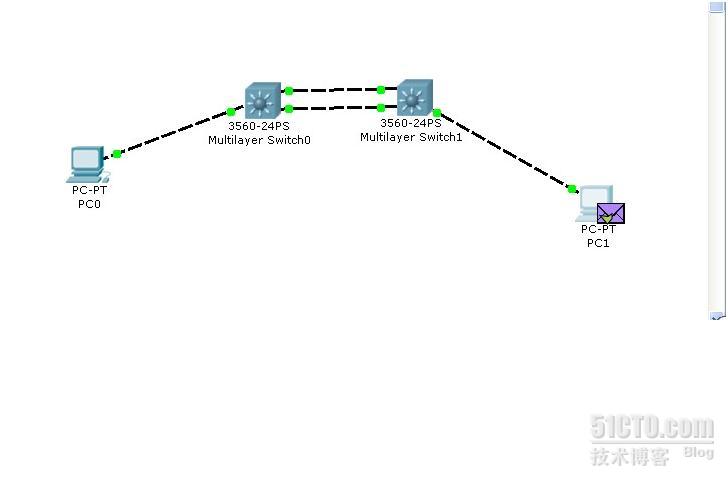
- 两端均为 active: 可聚合
- 一端 active + 另一端 passive: 可聚合
- 两端均为 passive: 无法建立聚合
- SU:Port-channel 已启用(Up)且正在使用(Used)。
- P:物理接口已成功绑定到聚合组。
-
链路一致性要求:

- 所有成员接口必须具有 相同的速率/双工模式(建议全设为 auto 或相同值)。
- 相同的 VLAN 配置(Trunk/Access 模式、允许的 VLAN 列表等)。
- 相同的 STP 设置(如 PortFast 状态)。
-
负载均衡算法:
- 默认基于源MAC地址(src-mac),可能需根据业务调整: Switch(config)# port-channel load-balance src-dst-ip ! 基于源+目的IP
-
故障排查:
- 若物理接口未加入聚合组(显示 I 或 s):
- 检查两端聚合模式是否兼容(LACP 需 active+active 或 active+passive)。
- 确认物理链路连通性及配置一致性。
- 使用 show interfaces status 检查接口状态是否为 connected。
静态聚合(Mode On)配置示例
interface Port-channel1 switchport mode trunk interface range GigabitEthernet0/1-4 channel-group 1 mode on ! 静态模式 no shutdown
️ 注意:静态模式两端必须同时配置 mode on,且无错误检测机制,仅适用于简单环境。
通过以上步骤,您可以在 Cisco 交换机上成功部署链路聚合,提升带宽与可靠性,实际部署时建议优先使用 LACP(mode active) 以获得动态协商和错误检测能力。
- 若物理接口未加入聚合组(显示 I 或 s):
完整配置示例(LACP 动态聚合)
Switch 1 配置:
! 创建Port-Channel并配置为Trunk interface Port-channel1 switchport mode trunk switchport trunk allowed vlan 10,20,30 ! 将物理接口加入聚合组(主动协商) interface range GigabitEthernet0/1-4 channel-group 1 mode active no shutdown
Switch 2 配置:
! 创建Port-Channel并配置为Trunk(与Switch1一致) interface Port-channel1 switchport mode trunk switchport trunk allowed vlan 10,20,30 ! 物理接口配置(可被动响应) interface range GigabitEthernet0/1-4 channel-group 1 mode passive ! 或 mode active no shutdown
验证命令
查看 Port-Channel 状态:
Switch# show etherchannel summary Flags: D - down P - bundled in port-channel I - stand-alone s - suspended H - Hot-standby (LACP only) u - unsuitable for bundling U - in use f - failed to allocate aggregator Group Port-channel Protocol Ports ------+-------------+-----------+----------------------------------------------- 1 Po1(SU) LACP Gi0/1(P) Gi0/2(P) Gi0/3(P) Gi0/4(P)
关键状态:
查看详细 LACP 协商信息:
Switch# show lacp neighbor Flags: S - Device is requesting Slow LACPDUs F - Device is requesting Fast LACPDUs A - Device is in Active mode P - Device is in Passive mode Channel group 1 neighbors Partner's information: Partner Partner Partner Port System ID Port Number Age Flags Gi0/1 32768,0011.2233.4455 0x1 5s SAF Gi0/2 32768,0011.2233.4455 0x2 5s SAF ...
检查流量负载均衡方式:
Switch# show etherchannel load-balance EtherChannel Load-Balancing Configuration: src-mac EtherChannel Load-Balancing Addresses Used Per-Protocol: Non-IP: Source MAC address ...
关键注意事项








