
上一篇
如何配置MVC4路由规则?路由设置教程
在 ASP.NET MVC 4 中,路由配置用于将 URL 请求映射到对应的控制器(Controller)和动作方法(Action),以下是详细的路由配置说明和示例:
核心配置文件位置
路由配置通常在 App_Start/RouteConfig.cs 文件中定义。
默认路由配置
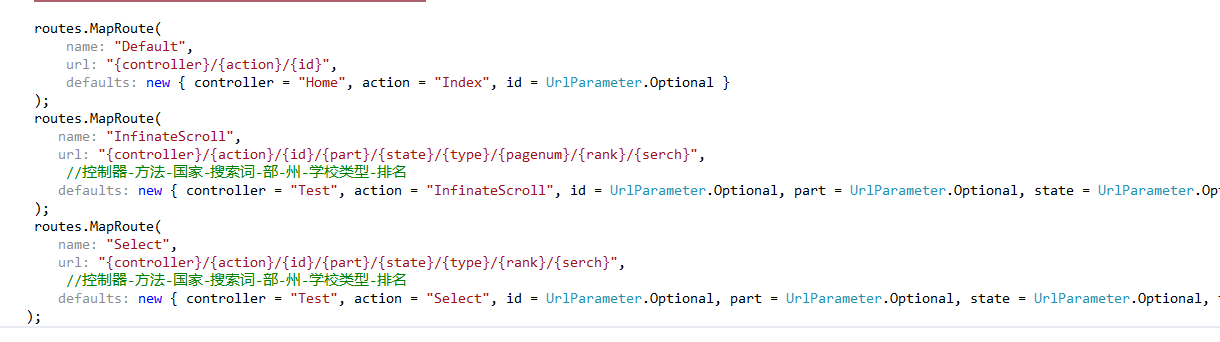
public class RouteConfig { public static void RegisterRoutes(RouteCollection routes) { routes.IgnoreRoute("{resource}.axd/{*pathInfo}"); // 忽略特定请求 // 默认路由规则 routes.MapRoute( name: "Default", // 路由名称 url: "{controller}/{action}/{id}", // URL 模式 defaults: new { controller = "Home", action = "Index", id = UrlParameter.Optional // 可选参数 } ); } }
路由参数详解
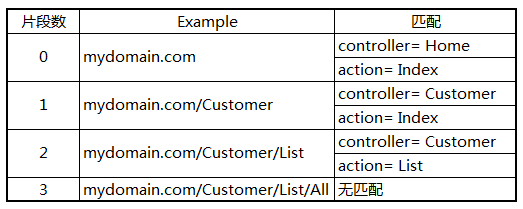
- {controller}:控制器名称(自动匹配 [Name]Controller 类)
- {action}:动作方法名称(对应控制器中的 public 方法)
- {id}:可选参数(可通过方法参数接收)
自定义路由示例
示例 1:静态 URL 前缀
routes.MapRoute( name: "Products", url: "products/{action}/{id}", defaults: new { controller = "Product", action = "List", id = UrlParameter.Optional } );
- 匹配 URL:/products/details/5
- 执行:ProductController.Details(5)
示例 2:多参数路由
routes.MapRoute( name: "Blog", url: "blog/{year}/{month}/{day}", defaults: new { controller = "Blog", action = "Archive" }, constraints: new { year = @"d{4}", // 约束:4位数字 month = @"d{2}" // 约束:2位数字 } );
- 匹配 URL:/blog/2023/05/10
- 执行:BlogController.Archive(year: 2023, month: 05, day: 10)
示例 3:完全静态路由
routes.MapRoute( name: "About", url: "about-us", defaults: new { controller = "Home", action = "About" } );
- 匹配 URL:/about-us
- 执行:HomeController.About()
路由约束(Constraints)
使用正则表达式限制参数格式:
routes.MapRoute( name: "User", url: "user/{id}", defaults: new { controller = "User", action = "Profile" }, constraints: new { id = @"d+" } // 只允许数字 );
路由注册顺序
重要:路由按注册顺序匹配,优先匹配第一个符合条件的路由,应将更具体的路由放在前面。
忽略路由
排除特定路径的路由处理:
routes.IgnoreRoute("admin/{*path}"); // 忽略所有以 /admin 开头的请求 routes.IgnoreRoute("*.html"); // 忽略所有 .html 请求
在控制器中使用路由数据
通过 RouteData.Values 获取参数:
public ActionResult Detail() { var id = RouteData.Values["id"]; // 获取路由中的 id // ... }
常见问题解决
-
404 错误:
- 检查路由注册顺序
- 确认控制器/方法名拼写正确
- 确保方法为 public
-
路由冲突:
- 调整路由注册顺序
- 添加更具体的约束
最佳实践
- 优先使用默认路由简化配置
- 对 SEO 关键页面使用静态 URL
- 为 RESTful API 设计专用路由
- 复杂项目考虑使用 区域(Areas) 隔离模块
区域(Areas)路由配置
在区域内的 [AreaName]AreaRegistration.cs 中:
public class AdminAreaRegistration : AreaRegistration { public override string AreaName => "Admin"; public override void RegisterArea(AreaRegistrationContext context) { context.MapRoute( "Admin_default", "Admin/{controller}/{action}/{id}", new { action = "Index", id = UrlParameter.Optional } ); } }
提示:运行项目时,可通过 http://localhost:端口号/RouteDebugger(需安装 RouteDebugger 包)实时查看路由匹配情况。








