
上一篇
html中如何取消项目列表
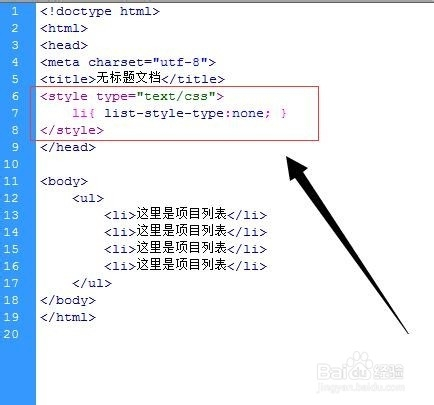
HTML中,可通过CSS设置list-style-type或list-style为none来取消项目列表
HTML中,取消项目列表(无论是有序列表<ol>还是无序列表<ul>)的标记有多种方法,以下是几种常见且有效的方法:
使用CSS的list-style-type属性
-
基本用法
- 全局取消:通过为<ul>或<ol>标签添加list-style-type: none;样式,可以取消整个列表的项目符号或编号。 <ul style="list-style-type: none;"> <li>Item 1</li> <li>Item 2</li> </ul>
- 针对特定元素:如果只想取消部分列表的标记,可以为这些列表添加特定的class或id,然后在CSS中定义样式。 <ul class="no-marker"> <li>Item A</li> <li>Item B</li> </ul> <style> .no-marker { list-style-type: none; } </style>
-
适用场景:这种方法适用于需要快速隐藏所有列表标记的情况,且不会影响列表的其他结构和内容。
使用CSS的list-style属性
-
基本用法:list-style属性是list-style-type、list-style-image和list-style-position的简写,通过设置list-style: none;,可以同时取消列表标记和图像(如果有的话)。
-
适用场景:与list-style-type: none;类似,但更简洁,适用于需要一次性清除所有列表样式的情况。

-
基本用法:通过JavaScript选择目标列表元素,并修改其style.listStyleType属性为'none',可以动态取消列表标记。
<ul id="dynamic-list"> <li>Item 1</li> <li>Item 2</li> </ul> <script> document.getElementById('dynamic-list').style.listStyleType = 'none'; </script> -
针对特定事件:结合用户交互(如点击按钮),可以动态切换列表标记的显示状态。
<ul id="toggle-list"> <li>Item 1</li> <li>Item 2</li> </ul> <button onclick="toggleMarkers()">Toggle Markers</button> <script> function toggleMarkers() { var list = document.getElementById('toggle-list'); if (list.style.listStyleType === 'none') { list.style.listStyleType = 'disc'; } else { list.style.listStyleType = 'none'; } } </script> -
适用场景:适用于需要根据用户操作动态调整列表样式的场景,灵活性较高。
-
基本用法:对于有序列表<ol>,可以使用type属性来指定编号的样式(如字母、数字或罗马数字),虽然不能直接取消编号,但可以通过设置为空字符串来间接实现。
<ol type=""> <li>Item 1</li> <li>Item 2</li> </ol>
-
适用场景:这种方法不如CSS和JavaScript灵活,且在某些浏览器中可能不生效,因此不推荐作为主要方法。
综合对比
方法 优点 缺点 适用场景 CSS list-style-type: none; 简单快捷,不影响HTML结构 无法动态调整 静态页面或不需要动态交互的场景 CSS list-style: none; 更简洁,一次性清除所有列表样式 同上 同上 JavaScript动态移除 灵活,可动态调整 需要编写额外的脚本 需要根据用户操作动态调整的场景 HTML type属性 简单直接 不灵活,部分浏览器不支持 简单有序列表的编号调整 FAQs
-
如何只取消无序列表的部分项目符号?
- 解答:可以为需要取消符号的<li>元素单独添加class或id,然后在CSS中针对这些元素设置list-style-type: none;。 <ul> <li class="no-marker">Item 1</li> <li>Item 2</li> </ul> <style> .no-marker { list-style-type: none; } </style>
-
使用JavaScript取消列表标记时,如何确保代码在页面加载后执行?
- 解答:可以将JavaScript代码放在<body>标签的末尾,或者使用window.onload事件确保代码在页面完全加载后执行。 <body> <ul id="dynamic-list"> <li>Item 1</li> <li>Item 2</li> </ul> <script> window.onload = function() { document.getElementById('dynamic-list').style.listStyleType = 'none'; }; </script>
-
使用JavaScript动态移除
使用HTML的type属性(仅适用于有序列表)















