
上一篇
Python网络数据采集PDF,如何高效获取网络资源?
Python网络数据采集:PDF获取与应用
随着互联网的快速发展,网络数据已成为人们获取信息、进行决策的重要依据,Python作为一种功能强大的编程语言,在网络数据采集方面具有广泛的应用,本文将介绍Python在网络数据采集中的应用,重点关注PDF数据的获取与处理。
Python网络数据采集基础
网络请求库
Python中常用的网络请求库有requests、urllib等,requests库使用简单,功能强大,是网络数据采集的首选库。
数据解析库
Python中常用的数据解析库有BeautifulSoup、lxml等,BeautifulSoup库可以方便地解析HTML和XML数据,lxml库则具有更高的解析速度。
PDF处理库
Python中常用的PDF处理库有PyPDF2、pdfplumber等,PyPDF2库可以读取、写入PDF文件,pdfplumber库则提供了更丰富的PDF处理功能。
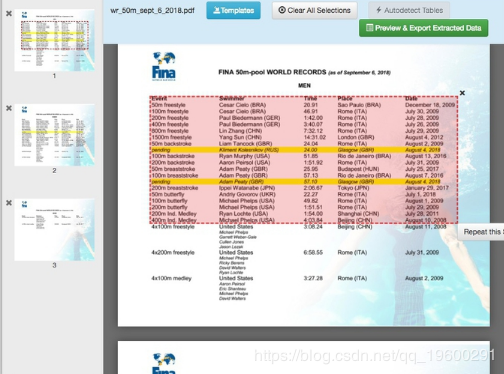
PDF数据获取
使用requests库获取PDF文件
以下是一个使用requests库获取PDF文件的示例代码:
import requests url = "http://example.com/file.pdf" response = requests.get(url) if response.status_code == 200: with open("file.pdf", "wb") as f: f.write(response.content) else: print("下载失败,状态码:", response.status_code)
使用requests库获取PDF中的文本内容
以下是一个使用requests库获取PDF中文本内容的示例代码:
import requests from pdfplumber import PdfReader url = "http://example.com/file.pdf" response = requests.get(url) if response.status_code == 200: with open("file.pdf", "wb") as f: f.write(response.content) pdf_reader = PdfReader("file.pdf") for page in pdf_reader.pages: print(page.extract_text()) else: print("下载失败,状态码:", response.status_code)
PDF数据处理
使用pdfplumber库提取PDF表格数据
以下是一个使用pdfplumber库提取PDF表格数据的示例代码:
import pdfplumber with pdfplumber.open("file.pdf") as pdf: table = pdf.pages[0].extract_table() print(table)
使用PyPDF2库合并PDF文件
以下是一个使用PyPDF2库合并PDF文件的示例代码:
import PyPDF2 pdf_files = ["file1.pdf", "file2.pdf", "file3.pdf"] output_pdf = "output.pdf" with open(output_pdf, "wb") as output_file: pdf_writer = PyPDF2.PdfFileWriter() for file in pdf_files: with open(file, "rb") as pdf_file: pdf_reader = PyPDF2.PdfFileReader(pdf_file) for page in range(pdf_reader.numPages): pdf_writer.addPage(pdf_reader.getPage(page)) pdf_writer.write(output_file)
FAQs
Q1:如何判断PDF文件是否包含表格?
A1:可以使用pdfplumber库的extract_table()方法提取PDF中的表格,如果返回空列表,则表示该PDF文件不包含表格。
Q2:如何将PDF文件转换为Word文档?
A2:可以使用python-docx库将PDF文件转换为Word文档,以下是一个示例代码:
from pdf2docx import Converter cv = Converter("file.pdf") cv.convert("output.docx") cv.close()









