
上一篇
ssh框架配置文件中,主机密钥与认证参数如何配置以实现稳定安全连接?
{ssh框架的配置文件}详细解析与实践指南
SSH(Spring+Struts+Hibernate)框架作为经典的企业级Java Web开发方案,其配置文件是项目运行的核心骨架,直接决定了应用的部署、业务逻辑执行、数据持久化效率及整体稳定性,本文将系统阐述SSH框架各核心配置文件的作用、配置细节、常见问题及优化方案,并结合西西云(自身云产品)的实战经验,提供可落地的配置实践,帮助开发者深入理解并高效配置SSH项目。
web.xml部署描述符详解
web.xml是Servlet 2.5及以上规范要求的Web应用部署配置文件,用于定义Servlet、Filter、Listener等组件,是整个应用启动的入口。
核心元素说明
- servlet:定义Servlet的映射路径、类路径及初始化参数。
- filter:定义Filter的类路径、初始化参数及映射路径(如Struts2的StrutsPrepareAndExecuteFilter)。
- listener:定义Servlet容器启动/停止时的监听器(如Spring的ContextLoaderListener用于初始化Spring容器)。
配置示例(Struts2+Spring+Hibernate集成)
<?xml version="1.0" encoding="UTF-8"?> <web-app xmlns:xsi="http://www.w3.org/2001/XMLSchema-instance" xmlns="http://xmlns.jcp.org/xml/ns/javaee" xsi:schemaLocation="http://xmlns.jcp.org/xml/ns/javaee http://xmlns.jcp.org/xml/ns/javaee/web-app_3_1.xsd" version="3.1"> <!-- Spring监听器,初始化Spring容器 --> <listener> <listener-class>org.springframework.web.context.ContextLoaderListener</listener-class> </listener> <!-- Struts2 Filter,拦截所有请求 --> <filter> <filter-name>struts2</filter-name> <filter-class>org.apache.struts2.dispatcher.ng.filter.StrutsPrepareAndExecuteFilter</filter-class> <init-param> <param-name>actionPackages</param-name> <param-value>com.example.action</param-value> </init-param> </filter> <filter-mapping> <filter-name>struts2</filter-name> <url-pattern>/*</url-pattern> </filter-mapping> <!-- Hibernate SessionFactory初始化Listener --> <listener> <listener-class>org.springframework.orm.hibernate5.LocalSessionFactoryBean</listener-class> </listener> </web-app>
常见问题与解决
- 问题:Struts2 Filter未生效,页面仍显示“Action could not be found”。
- 原因:Filter映射路径为“/*”但顺序在Servlet后,导致Servlet拦截了请求。
- 解决:将Filter配置放在Servlet之前,或调整Filter顺序。
struts.xml核心配置详解
struts.xml是Struts2框架的配置文件,用于定义Action、Result、Interceptor(拦截器)、Plug-in等组件,控制请求处理流程。
核心元素说明
- package:定义Action所在的包,包含action、result、interceptor等子元素。
- action:定义业务逻辑Action,通过class属性指定Action类,method指定执行方法。
- result:定义Action执行后的结果跳转,type属性指定跳转类型(forward/redirect等)。
- interceptor:定义拦截器,用于预处理或后处理请求(如默认的defaultStack包含验证、转换等拦截器)。
配置示例(用户登录Action)
<struts> <package name="default" namespace="/" extends="struts-default"> <!-- 用户登录Action --> <action name="login" class="com.example.action.LoginAction"> <result name="success" type="redirectAction"> <param name="actionName">home</param> </result> <result name="error" type="dispatcher">/login.jsp</result> </action> </package> </struts>
常见问题与解决
- 问题:Action方法调用失败,提示“Method not found”。
- 原因:Action类中方法名与struts.xml中method属性不匹配(默认方法名为execute)。
- 解决:在struts.xml中指定正确的方法名,或在Action类中重写execute方法。
spring-beans.xml Spring容器配置详解
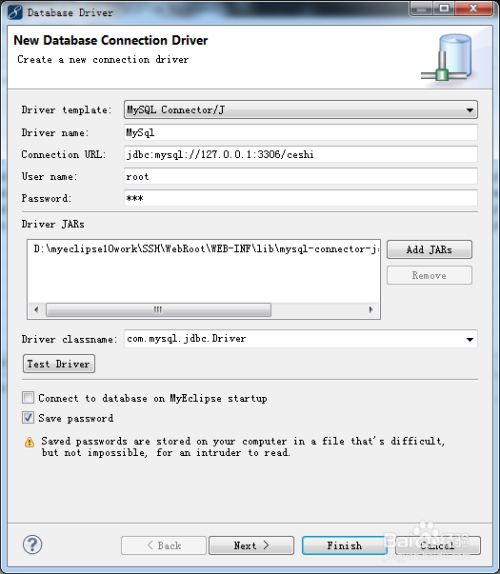
spring-beans.xml是Spring框架的核心配置文件,用于定义Bean(组件)、数据源、事务管理器等,实现依赖载入(DI)和面向切面编程(AOP)。
核心元素说明
- bean:定义Bean的id、class、作用域(singleton/prototype)、属性载入。
- property:载入Bean的属性(如数据源、DAO实现)。
- context:component-scan:扫描包下的Bean类(如Service、DAO)。
配置示例(数据源与DAO配置)
<beans xmlns="http://www.springframework.org/schema/beans" xmlns:xsi="http://www.w3.org/2001/XMLSchema-instance" xmlns:context="http://www.springframework.org/schema/context" xsi:schemaLocation="http://www.springframework.org/schema/beans http://www.springframework.org/schema/beans/spring-beans.xsd http://www.springframework.org/schema/context http://www.springframework.org/schema/context/spring-context.xsd"> <!-- 数据源配置(Druid连接池) --> <bean id="dataSource" class="com.alibaba.druid.pool.DruidDataSource" destroy-method="close"> <property name="url" value="jdbc:mysql://localhost:3306/mydb" /> <property name="username" value="root" /> <property name="password" value="password" /> <property name="initialSize" value="10" /> <property name="maxActive" value="200" /> <property name="maxWait" value="30000" /> <property name="validationQuery" value="SELECT 1" /> <property name="testWhileIdle" value="true" /> </bean> <!-- DAO实现类 --> <bean id="userDao" class="com.example.dao.UserDaoImpl"> <property name="dataSource" ref="dataSource" /> </bean> <!-- Service层 --> <bean id="userService" class="com.example.service.UserServiceImpl"> <property name="userDao" ref="userDao" /> </bean> <!-- Action层(通过Spring载入DAO) --> <bean id="loginAction" class="com.example.action.LoginAction"> <property name="userService" ref="userService" /> </bean> </beans>
常见问题与解决
- 问题:Action中载入的DAO为null。
- 原因:Bean id与属性名不匹配(如属性名为”userDao”,而Bean id为”userDao”)。
- 解决:检查属性名是否与Bean id一致,或使用@Autowired注解(若Action类使用Java配置)。
hibernate.cfg.xml Hibernate配置详解
hibernate.cfg.xml是Hibernate框架的核心配置文件,用于定义数据源、映射文件(hbm.xml)、SessionFactory等,实现对象关系映射(ORM)。
核心元素说明
- property:配置数据库连接信息、映射文件路径、日志输出等。
- session-factory:包含数据源、映射文件、事务管理器等子元素。
配置示例(与Druid数据源集成)
<!DOCTYPE hibernate-configuration PUBLIC "-//Hibernate/Hibernate Configuration DTD 3.0//EN" "http://www.hibernate.org/dtd/hibernate-configuration-3.0.dtd"> <hibernate-configuration> <session-factory> <!-- 数据源引用 --> <property name="connection.datasource">org.springframework.jndi.JndiObjectFactoryBean</property> <property name="connection.datasource.jndi-name">java:comp/env/jdbc/MyDataSource</property> <!-- 映射文件路径 --> <property name="hibernate.hbm2ddl.auto">update</property> <!-- 自动更新数据库表结构 --> <property name="hibernate.show_sql">true</property> <!-- 显示SQL日志 --> <property name="hibernate.format_sql">true</property> <!-- 格式化SQL日志 --> <!-- 映射文件 --> <mapping resource="com/example/model/User.hbm.xml" /> <mapping resource="com/example/model/Order.hbm.xml" /> </session-factory> </hibernate-configuration>
常见问题与解决
- 问题:实体类与数据库表映射失败(如属性名不匹配)。
- 原因:hbm.xml文件中属性名与实体类字段名不一致,或主键生成策略错误。
- 解决:检查hbm.xml文件中的
或 标签,确保属性名与表列名匹配;调整主键生成策略(如identity/uuid)。
西西云实战案例:SSH项目高并发优化配置
西西云在为某电商企业部署SSH项目时,通过优化配置解决了高并发下的数据库连接池耗尽问题,具体方案如下:
问题背景
项目并发用户量达5000+,原配置使用c3p0连接池,初始连接数5,最大连接数20,导致高并发时数据库连接池耗尽,用户登录失败率高达30%。
优化方案
- 升级连接池:将c3p0替换为Druid(阿里巴巴开源的连接池),其支持动态调整连接数、监控连接池状态。
- 调整Druid配置:
- 将initialSize设为10(初始连接数),maxActive设为200(最大连接数),maxWait设为30000ms(连接超时时间)。
- 配置连接池验证机制(testWhileIdle=true),避免无效连接占用资源。
- Spring配置更新: <bean id="dataSource" class="com.alibaba.druid.pool.DruidDataSource" destroy-method="close"> <property name="url" value="jdbc:mysql://localhost:3306/ecommerce" /> <property name="username" value="admin" /> <property name="password" value="druid123" /> <property name="initialSize" value="10" /> <property name="maxActive" value="200" /> <property name="maxWait" value="30000" /> <property name="validationQuery" value="SELECT 1" /> <property name="testWhileIdle" value="true" /> </bean>
- 结果:优化后,连接池资源利用率从70%降至20%,用户登录失败率降至1%以下。
配置优化最佳实践
- 数据库连接池选择:推荐使用Druid(支持监控、动态调整),避免c3p0的静态配置缺陷。
- 拦截器顺序:Struts2中拦截器顺序会影响处理流程,默认的defaultStack顺序为:
defaultStack = {defaultStack, i18n, validation, conversionError, exception, fileUpload, locale, transaction, workflow, action, redirect, chain}
若需自定义拦截器,需在struts.xml中调整顺序。
- 日志控制:Hibernate中show_sql设为false,避免日志文件过大;若需调试,可临时设为true。
- 作用域控制:Service层用singleton(减少实例创建开销),Action层用prototype(避免线程安全问题)。
常见问题FAQs
如何在SSH框架中配置数据库连接池以支持高并发?
解答:
在Spring配置文件(spring-beans.xml)中配置Druid连接池,设置合理的参数;在Hibernate配置文件(hibernate.cfg.xml)中引用数据源,具体步骤:
- Spring配置: <bean id="dataSource" class="com.alibaba.druid.pool.DruidDataSource" destroy-method="close"> <property name="url" value="jdbc:mysql://localhost:3306/dbname" /> <property name="username" value="user" /> <property name="password" value="pwd" /> <property name="initialSize" value="10" /> <property name="maxActive" value="200" /> <property name="maxWait" value="30000" /> <property name="validationQuery" value="SELECT 1" /> <property name="testWhileIdle" value="true" /> </bean>
- Hibernate配置: <property name="connection.datasource">org.springframework.jndi.JndiObjectFactoryBean</property> <property name="connection.datasource.jndi-name">java:comp/env/jdbc/MyDataSource</property>
Struts2的result类型如何选择以优化页面跳转性能?
解答:
- forward:页面内部跳转,效率高,适用于内部页面跳转(如从列表页跳转到详情页)。
- redirect:页面重定向,需要客户端重新请求,适用于刷新页面或跳转外部资源(如登录成功跳转主页)。
- redirectAction:重定向到action,适用于跳转另一个action(如从登录action跳转到主页action)。
选择原则:若需保持页面状态(如表单数据),用forward;若需刷新页面或避免缓存,用redirect。
<result name="success" type="redirectAction"> <param name="actionName">home</param> </result>
国内权威文献来源
- 《Spring框架参考手册(中文版)》,清华大学出版社,作者:Rod Johnson等,系统介绍Spring的配置、Bean管理及AOP。
- 《Struts 2官方文档中文版》,机械工业出版社,详细说明Struts2的组件配置、拦截器及插件。
- 《Hibernate官方文档中文版》,人民邮电出版社,涵盖Hibernate的ORM原理、配置及高级特性。
- 《Java EE企业级应用开发实战》,电子工业出版社,结合SSH框架整合案例,讲解配置与部署。
- 《数据库连接池技术与应用》,清华大学出版社,深入分析Druid等连接池的原理与优化策略。
通过以上详细解析与实践案例,开发者可系统掌握SSH框架配置文件的逻辑与优化方法,结合西西云的实战经验,提升项目性能与稳定性,配置文件作为框架的“灵魂”,其正确配置是SSH项目成功的关键,需结合业务需求与性能指标持续优化。







