
上一篇
一键脚本搭建OpenLiteSpeed+PHP+MariaDB/MySQL+WordPress+LiteSpeedCache
由于更新快、插件多、主题多、开发人员也多,wordpress是当前全世界最流行使用人数最多的博客和CMS程序。在linux环境下搭建一个高性能的wordpress运作环境其实是个有挑战性的任务,目前比较公认的是OpenLiteSpeed配合wordpress再加上wordpress的插件LiteSpeedCache。就是单纯搭建个wordpress博客,很多人不想折腾,也有些人不会折腾,这里litespeedtech其实早就发布了一键搭建脚本,今天推荐给大家。
项目地址:https://github.com/litespeedtech/ols1clk
文章目录
- 1 安装
- 1.1 Examples
安装
安装OpenLiteSpeed、LSPHP、MariaDB、WordPress,、LiteSpeed Cache插件:
bash <( curl -k https://raw.githubusercontent.com/litespeedtech/ols1clk/master/ols1clk.sh ) -w
仅限安装OpenLiteSpeed和LSPHP:
bash <( curl -k https://raw.githubusercontent.com/litespeedtech/ols1clk/master/ols1clk.sh )
下方有一些额外的选项和用法示例
./ols1clk.sh [option] [option] …
| Opt | Options | Description |
|---|---|---|
| --adminuser [USERNAME] | To set the WebAdmin username for OpenLiteSpeed instead of admin. | |
| -A | --adminpassword [PASSWORD] | To set the WebAdmin password for OpenLiteSpeed instead of using a random one. |
| --adminport [PORTNUMBER] | To set the WebAdmin console port number instead of 7080. | |
| -E | --email [EMAIL] | To set the administrator email. |
| --lsphp [VERSION] | To set the LSPHP version, such as 82. We currently support versions ’71 72 73 74 80 81 82′. | |
| --mariadbver [VERSION] | To set MariaDB version, such as 10.9. We currently support versions ‘10.2 10.3 …10.11’. | |
| -W | --wordpress | To install WordPress. You will still need to complete the WordPress setup by browser |
| --wordpressplus [SITEDOMAIN] | To install, set up, and configure WordPress, also LSCache will be enabled | |
| --wordpresspath [WP_PATH] | To specify a location for the new WordPress installation or use for an existing WordPress. | |
| -R | --dbrootpassword [PASSWORD] | To set the database root password instead of using a random one. |
| --dbname [DATABASENAME] | To set the database name to be used by WordPress. | |
| --dbuser [DBUSERNAME] | To set the WordPress username in the database. | |
| --dbpassword [PASSWORD] | To set the WordPress table password in MySQL instead of using a random one. | |
| --prefix [PREFIXNAME] | To set the WordPress table prefix. | |
| --listenport [PORT] | To set the HTTP server listener port, default is 80. | |
| --ssllistenport [PORT] | To set the HTTPS server listener port, default is 443. | |
| --wpuser [WP_USER] | To set the WordPress admin user for WordPress dashboard login. Default value is wpuser. | |
| --wppassword [PASSWORD] | To set the WordPress admin user password for WordPress dashboard login. | |
| --wplang [WP_LANGUAGE] | To set the WordPress language. Default value is “en_US” for English. | |
| --sitetitle [WP_TITLE] | To set the WordPress site title. Default value is mySite. | |
| --pure-mariadb | To install OpenLiteSpeed and MariaDB. | |
| --pure-mysql | To install OpenLiteSpeed and MySQL. | |
| --pure-percona | To install OpenLiteSpeed and Percona. | |
| --with-mysql | To install OpenLiteSpeed/App with MySQL. | |
| --with-percona | To install OpenLiteSpeed/App with Percona. | |
| --owasp-enable | To enable mod_security with OWASP rules. If OLS is installed, then enable the owasp directly | |
| --owasp-disable | To disable mod_security with OWASP rules. | |
| --proxy-r | To set a proxy with rewrite type. | |
| --proxy-c | To set a proxy with config type. | |
| -U | --uninstall | To uninstall OpenLiteSpeed and remove installation directory. |
| -P | --purgeall | To uninstall OpenLiteSpeed, remove installation directory, and purge all data in MySQL. |
| -Q | --quiet | To use quiet mode, won’t prompt to input anything. |
| -V | --version | To display the script version information. |
| -v | --verbose | To display more messages during the installation. |
| --update | To update ols1clk from github. | |
| -H | --help | To display help messages. |
Examples
| Examples | Description |
|---|---|
| ./ols1clk.sh | To install OpenLiteSpeed with a random WebAdmin password. |
| ./ols1clk.sh --lsphp 81 | To install OpenLiteSpeed with lsphp80. |
| ./ols1clk.sh -A 123456 -e a@cc.com | To install OpenLiteSpeed with WebAdmin password “123456” and emaila@cc.com. |
| ./ols1clk.sh -R 123456 -W | To install OpenLiteSpeed with WordPress and MySQL root password “123456”. |
| ./ols1clk.sh --wordpressplus a.com | To install OpenLiteSpeed with a fully configured WordPress installation at “a.com”. |
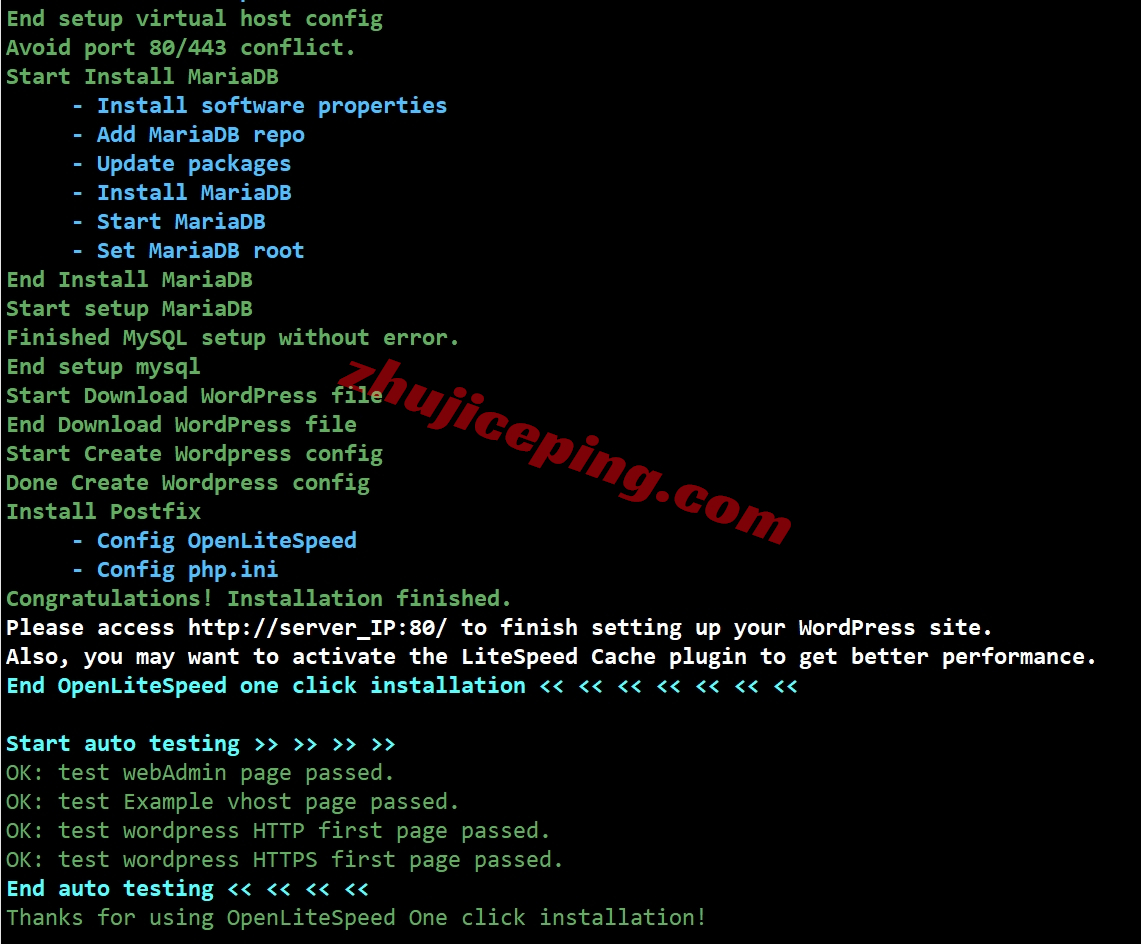
比如,输入命令:
bash ols1clk.sh –wordpressplus www.xixizhuji.com
来实现wordpress安装及完整配置。
贴几张图,大家看看:
相关文章
-

spinservers美国独立服务器限时特惠,低至$69,多款高配/10Gbps带宽
-
hhost日本VPS测评,解锁TikTok/AI等,三网软银-移动能飞/电信&联通凑合
-
hhost日本VPS低至$2.5/月,软银/IIJ线路,4G内存/2核/20gSSD/1T流量/500M带宽
-
Zlidc墨西哥家庭住宅IP多站,双ISP属性,适合TikTok/AI等流媒体运作
-
danyun香港VPS(BGP直连-B区)测评,速度快适合建站等,不宜做流媒体解锁
-
danyun香港VPS(BGP直连-A区)测评,三网全天高速直连
-

蛋云/danyun香港VPS低至98元/年,大陆优化线路,支持换IP
-
666clouds菲律宾住宅VPS(双ISP属性IP)测评,解锁TikTok/AI等,适合运作流媒体







