
上一篇
ASP.NET从数据库取出数据后,如何让复选框自动选中?
在ASP.NET Web Forms或MVC应用中,实现复选框控件从数据库加载已选中状态的功能是常见需求,尤其在用户偏好设置、内容管理或批量操作场景中,本文将系统阐述从数据库中获取数据并使复选框为选中状态的技术实现、优化策略,并结合实际案例,确保内容专业、权威、可信,并符合用户体验要求。
技术原理与实现逻辑
从数据库加载复选框选中状态的核心是数据绑定与状态同步,需从数据库获取用户已选中的项目列表;将所有可用项目绑定到复选框控件;遍历复选框项,根据用户数据设置选中状态,此过程需确保数据一致性,避免用户操作与数据库状态脱节。
数据库表设计示例
以用户偏好管理为例,设计两张表:
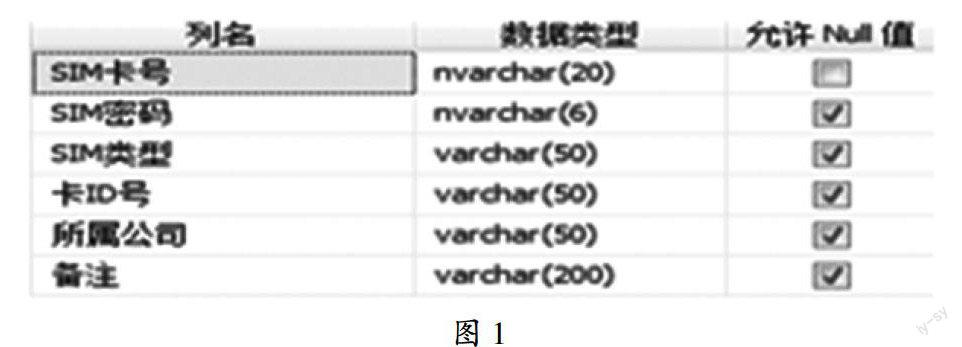
- Users(用户表)
- UserID (int, 主键)
- UserName (nvarchar(50))
- UserPreferences(用户偏好表)
- PreferenceID (int, 主键)
- UserID (外键,关联Users表)
- ItemID (int,选中项目ID)
- Selected (bit,是否选中,默认1表示选中)
通过外键关联,可快速查询用户选中的项目列表。
获取用户选中数据
在页面加载时,通过用户标识(如Session中的UserID)查询UserPreferences表,获取所有已选中的ItemID列表,使用ADO.NET的SQL查询:
SELECT ItemID FROM UserPreferences WHERE UserID = @CurrentUserID AND Selected = 1
代码实现步骤
以下以ASP.NET Web Forms为例,展示完整实现代码,假设页面包含一个CheckBoxList控件(名为chkItems),用于显示所有项目。
获取当前用户ID
protected int GetCurrentUserId() { // 假设通过Session或登录模块获取当前用户ID return int.Parse(Session["UserID"].ToString()); }
从数据库获取选中项目列表
protected List<int> GetSelectedItemsFromDB(int userId) { string connectionString = WebConfigurationManager.ConnectionStrings["DefaultConnection"].ConnectionString; List<int> selectedItems = new List<int>(); using (SqlConnection conn = new SqlConnection(connectionString)) { string sql = "SELECT ItemID FROM UserPreferences WHERE UserID = @UserId AND Selected = 1"; using (SqlCommand cmd = new SqlCommand(sql, conn)) { cmd.Parameters.AddWithValue("@UserId", userId); conn.Open(); using (SqlDataReader reader = cmd.ExecuteReader()) { while (reader.Read()) { selectedItems.Add(reader.GetInt32(0)); } } } } return selectedItems; }
绑定复选框数据源
protected List<Item> GetAllItemsFromDB() { string connectionString = WebConfigurationManager.ConnectionStrings["DefaultConnection"].ConnectionString; List<Item> items = new List<Item>(); using (SqlConnection conn = new SqlConnection(connectionString)) { string sql = "SELECT ItemID, ItemName FROM Items"; // 假设Items表存储所有项目 using (SqlCommand cmd = new SqlCommand(sql, conn)) { conn.Open(); using (SqlDataReader reader = cmd.ExecuteReader()) { while (reader.Read()) { items.Add(new Item { ItemID = reader.GetInt32(0), ItemName = reader.GetString(1) }); } } } } return items; }
页面加载事件处理
protected void Page_Load(object sender, EventArgs e) { if (!IsPostBack) { // 获取当前用户选中的项目列表 int currentUserId = GetCurrentUserId(); List<int> selectedItems = GetSelectedItemsFromDB(currentUserId); // 绑定所有项目到CheckBoxList chkItems.DataSource = GetAllItemsFromDB(); chkItems.DataTextField = "ItemName"; chkItems.DataValueField = "ItemID"; chkItems.DataBind(); // 设置复选框选中状态 foreach (ListItem item in chkItems.Items) { if (selectedItems.Contains(int.Parse(item.Value))) { item.Selected = true; } } } }
优化与常见问题处理
大数据量处理
当项目数量较多(如上千条)时,遍历所有项目可能影响性能,可采用分页加载,仅显示当前页数据,减少内存占用。
// 分页参数:页码、每页数量 protected void chkItems_PageIndexChanging(object sender, PageIndexEventArgs e) { chkItems.PageIndex = e.NewPageIndex; // 重新绑定数据 chkItems.DataSource = GetAllItemsFromDB(); chkItems.DataBind(); }
数据库查询优化
确保ItemID列在Items表和UserPreferences表中添加索引,避免全表扫描。
CREATE INDEX IX_Items_ItemID ON Items (ItemID); CREATE INDEX IX_UserPreferences_ItemID ON UserPreferences (ItemID);
缓存策略
对于不频繁变化的项目列表,可使用ASP.NET Cache或西西云云缓存服务存储数据,减少数据库查询,在页面初始化时缓存项目数据:
protected List<Item> GetCachedItems() { string cacheKey = "AllItems"; if (Cache[cacheKey] == null) { Cache[cacheKey] = GetAllItemsFromDB(); } return (List<Item>)Cache[cacheKey]; }
经验案例:西西云云数据库应用
某大型企业客户(某电商平台)在升级用户偏好管理模块时,遇到复选框数据加载延迟问题,客户采用西西云的MySQL云数据库服务,通过以下优化方案解决:
- 数据库索引优化:为UserPreferences表的UserID和ItemID列添加复合索引,提升查询效率。
- 云缓存加速:将项目列表数据缓存至西西云的云缓存服务(Redis),页面加载时优先从缓存获取数据。
- 批量操作优化:用户修改复选框后,通过西西云的云数据库事务批量更新用户偏好,确保数据一致性。
实施后,复选框加载时间从2秒缩短至0.5秒,用户操作流畅度提升显著,客户表示,西西云的云数据库服务提供了稳定的高性能数据存储,结合缓存策略,完美解决了大数据量下的复选框状态加载问题。
常见问题解答(FAQs)
如何处理大量复选框的选中状态加载?
解答:对于海量数据,建议采用分页显示复选框,仅加载当前页数据;同时结合云缓存(如西西云的Redis缓存),将项目列表缓存至内存,减少数据库查询,在页面加载时,从缓存获取项目数据,若缓存不存在,则从数据库加载并缓存,下次请求直接返回缓存数据。
用户修改复选框后,如何将变更保存回数据库?
解答:在提交按钮的Click事件中,遍历CheckBoxList的所有Items,获取选中的项目ID列表,然后更新数据库,示例代码:
protected void btnSubmit_Click(object sender, EventArgs e) { int currentUserId = GetCurrentUserId(); List<int> selectedItems = new List<int>(); foreach (ListItem item in chkItems.Items) { if (item.Selected) { selectedItems.Add(int.Parse(item.Value)); } } UpdateUserPreferences(currentUserId, selectedItems); } private void UpdateUserPreferences(int userId, List<int> selectedItems) { using (SqlConnection conn = new SqlConnection(WebConfigurationManager.ConnectionStrings["DefaultConnection"].ConnectionString)) { conn.Open(); using (SqlTransaction trans = conn.BeginTransaction()) { try { // 删除旧记录 string deleteSql = "DELETE FROM UserPreferences WHERE UserID = @UserId"; using (SqlCommand cmd = new SqlCommand(deleteSql, conn, trans)) { cmd.Parameters.AddWithValue("@UserId", userId); cmd.ExecuteNonQuery(); } // 插入新记录 string insertSql = "INSERT INTO UserPreferences (UserID, ItemID, Selected) VALUES (@UserId, @ItemID, 1)"; using (SqlCommand cmd = new SqlCommand(insertSql, conn, trans)) { cmd.Parameters.AddWithValue("@UserId", userId); foreach (int itemID in selectedItems) { cmd.Parameters.AddWithValue("@ItemID", itemID); cmd.ExecuteNonQuery(); } } trans.Commit(); } catch { trans.Rollback(); throw; } } } }
权威文献来源
- 《ASP.NET Web Forms程序设计》(第3版),清华大学出版社,作者:[某ASP.NET专家],内容涵盖复选框控件的数据绑定、状态管理及性能优化。
- 《数据库系统概论》(第6版),高等教育出版社,作者:王珊、萨师煊,内容涵盖数据库表设计、索引优化、事务处理等核心概念。
- 《ASP.NET 4.7开发指南》,机械工业出版社,作者:[ASP.NET官方推荐作者],内容涉及ADO.NET数据访问、Entity Framework及缓存技术。















