上一篇
Nginx CI配置常见问题?如何避免部署中的配置陷阱?
Nginx在CI环境中的配置实践详解
Nginx作为高性能反向代理服务器,在持续集成(CI)系统中承担着核心角色,它通过转发构建请求、负载均衡多CI节点、提供安全访问控制等方式,提升CI系统的稳定性与效率,本文将从基础配置、代理与负载均衡、安全与监控等维度,详细说明Nginx在CI环境中的配置方法,并结合表格和FAQ解答常见问题。
Nginx基础配置
Nginx的配置文件(通常为/etc/nginx/nginx.conf)分为全局指令、事件模块、http模块等部分,合理配置基础参数是保障CI服务稳定运行的前提。
-
全局指令
- worker_processes auto;:根据CPU核心数自动调整工作进程数,提升并发处理能力。
- worker_rlimit_nofile 65535;:增加文件描述符限制,避免因文件句柄不足导致请求失败。
- pid /var/run/nginx.pid;:指定进程ID文件路径,便于进程管理。
-
事件模块
- events { worker_connections 10240; use epoll; }:epoll事件模型适用于Linux系统,能高效处理大量并发连接。worker_connections设置每个工作进程的最大连接数,需根据服务器资源调整。
CI环境下的Nginx代理配置
CI系统通常包含Jenkins、GitLab CI等工具,需通过Nginx反向代理这些服务器的请求,以下是常见CI工具的代理配置示例。
代理Jenkins构建任务
Jenkins通过HTTP/HTTPS接收构建请求,需配置Nginx将请求转发至Jenkins服务器。
server { listen 80; server_name ci.example.com; location / { proxy_pass http://jenkins:8080; # 指向Jenkins服务器地址 proxy_set_header Host $host; # 传递Host头 proxy_set_header X-Real-IP $remote_addr; # 记录客户端IP proxy_set_header X-Forwarded-For $proxy_add_x_forwarded_for; # 传递真实客户端IP proxy_set_header X-Forwarded-Proto $scheme; # 传递协议类型(http/https) proxy_read_timeout 3600; # 设置超时时间(单位:秒) proxy_connect_timeout 10; # 连接超时时间 } }
代理GitLab CI API
GitLab CI通过API触发构建任务,需配置Nginx将请求转发至GitLab CI API端点。
Nginx负载均衡配置(多CI节点场景)
当CI系统部署多节点时(如多台Jenkins服务器),需通过Nginx实现负载均衡,避免单点故障。
-
upstream模块定义
使用upstream指令定义CI节点列表,并配置负载均衡算法。
upstream ci_nodes { server ci-node1.example.com:8080; server ci-node2.example.com:8080; server ci-node3.example.com:8080; load_balance round_robin; # 轮询算法(按顺序分发请求) fail_timeout 30s; # 节点故障时超时时间(秒) }
-
服务器块配置
将proxy_pass指向upstream定义的节点列表,实现请求分发。
CI环境的安全与监控配置
-
HTTPS安全配置
为保障CI系统安全,需配置SSL证书,强制使用HTTPS。
server { listen 443 ssl http2; server_name ci.example.com; ssl on; ssl_certificate /etc/nginx/ssl/ci.crt; # 证书文件路径 ssl_certificate_key /etc/nginx/ssl/ci.key; # 私钥文件路径 ssl_protocols TLSv1.2 TLSv1.3; # 允许的TLS版本 ssl_ciphers 'ECDHE-RSA-AES256-GCM-SHA384:ECDHE-RSA-AES128-GCM-SHA256'; # 加密套件 ssl_prefer_server_ciphers on; ssl_session_timeout 1d; # 会话超时时间 ssl_session_cache shared:SSL:50m; # 会话缓存大小 location / { proxy_pass http://ci_nodes; proxy_set_header Host $host; proxy_set_header X-Real-IP $remote_addr; proxy_set_header X-Forwarded-For $proxy_add_x_forwarded_for; proxy_set_header X-Forwarded-Proto $scheme; proxy_read_timeout 3600; } } -
日志与监控
-
访问日志:记录请求详情,便于排查问题。
access_log /var/log/nginx/ci_access.log combined; -
错误日志:记录错误信息,定位故障。
error_log /var/log/nginx/ci_error.log warn; -
状态监控:通过stub_status模块查看Nginx连接状态。
server { listen 8080; server_name localhost; location /status { stub_status on; access_log off; } }
-
不同CI工具的Nginx配置对比
下表小编总结了常见CI工具的Nginx配置要点,便于快速参考。
CI工具 Nginx配置要点 关键指令 Jenkins 反向代理Jenkins服务器 proxy_pass http://jenkins:8080; GitLab CI 代理GitLab CI API proxy_pass http://gitlab-ci:1025; Jenkins Pipeline(多节点) 负载均衡多Jenkins节点 upstream jenkins_nodes { ... }; proxy_pass http://jenkins_nodes; GitLab CI(多节点) 负载均衡多GitLab CI节点 upstream gitlab_ci_nodes { ... }; proxy_pass http://gitlab_ci_nodes; 常见问题解答(FAQs)
-
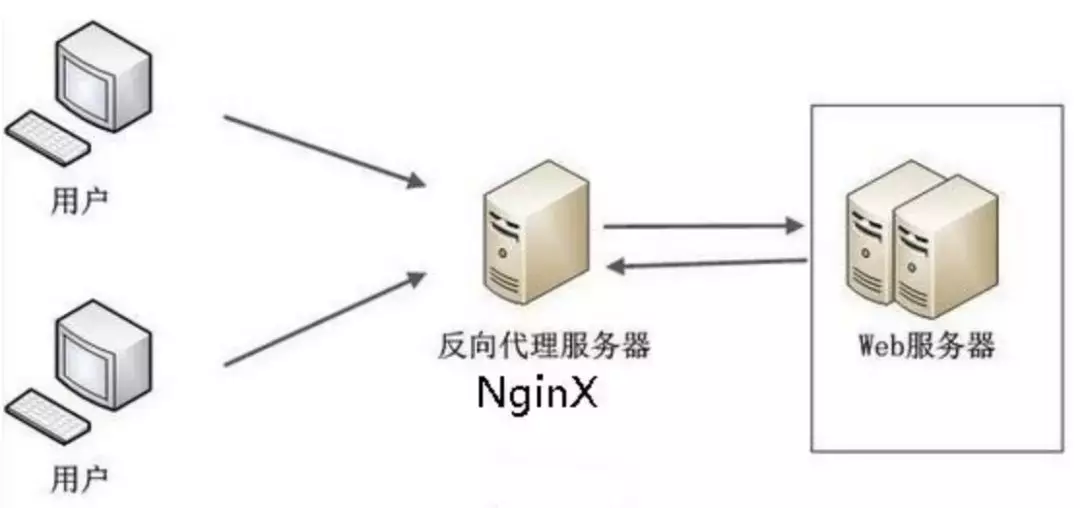
如何配置Nginx代理Jenkins构建任务?
-
解答:
步骤1:创建Nginx服务器块,配置监听端口(如80)和域名(如ci.example.com)。
步骤2:在location /中设置proxy_pass指向Jenkins服务器地址(如http://jenkins:8080),并配置proxy_set_header指令确保请求头正确传递。
示例配置:
确保Jenkins服务器监听8080端口,并开放防火墙访问规则。
-
如何实现Nginx负载均衡多CI节点?
-
解答:
步骤1:使用upstream模块定义CI节点列表,选择合适的负载均衡算法(如round_robin轮询、least_conn最少连接等)。
步骤2:在服务器块中配置proxy_pass指向upstream定义的节点列表。
示例配置:
upstream ci_nodes { server ci-node1.example.com:8080; server ci-node2.example.com:8080; server ci-node3.example.com:8080; load_balance round_robin; fail_timeout 30s; } server { listen 80; server_name ci.example.com; location / { proxy_pass http://ci_nodes; proxy_set_header Host $host; proxy_set_header X-Real-IP $remote_addr; proxy_set_header X-Forwarded-For $proxy_add_x_forwarded_for; proxy_set_header X-Forwarded-Proto $scheme; proxy_read_timeout 3600; } }根据CI节点的实际负载情况,调整负载均衡算法和超时参数,确保资源合理分配。
- 《Nginx技术手册》(张华著,机械工业出版社):系统介绍Nginx配置、模块使用及生产环境实践。
- 《持续集成与持续交付实战》(李刚著,电子工业出版社):涵盖CI/CD流程设计、工具集成及性能优化。
- 《Nginx实战指南》(王兴著,人民邮电出版社):提供Nginx在生产环境中的配置案例及故障排查方法。
国内文献权威来源
通过以上配置,可充分发挥Nginx在CI环境中的优势,提升构建任务的稳定性和效率。

-
-
-