
上一篇
pip安装报错怎么办?常见错误及解决方法汇总
当 pip 安装报错时,解决方法取决于具体的错误信息,以下是常见错误及解决方案,请根据你的报错内容选择对应方法:
权限不足错误(Permission Denied)
ERROR: Could not install packages due to an OSError: [Errno 13] Permission denied
解决方法:
- 使用 --user 安装到用户目录: pip install 包名 --user
- 启用虚拟环境(推荐): python -m venv myenv # 创建虚拟环境 source myenv/bin/activate # Linux/Mac 激活 myenvScriptsactivate # Windows 激活 pip install 包名
- 或以管理员权限运行(不推荐): sudo pip install 包名 # Linux/Mac pip install 包名 # Windows(以管理员身份运行CMD)
网络超时/连接失败(Timeout/Connection Error)
WARNING: Retrying (Retry(total=4, connect=None, read=None, redirect=None, status=None)) after connection broken
解决方法:
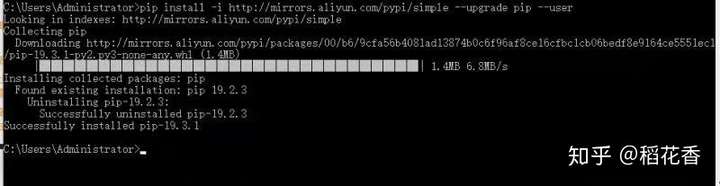
- 更换国内镜像源(如清华源、阿里云): pip install 包名 -i https://pypi.tuna.tsinghua.edu.cn/simple
- 设置超时时间: pip install 包名 --default-timeout=100
- 使用代理(如处于内网): pip install 包名 --proxy=http://user:password@proxy_ip:port
包版本冲突(Version Conflict)
ERROR: Cannot install 包A and 包B because these package versions have conflicting dependencies.
解决方法:

- 升级 pip 并尝试安装: pip install --upgrade pip pip install 包名
- 使用 --ignore-installed 强制安装: pip install 包名 --ignore-installed
- 创建新的虚拟环境(避免旧依赖干扰)。
缺少编译环境(C/C++ 编译错误)
error: Microsoft Visual C++ 14.0 or greater is required.
解决方法(Windows):
- 安装 Microsoft Build Tools
- 或直接下载预编译的 .whl 文件安装:
- 在 https://www.lfd.uci.edu/~gohlke/pythonlibs/ 搜索包名。
- 下载对应版本的 .whl 文件(如 包名‑cp39‑win_amd64.whl)。
- 执行: pip install 下载路径包名.whl
不支持的 Python 版本
ERROR: Package requires Python '>=3.8' but the running Python is 3.7.10
解决方法:
- 升级 Python 版本。
- 或安装兼容旧版的包版本: pip install 包名==旧版本号 # pip install numpy==1.18.5
SSL 证书错误(SSL Verification Failure)
ERROR: Could not fetch URL https://pypi.org/simple/...: SSLError(SSLCertVerificationError(...))
解决方法:
- 临时关闭 SSL 验证(不推荐,仅测试用): pip install 包名 --trusted-host pypi.org --trusted-host files.pythonhosted.org
- 更新根证书:
- 更新系统 CA 证书(操作系统层面)。
- 或更新 Python 的 certifi 包: pip install --upgrade certifi
环境变量问题(pip 命令未找到)
'pip' is not recognized as an internal or external command...
解决方法:
- 将 Python 加入系统 PATH:
- 安装 Python 时勾选 Add Python to PATH。
- 或手动添加路径(如 C:Python39Scripts 和 C:Python39)。
- 使用模块方式运行: python -m pip install 包名
通用排查步骤
- 升级 pip: pip install --upgrade pip
- 查看错误详情: pip install 包名 --verbose # 显示详细日志
- 清除缓存: pip cache purge







