
上一篇
Java中构建绝对路径的方法与注意事项有哪些?
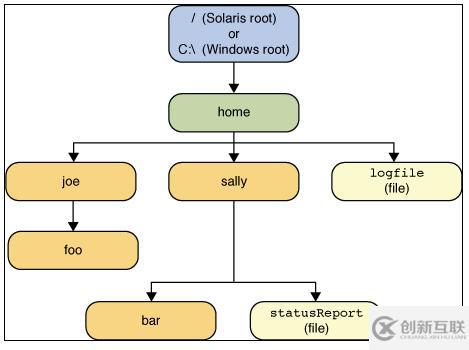
在Java中,绝对路径通常用于指定文件或目录的确切位置,以便于程序可以准确地访问它们,绝对路径指的是从文件系统的根目录开始到指定文件或目录的路径,以下是Java中编写绝对路径的几种方法:
使用文件系统对象
Java的java.io.File类提供了获取绝对路径的方法,以下是如何使用File类来获取文件的绝对路径:
import java.io.File; public class AbsolutePathExample { public static void main(String[] args) { // 创建File对象 File file = new File("example.txt"); // 获取绝对路径 String absolutePath = file.getAbsolutePath(); // 打印绝对路径 System.out.println("Absolute Path: " + absolutePath); } }
使用路径字符串
你也可以直接使用路径字符串来指定绝对路径,尤其是在编写配置文件或脚本时,以下是一个例子:
使用System.getProperty()方法
Java的System类提供了一个方法getProperty(),可以用来获取系统属性,如用户的主目录,以下是如何使用这个方法来获取绝对路径:
public class AbsolutePathExample { public static void main(String[] args) { // 获取用户的主目录 String userHome = System.getProperty("user.home"); // 构建绝对路径 String absolutePath = userHome + "/documents/example.txt"; // 打印绝对路径 System.out.println("Absolute Path: " + absolutePath); } }
使用路径变量
有时,为了使代码更加灵活,可以定义一个路径变量来存储绝对路径,以下是如何定义和使用路径变量:
public class AbsolutePathExample { public static void main(String[] args) { // 定义路径变量 String pathVariable = "/home/user/documents/"; // 使用路径变量 String absolutePath = pathVariable + "example.txt"; // 打印绝对路径 System.out.println("Absolute Path: " + absolutePath); } }
以下是一个表格,归纳了上述方法:
| 方法 | 描述 | 示例 |
|---|---|---|
| File.getAbsolutePath() | 使用File类获取绝对路径 | File file = new File("example.txt"); String absolutePath = file.getAbsolutePath(); |
| 路径字符串 | 直接使用路径字符串 | String absolutePath = "/home/user/documents/example.txt"; |
| System.getProperty() | 使用系统属性获取路径 | String userHome = System.getProperty("user.home"); String absolutePath = userHome + "/documents/example.txt"; |
| 路径变量 | 定义路径变量 | String pathVariable = "/home/user/documents/"; String absolutePath = pathVariable + "example.txt"; |
FAQs
Q1: 在Java中,如何获取当前工作目录的绝对路径?
A1: 可以使用System.getProperty("user.dir")来获取当前工作目录的绝对路径,以下是一个例子:
public class AbsolutePathExample { public static void main(String[] args) { // 获取当前工作目录的绝对路径 String workingDirectory = System.getProperty("user.dir"); // 打印当前工作目录的绝对路径 System.out.println("Working Directory: " + workingDirectory); } }
Q2: 在Java中,如何将相对路径转换为绝对路径?
A2: 如果你有相对路径,你可以将其与当前工作目录结合,以获取绝对路径,以下是一个例子:
public class AbsolutePathExample { public static void main(String[] args) { // 相对路径 String relativePath = "documents/example.txt"; // 获取当前工作目录的绝对路径 String workingDirectory = System.getProperty("user.dir"); // 将相对路径转换为绝对路径 String absolutePath = new File(workingDirectory, relativePath).getAbsolutePath(); // 打印绝对路径 System.out.println("Absolute Path: " + absolutePath); } }















