
上一篇
Java中处理CORS请求的最佳实践和具体步骤是怎样的?
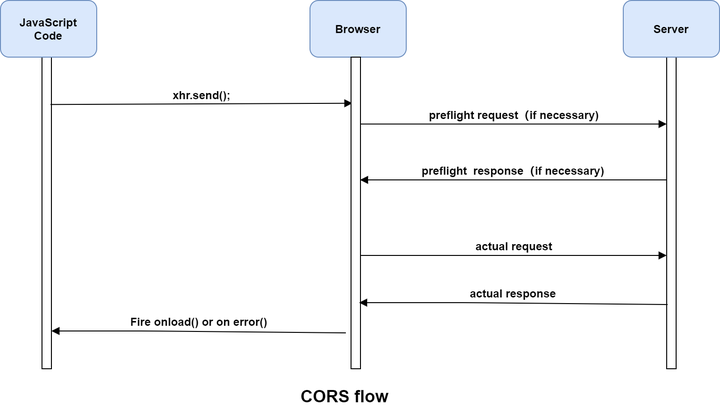
Java处理CORS(跨源资源共享)请求主要涉及到在服务器端设置相应的HTTP响应头,CORS是一个安全策略,用于控制哪些外部源可以访问你的服务器资源,以下是如何在Java中处理CORS请求的详细步骤:
使用Servlet过滤器
Servlet过滤器是处理CORS请求的一种常见方法,以下是一个简单的示例,展示如何使用Servlet过滤器来设置CORS响应头。
步骤1:创建过滤器类
import javax.servlet.*; import javax.servlet.http.HttpServletResponse; import java.io.IOException; public class CORSFilter implements Filter { @Override public void doFilter(ServletRequest request, ServletResponse response, FilterChain chain) throws IOException, ServletException { HttpServletResponse httpResponse = (HttpServletResponse) response; httpResponse.setHeader("AccessControlAllowOrigin", "*"); httpResponse.setHeader("AccessControlAllowMethods", "GET, POST, PUT, DELETE, OPTIONS"); httpResponse.setHeader("AccessControlAllowHeaders", "ContentType, Authorization"); httpResponse.setHeader("AccessControlAllowCredentials", "true"); chain.doFilter(request, response); } @Override public void init(FilterConfig filterConfig) throws ServletException { } @Override public void destroy() { } }
步骤2:配置Web.xml
在web.xml文件中配置过滤器:
使用Spring框架
如果你的项目使用Spring框架,可以通过以下方式处理CORS请求:
步骤1:创建CORS配置类
import org.springframework.context.annotation.Bean; import org.springframework.context.annotation.Configuration; import org.springframework.web.servlet.config.annotation.CorsRegistry; import org.springframework.web.servlet.config.annotation.WebMvcConfigurer; @Configuration public class CORSConfig implements WebMvcConfigurer { @Override public void addCorsMappings(CorsRegistry registry) { registry.addMapping("/**") .allowedOrigins("*") .allowedMethods("GET", "POST", "PUT", "DELETE", "OPTIONS") .allowedHeaders("*") .allowCredentials(true); } }
使用Spring Security
如果你的项目使用Spring Security,可以通过以下方式处理CORS请求:

步骤1:创建CORS配置类
import org.springframework.context.annotation.Bean; import org.springframework.context.annotation.Configuration; import org.springframework.security.config.annotation.web.builders.HttpSecurity; import org.springframework.security.config.annotation.web.configuration.EnableWebSecurity; import org.springframework.security.config.annotation.web.configuration.WebSecurityConfigurerAdapter; import org.springframework.security.web.cors.CorsHttpSecurityCustomizer; @Configuration @EnableWebSecurity public class SecurityConfig extends WebSecurityConfigurerAdapter { @Bean public CorsHttpSecurityCustomizer corsConfigurer() { return httpSecurity > httpSecurity.cors().disable(); } @Override protected void configure(HttpSecurity http) throws Exception { http.cors().and().authorizeRequests() .antMatchers("/api/**").permitAll() .anyRequest().authenticated(); } }
使用Apache HttpClient
如果你需要在Java应用程序中使用Apache HttpClient来发送CORS请求,可以按照以下步骤操作:
步骤1:添加依赖
在pom.xml文件中添加Apache HttpClient依赖:
<dependency> <groupId>org.apache.httpcomponents</groupId> <artifactId>httpclient</artifactId> <version>4.5.13</version> </dependency>
步骤2:发送CORS请求
import org.apache.http.HttpEntity; import org.apache.http.client.methods.CloseableHttpResponse; import org.apache.http.client.methods.HttpGet; import org.apache.http.impl.client.CloseableHttpClient; import org.apache.http.impl.client.HttpClients; import org.apache.http.util.EntityUtils; public class Main { public static void main(String[] args) { CloseableHttpClient httpClient = HttpClients.createDefault(); HttpGet httpGet = new HttpGet("https://example.com/api/resource"); httpGet.setHeader("Origin", "http://localhost:3000"); try (CloseableHttpResponse response = httpClient.execute(httpGet)) { HttpEntity entity = response.getEntity(); if (entity != null) { String result = EntityUtils.toString(entity); System.out.println(result); } } catch (IOException e) { e.printStackTrace(); } } }
FAQs
Q1:CORS请求有哪些限制?
A1:CORS请求有一些限制,包括:
- 同源策略:默认情况下,浏览器会阻止跨源请求。
- 响应头限制:CORS请求的响应头可能受到限制。
- 方法限制:CORS请求的方法可能受到限制。
Q2:如何处理CORS预检请求?
A2:CORS预检请求是一种特殊的HTTP请求,用于检查服务器是否支持CORS,要处理CORS预检请求,可以在过滤器或Spring配置中添加相应的逻辑,并设置适当的响应头,以下代码演示了如何处理CORS预检请求:
if ("OPTIONS".equalsIgnoreCase(request.getMethod())) { response.setHeader("AccessControlAllowOrigin", "*"); response.setHeader("AccessControlAllowMethods", "GET, POST, PUT, DELETE, OPTIONS"); response.setHeader("AccessControlAllowHeaders", "ContentType, Authorization"); response.setStatus(HttpServletResponse.SC_OK); return; }
















