
上一篇
Java中关闭Dialog的方法有哪些,最佳实践是直接调用哪个方法来关闭对话框?
在Java中,关闭Dialog通常意味着结束Dialog的显示状态,让用户能够继续与主界面交互,以下是一些常用的方法来关闭Dialog:
关闭Dialog的方法
| 方法 | 描述 | 代码示例 |
|---|---|---|
| setVisible(false) | 将Dialog的可见性设置为false,但Dialog对象仍然存在 | dialog.setVisible(false); |
| dispose() | 销毁Dialog对象,释放与之相关的资源 | dialog.dispose(); |
| setDefaultCloseOperation(JFrame.EXIT_ON_CLOSE) | 当用户点击窗口的关闭按钮时,关闭Dialog | dialog.setDefaultCloseOperation(JFrame.EXIT_ON_CLOSE); |
| setVisible(false) + setDefaultCloseOperation(JFrame.EXIT_ON_CLOSE) | 结合使用上述两种方法,先隐藏Dialog,然后设置关闭操作 | dialog.setVisible(false); dialog.setDefaultCloseOperation(JFrame.EXIT_ON_CLOSE); |
代码示例
以下是一个简单的示例,演示如何创建一个Dialog,并在按钮点击事件中关闭它:
import javax.swing.*; import java.awt.event.ActionEvent; import java.awt.event.ActionListener; public class DialogCloseExample { public static void main(String[] args) { // 创建主窗口 JFrame frame = new JFrame("Dialog Close Example"); frame.setDefaultCloseOperation(JFrame.EXIT_ON_CLOSE); frame.setSize(300, 200); frame.setLocationRelativeTo(null); // 创建Dialog JDialog dialog = new JDialog(frame, "Example Dialog", true); dialog.setSize(200, 100); dialog.setLocationRelativeTo(frame); // 创建按钮并添加到Dialog JButton closeButton = new JButton("Close Dialog"); closeButton.addActionListener(new ActionListener() { @Override public void actionPerformed(ActionEvent e) { // 关闭Dialog dialog.setVisible(false); dialog.dispose(); } }); dialog.add(closeButton); // 显示Dialog dialog.setVisible(true); // 显示主窗口 frame.setVisible(true); } }
FAQs
Q1:为什么有时候使用setVisible(false)后,Dialog仍然可见?
A1: 这可能是因为Dialog没有正确地显示在屏幕上,确保在调用setVisible(true)之前,Dialog已经添加到了一个容器中,并且该容器已经正确显示,在上面的示例中,Dialog被添加到了主窗口中,并且主窗口在显示Dialog之前已经显示了。
Q2:为什么使用dispose()后,Dialog没有关闭?
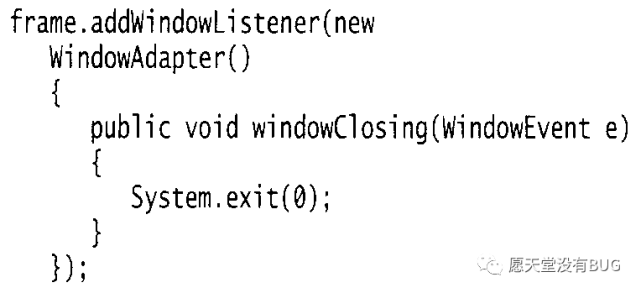
A2: 这可能是因为Dialog没有正确地设置关闭操作,确保在调用dispose()之前,已经设置了正确的关闭操作,例如使用setDefaultCloseOperation(JFrame.EXIT_ON_CLOSE),如果没有设置关闭操作,Dialog可能只是被隐藏而没有被销毁。















