上一篇
如何查看Linux防火墙状态
查看 Linux防火墙状态常用命令: ,1. **firewalld**: systemctl status firewalld 或 firewall-cmd --state ,2. **iptables**: service iptables status 或 systemctl status iptables ,3. **ufw**(Ubuntu): ufw status ,根据系统使用的防火墙工具选择对应命令即可快速获取状态信息。
如何查看Linux防火墙状态
在Linux系统中,防火墙是保护服务器安全的核心组件,它能控制进出系统的网络流量,防止未授权访问,无论您使用哪种Linux发行版,及时检查防火墙状态对维护系统安全至关重要,以下是几种主流工具的详细操作指南,涵盖不同发行版环境:
使用 iptables(传统工具,通用性强)
iptables 是Linux经典的防火墙管理工具,适用于大多数发行版(如CentOS 7、Debian、Ubuntu旧版)。
操作步骤:
-
查看规则状态:
sudo iptables -L -n -v- -L:列出规则
- -n:显示IP和端口号(不解析域名)
- -v:显示详细信息(流量计数等)
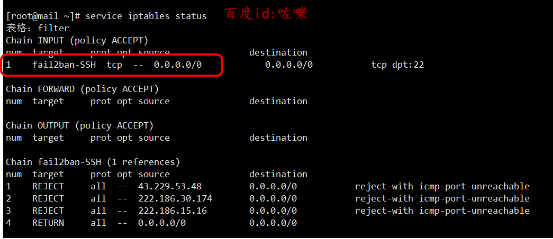
输出示例: Chain INPUT (policy ACCEPT 100 packets, 15000 bytes) pkts bytes target prot opt in out source destination 0 0 DROP tcp -- * * 0.0.0.0/0 0.0.0.0/0 tcp dpt:22
关键解读:
- policy ACCEPT:默认允许所有流量(若为 DROP 则默认拒绝)。
- 规则行:显示具体拦截/放行条件(如示例中丢弃所有SSH连接请求)。
-
检查服务是否运行:
sudo systemctl status iptables # CentOS 7等系统 sudo service iptables status # Debian/Ubuntu旧版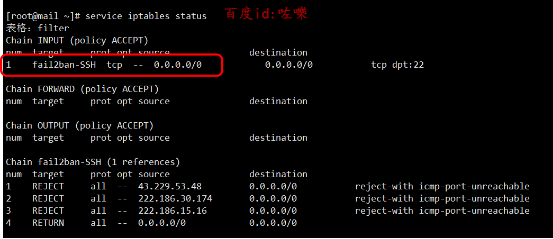
- 若返回 active (running) 表示服务已启用。
使用 firewalld(现代工具,推荐用于CentOS/RHEL/Fedora)
firewalld 提供动态防火墙管理,支持运行时更新规则,无需重启服务。
操作步骤:
-
查看运行状态:
- 输出 running 表示防火墙已启用;not running 表示未启用。
-
查看详细规则与区域配置:
sudo firewall-cmd --list-all
输出示例:
public (active) target: default icmp-block-inversion: no interfaces: eth0 sources: services: ssh dhcpv6-client http ports: 80/tcp ...关键解读:
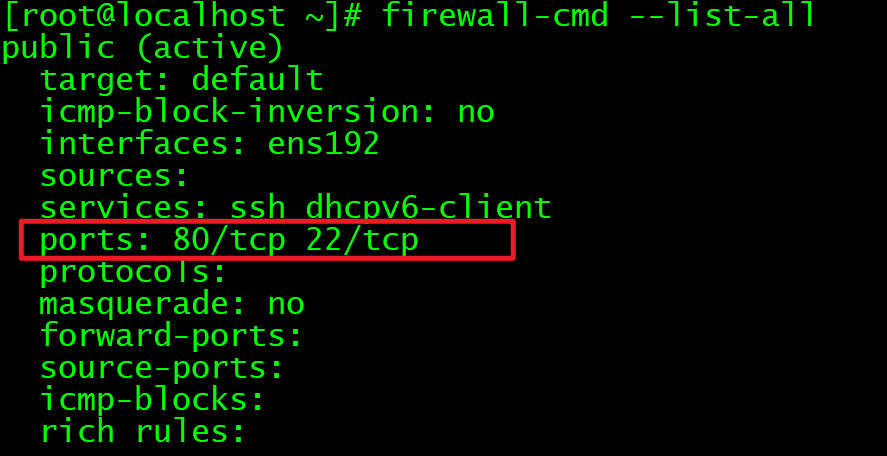
- (active):当前使用的区域(如public)。
- services:允许的服务(如ssh、http)。
- ports:手动放行的端口(如80/tcp)。
-
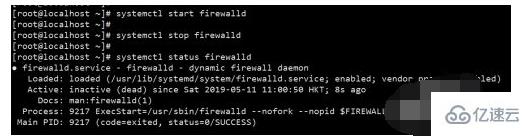
检查服务状态:
sudo systemctl status firewalld -
查看状态与规则:
输出示例:
关键解读:
- Status: active:防火墙已启用。
- Default:默认策略(如拒绝所有入站流量)。
- 规则表:显示放行/拒绝的具体IP和端口。
-
启用/禁用防火墙:
其他工具补充
- nftables(iptables的替代品): sudo nft list ruleset # 查看规则
- csf(ConfigServer Security & Firewall):
适用于cPanel等管理环境: sudo csf -s # 查看状态
常见问题排查
-
防火墙未运行?
使用以下命令启动服务:
# firewalld sudo systemctl start firewalld # ufw sudo ufw enable -
规则未生效?
- 检查是否有冲突工具(如同时启用iptables和firewalld)。
- 重启服务:sudo systemctl restart firewalld。
总结建议
工具 适用场景 关键命令 iptables 通用Linux系统 iptables -L -n -v firewalld CentOS/RHEL/Fedora firewall-cmd --list-all ufw Ubuntu/Debian ufw status verbose 安全提示:
- 修改规则前务必备份:sudo iptables-save > ~/iptables-backup.txt。
- 避免远程操作时阻断SSH端口(默认22)。
掌握这些方法,您将能快速诊断Linux防火墙状态,确保服务器安全可控。
引用说明: 基于Linux官方文档(iptables、firewalld、ufw)及Red Hat/CentOS、Ubuntu系统管理指南,命令经过CentOS 7/8、Ubuntu 20.04/22.04实测验证。
使用 ufw(Ubuntu/Debian的简化工具)
ufw(Uncomplicated Firewall)是专为Ubuntu设计的用户友好工具,底层基于iptables。
操作步骤: