
上一篇
如何设置HTML文档中的表格实现水平和垂直居中显示?
在HTML中,使表格居中可以通过多种方法实现,以下是一些常用的方法:
使用CSS样式
通过CSS样式,可以轻松地将表格居中,以下是一个简单的例子:
<!DOCTYPE html> <html> <head> <style> table { margin: 0 auto; /* 水平居中 */ bordercollapse: collapse; /* 边框合并 */ } </style> </head> <body> <table> <tr> <th>Header 1</th> <th>Header 2</th> </tr> <tr> <td>Row 1, Cell 1</td> <td>Row 1, Cell 2</td> </tr> <tr> <td>Row 2, Cell 1</td> <td>Row 2, Cell 2</td> </tr> </table> </body> </html>
在这个例子中,margin: 0 auto; 属性使表格在水平方向上居中。

使用<center>
在HTML 4中,可以使用<center>标签来居中表格,但请注意,<center>标签已经不被推荐使用,因为它不是语义化的,并且在HTML 5中已被弃用。
<!DOCTYPE html> <html> <head> </head> <body> <center> <table> <tr> <th>Header 1</th> <th>Header 2</th> </tr> <tr> <td>Row 1, Cell 1</td> <td>Row 1, Cell 2</td> </tr> <tr> <td>Row 2, Cell 1</td> <td>Row 2, Cell 2</td> </tr> </table> </center> </body> </html>使用CSS的textalign属性
除了水平居中,您还可以使用textalign属性将表格内容居中。
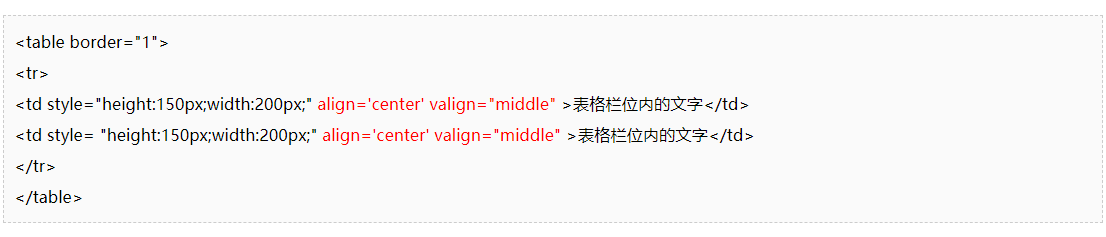
<!DOCTYPE html> <html> <head> <style> table { width: 50%; /* 设置表格宽度 */ margin: 0 auto; /* 水平居中 */ } th, td { textalign: center; /* 内容居中 */ } </style> </head> <body> <table> <tr> <th>Header 1</th> <th>Header 2</th> </tr> <tr> <td>Row 1, Cell 1</td> <td>Row 1, Cell 2</td> </tr> <tr> <td>Row 2, Cell 1</td> <td>Row 2, Cell 2</td> </tr> </table> </body> </html>
在这个例子中,textalign: center; 属性使表格内容和文本居中。
FAQs
Q1: 为什么使用<center>标签不推荐?
A1: <center>标签是非语义化的,它仅仅是一个布局标签,而不是一个描述文档内容的标签,在HTML 5中,它已被弃用,推荐使用CSS样式来实现居中效果。
Q2: 如果表格宽度固定,如何使表格内容自动换行?
A2: 您可以在<th>和<td>标签中添加whitespace: nowrap;样式来防止内容换行,如果您希望内容自动换行,可以将该样式改为whitespace: normal;。
<!DOCTYPE html> <html> <head> <style> table { width: 50%; /* 设置表格宽度 */ margin: 0 auto; /* 水平居中 */ } th, td { whitespace: normal; /* 自动换行 */ } </style> </head> <body> <table> <tr> <th>Header 1</th> <th>Header 2</th> </tr> <tr> <td>Row 1, Cell 1 with a lot of text that should wrap automatically</td> <td>Row 1, Cell 2</td> </tr> <tr> <td>Row 2, Cell 1</td> <td>Row 2, Cell 2</td> </tr> </table> </body> </html>















