
上一篇
java字符串和时间怎么相加
Java中,字符串和时间相加通常指将时间对象转换为字符串后与另一个字符串拼接,常见方法如下:,1. 使用 DateTimeFormatter(Java 8+):将 LocalDateTime等时间对象格式化为字符串,再与目标字符串拼接。, “ java, LocalDateTime now = LocalDateTime.now();, DateTimeFormatter formatter = DateTimeFormatter.ofPattern("yyyy-MM-dd HH:mm:ss");, String result = "当前时间是:" + now.format(formatter);, ` ,2. 使用SimpleDateFormat (旧版本兼容):将Date 对象格式化为字符串后拼接:, ` java, Date now = new Date();, SimpleDateFormat sdf = new SimpleDateFormat("yyyy-MM-dd HH:mm:ss");, String result = "当前时间是:" + sdf.format(now);, “,需注意格式匹配,避免解析异常
Java中,字符串和时间相加通常是指将表示时间的字符串与时间对象进行转换和运算,以下是几种常见的方法:
使用SimpleDateFormat类
SimpleDateFormat是Java中用于格式化和解析日期的类,它可以将日期对象转换为指定格式的字符串,也可以将字符串解析为日期对象。
示例代码:
import java.text.SimpleDateFormat; import java.util.Date; public class SimpleDateFormatExample { public static void main(String[] args) { try { // 当前日期对象转字符串 Date now = new Date(); SimpleDateFormat sdf = new SimpleDateFormat("yyyy-MM-dd HH:mm:ss"); String currentTime = sdf.format(now); System.out.println("当前时间字符串: " + currentTime); // 字符串转日期对象 String dateString = "2024-10-28 22:56:11"; Date date = sdf.parse(dateString); System.out.println("解析后的日期: " + date); } catch (Exception e) { e.printStackTrace(); } } }
使用DateTimeFormatter类
DateTimeFormatter是Java 8引入的新类,用于格式化和解析日期时间,它是线程安全的,并且提供了更多的灵活性。

示例代码:
import java.time.LocalDateTime; import java.time.format.DateTimeFormatter; public class DateTimeFormatterExample { public static void main(String[] args) { // 当前日期时间对象转字符串 LocalDateTime now = LocalDateTime.now(); DateTimeFormatter formatter = DateTimeFormatter.ofPattern("yyyy-MM-dd HH:mm:ss"); String formattedDate = now.format(formatter); System.out.println("当前时间字符串: " + formattedDate); // 字符串转日期时间对象 String customDate = "2023-10-11 12:34:56"; LocalDateTime dateTime = LocalDateTime.parse(customDate, formatter); System.out.println("解析后的日期时间: " + dateTime); } }
使用Calendar类
Calendar类可以获取当前的日期和时间,并将其格式化为字符串。
示例代码:
import java.util.Calendar; public class CalendarExample { public static void main(String[] args) { Calendar cal = Calendar.getInstance(); int year = cal.get(Calendar.YEAR); int month = cal.get(Calendar.MONTH) + 1; // 月份从0开始,需要加1 int day = cal.get(Calendar.DAY_OF_MONTH); int hour = cal.get(Calendar.HOUR_OF_DAY); int minute = cal.get(Calendar.MINUTE); int second = cal.get(Calendar.SECOND); String currentTime = String.format("%04d-%02d-%02d %02d:%02d:%02d", year, month, day, hour, minute, second); System.out.println("当前时间字符串: " + currentTime); } }
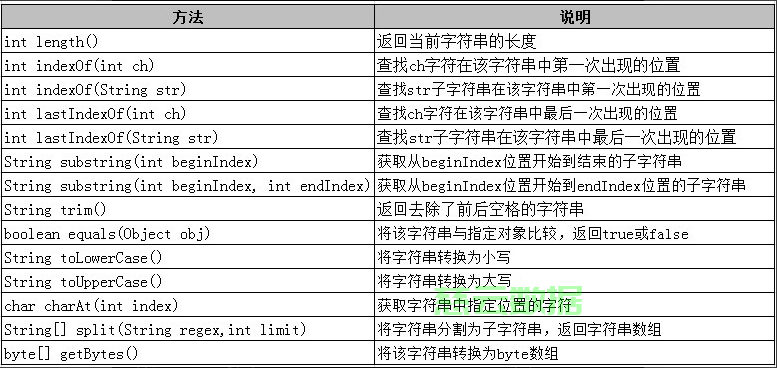
使用LocalDate和LocalTime类
LocalDate和LocalTime类分别表示日期和时间,可以结合使用来处理日期和时间。
示例代码:
import java.time.LocalDate; import java.time.LocalTime; import java.time.format.DateTimeFormatter; public class LocalDateLocalTimeExample { public static void main(String[] args) { LocalDate currentDate = LocalDate.now(); LocalTime currentTime = LocalTime.now(); DateTimeFormatter dtf = DateTimeFormatter.ofPattern("yyyy-MM-dd HH:mm:ss"); String formattedDate = currentDate.format(dtf); String formattedTime = currentTime.format(dtf); System.out.println("当前日期字符串: " + formattedDate); System.out.println("当前时间字符串: " + formattedTime); } }
处理不同时区的时间
在处理不同时区的时间时,可以使用ZonedDateTime类。
示例代码:
import java.time.ZonedDateTime; import java.time.format.DateTimeFormatter; public class ZonedDateTimeExample { public static void main(String[] args) { ZonedDateTime now = ZonedDateTime.now(); DateTimeFormatter formatter = DateTimeFormatter.ofPattern("yyyy-MM-dd HH:mm:ss Z"); String formattedDate = now.format(formatter); System.out.println("当前带时区的时间字符串: " + formattedDate); } }
FAQs
问题1:如何将字符串解析为日期对象?
答:可以使用SimpleDateFormat或DateTimeFormatter类将字符串解析为日期对象。
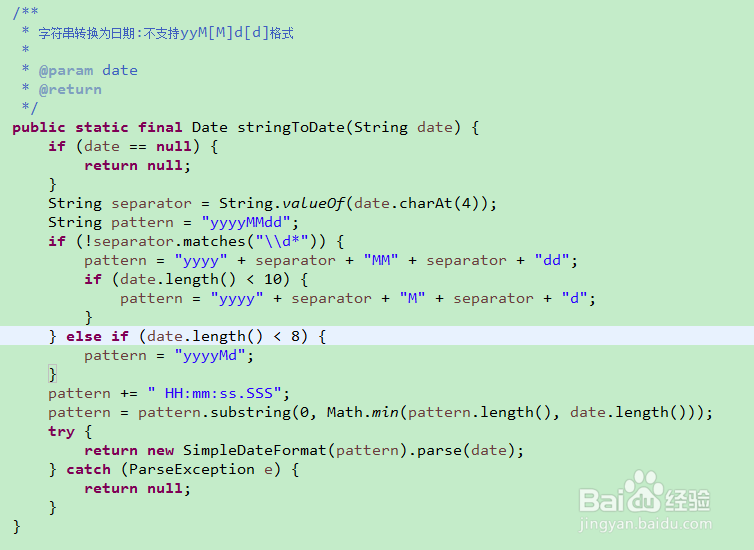
String dateString = "2024-10-28 22:56:11"; SimpleDateFormat sdf = new SimpleDateFormat("yyyy-MM-dd HH:mm:ss"); Date date = sdf.parse(dateString);
或使用DateTimeFormatter:
String dateString = "2024-10-28 22:56:11"; DateTimeFormatter formatter = DateTimeFormatter.ofPattern("yyyy-MM-dd HH:mm:ss"); LocalDateTime dateTime = LocalDateTime.parse(dateString, formatter);
问题2:如何将日期对象转换为字符串?
答:可以使用SimpleDateFormat或DateTimeFormatter类将日期对象转换为字符串。
Date now = new Date(); SimpleDateFormat sdf = new SimpleDateFormat("yyyy-MM-dd HH:mm:ss"); String currentTime = sdf.format(now);
或使用DateTimeFormatter:
LocalDateTime now = LocalDateTime.now(); DateTimeFormatter formatter = DateTimeFormatter.ofPattern("yyyy-MM-dd HH:mm:ss"); String formattedDate = now.format(formatter);















