
上一篇
MongoDB写入数据库时,需要注意哪些最佳实践和操作步骤?
在MongoDB中写入数据库通常涉及以下步骤:
-
连接到MongoDB实例:你需要使用MongoDB的驱动程序连接到你的MongoDB实例。
-
选择数据库:在连接后,选择你想要写入数据的数据库。
-
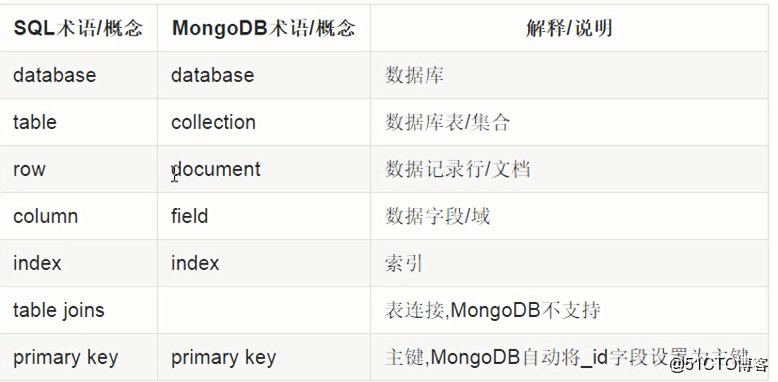
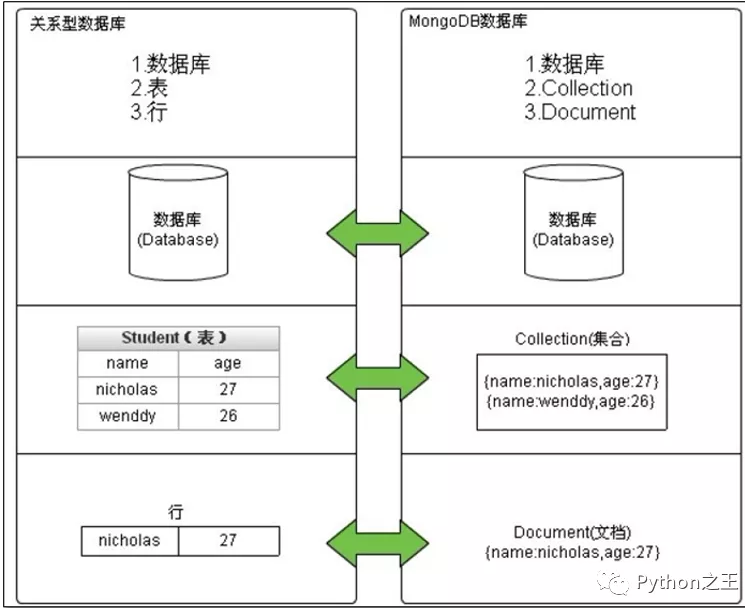
选择集合:在数据库中,选择一个集合(在MongoDB中,集合类似于关系型数据库中的表)。
-
创建文档:在集合中创建一个或多个文档(在MongoDB中,文档类似于行)。
-
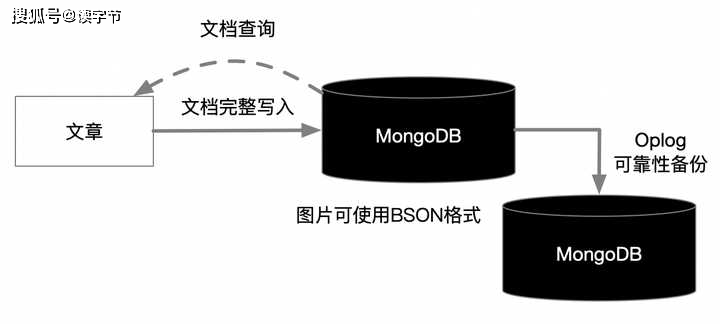
使用insert方法:使用insertOne()或insertMany()方法将文档写入数据库。
以下是一个使用Python和pymongo驱动的示例:
from pymongo import MongoClient # 连接到MongoDB实例 client = MongoClient('mongodb://localhost:27017/') # 选择数据库 db = client['mydatabase'] # 选择集合 collection = db['mycollection'] # 创建文档 document = {"name": "John", "age": 30, "city": "New York"} # 写入文档 result = collection.insert_one(document) print("Inserted document with id:", result.inserted_id)
以下是一个使用JavaScript和MongoDB Node.js驱动的示例:
const MongoClient = require('mongodb').MongoClient; // 连接到MongoDB实例 const url = 'mongodb://localhost:27017/'; const dbName = 'mydatabase'; MongoClient.connect(url, { useNewUrlParser: true, useUnifiedTopology: true }, (err, client) => { if (err) throw err; const db = client.db(dbName); const collection = db.collection('mycollection'); // 创建文档 const document = { name: "John", age: 30, city: "New York" }; // 写入文档 collection.insertOne(document, (err, result) => { if (err) throw err; console.log("Inserted document with id:", result.insertedId); client.close(); }); });
| 步骤 | 描述 | Python 示例 | JavaScript 示例 |
|---|---|---|---|
| 1 | 连接到MongoDB实例 | client = MongoClient('mongodb://localhost:27017/') | MongoClient.connect(url, { useNewUrlParser: true, useUnifiedTopology: true }, ...) |
| 2 | 选择数据库 | db = client['mydatabase'] | const db = client.db(dbName) |
| 3 | 选择集合 | collection = db['mycollection'] | const collection = db.collection('mycollection') |
| 4 | 创建文档 | document = {"name": "John", "age": 30, "city": "New York"} | const document = { name: "John", age: 30, city: "New York" } |
| 5 | 使用insert方法 | result = collection.insert_one(document) | collection.insertOne(document, ...) |
FAQs:
Q1: 如何在MongoDB中更新文档?
A1: 在MongoDB中,你可以使用updateOne()或updateMany()方法来更新文档,要更新名为”John”的用户的年龄,你可以这样做:
result = collection.update_one({"name": "John"}, {"$set": {"age": 31}}) print("Modified count:", result.modified_count)
Q2: 如何在MongoDB中删除文档?
A2: 在MongoDB中,你可以使用deleteOne()或deleteMany()方法来删除文档,要删除名为”John”的用户,你可以这样做:
result = collection.delete_one({"name": "John"}) print("Deleted count:", result.deleted_count)















