
上一篇
Java中如何正确读取InputStream流数据?入门级疑问解答!
在Java中读取InputStream是一种常见的操作,可以用于从文件、网络连接或其他输入源中读取数据,以下是如何使用Java的InputStream类读取数据的详细步骤和示例。
使用InputStream读取数据的基本步骤
-
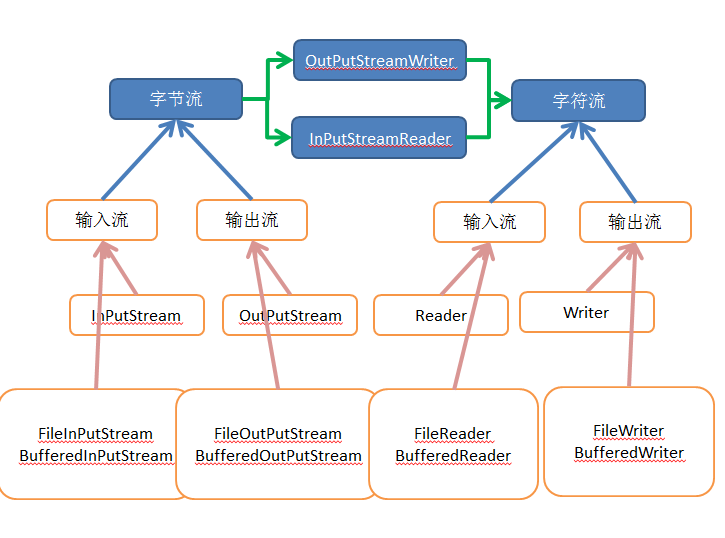
创建InputStream对象:首先需要创建一个InputStream对象,这通常是通过调用类如FileInputStream、SocketInputStream或ByteArrayInputStream的构造函数来完成的。
-
读取数据:使用read()方法从InputStream中读取数据,这个方法返回读取的字节数,如果返回1,则表示已经到达流的末尾。
-
处理数据:将读取的字节转换为字符串或其他需要的数据格式。
-
关闭流:在完成数据读取后,应该关闭InputStream以释放资源。
示例代码
以下是一个使用FileInputStream读取本地文件内容的示例:
import java.io.FileInputStream; import java.io.IOException; public class InputStreamExample { public static void main(String[] args) { FileInputStream fileInputStream = null; try { fileInputStream = new FileInputStream("example.txt"); int content; while ((content = fileInputStream.read()) != 1) { System.out.print((char) content); } } catch (IOException e) { e.printStackTrace(); } finally { if (fileInputStream != null) { try { fileInputStream.close(); } catch (IOException e) { e.printStackTrace(); } } } } }
表格说明
| 步骤 | 代码 | 说明 |
|---|---|---|
| 1 | FileInputStream fileInputStream = null; | 创建FileInputStream对象,准备读取文件 |
| 2 | try { ... } catch (IOException e) { ... } | 尝试读取文件内容,捕获可能的IOException |
| 3 | while ((content = fileInputStream.read()) != 1) { ... } | 循环读取文件内容,直到文件末尾 |
| 4 | System.out.print((char) content); | 将读取的字节转换为字符并打印 |
| 5 | finally { ... } | 确保在发生异常时关闭文件流 |
FAQs
Q1:如何处理读取大文件时内存不足的问题?

A1: 当读取大文件时,为了避免内存不足的问题,可以使用缓冲流(如BufferedInputStream)来减少实际读取的数据量,这样可以有效地减少内存消耗,并提高读取效率。
Q2:如何读取InputStream中的特定字符?
A2: 如果需要读取InputStream中的特定字符,可以使用read()方法,并检查返回的字节是否等于该字符的ASCII码,以下是一个示例:
int content; while ((content = fileInputStream.read()) != 1) { if (content == 'a') { System.out.println("Found character 'a'"); break; } }
在这个例子中,代码会读取每个字节,并检查它是否等于字符’a’的ASCII码(97),如果找到,它会打印一条消息并退出循环。
















