上一篇
koa如何直接输出html
Koa中,使用ctx.body直接赋值HTML字符串即可 输出HTML内容。
Koa 如何直接输出 HTML
Koa 是一个基于 Node.js 的现代化 Web 框架,以其简洁和灵活性受到开发者的喜爱,在 Koa 中直接输出 HTML 有多种方法,本文将详细介绍几种常见的方式,并提供相应的代码示例。
使用 ctx.body 直接赋值
Koa 的 Context 对象提供了一个 body 属性,可以直接赋值为字符串、Buffer 或 Stream,这是最直接的方法之一。
const Koa = require('koa'); const app = new Koa(); app.use(async (ctx) => { const html = ` <!DOCTYPE html> <html> <head> <title>Koa 输出 HTML</title> </head> <body> <h1>Hello, Koa!</h1> </body> </html> `; ctx.body = html; }); app.listen(3000, () => { console.log('Server is running on http://localhost:3000'); });
优点:
- 简单直接,无需额外依赖。
缺点:
- 对于复杂的 HTML 结构,维护起来可能比较困难。
- 缺乏模板引擎的功能,如条件渲染、循环等。
使用模板引擎(如 EJS、Pug)
对于更复杂的 HTML 渲染,使用模板引擎是更好的选择,Koa 可以与多种模板引擎配合使用,如 EJS、Pug、Handlebars 等,以下以 EJS 为例。
安装 EJS
npm install ejs
使用 EJS 渲染 HTML
const Koa = require('koa'); const path = require('path'); const ejs = require('ejs'); const app = new Koa(); // 设置模板文件目录 app.use(async (ctx, next) => { ctx.state.env = process.env.NODE_ENV; await next(); }); app.use(async (ctx) => { // 渲染 EJS 模板 await ejs.renderFile(path.join(__dirname, 'template.ejs'), { title: 'Koa + EJS' }, (err, html) => { if (err) throw err; ctx.body = html; }); }); app.listen(3000, () => { console.log('Server is running on http://localhost:3000'); });
template.ejs 文件内容
<!DOCTYPE html> <html> <head><%= title %></title> </head> <body> <h1>Hello, <%= title %>!</h1> </body> </html>
优点:
- 支持动态数据渲染。
- 易于维护和扩展。
缺点:
- 需要引入额外的依赖。
- 学习成本稍高。
使用 Koa 静态资源中间件
HTML 文件已经存在,可以使用 Koa 的静态资源中间件来直接提供 HTML 文件。
const Koa = require('koa'); const serve = require('koa-static'); const path = require('path'); const app = new Koa(); // 提供静态文件服务 app.use(serve(path.join(__dirname, 'public'))); app.listen(3000, () => { console.log('Server is running on http://localhost:3000'); });
public/index.html 文件内容
<!DOCTYPE html> <html> <head>Koa 静态 HTML</title> </head> <body> <h1>Hello, Koa with Static Files!</h1> </body> </html>
优点:

- 简单易用,适合纯静态页面。
- 无需编写额外的服务器端代码。
缺点:
- 无法动态渲染数据。
- 适用于简单的静态页面,复杂应用不适用。
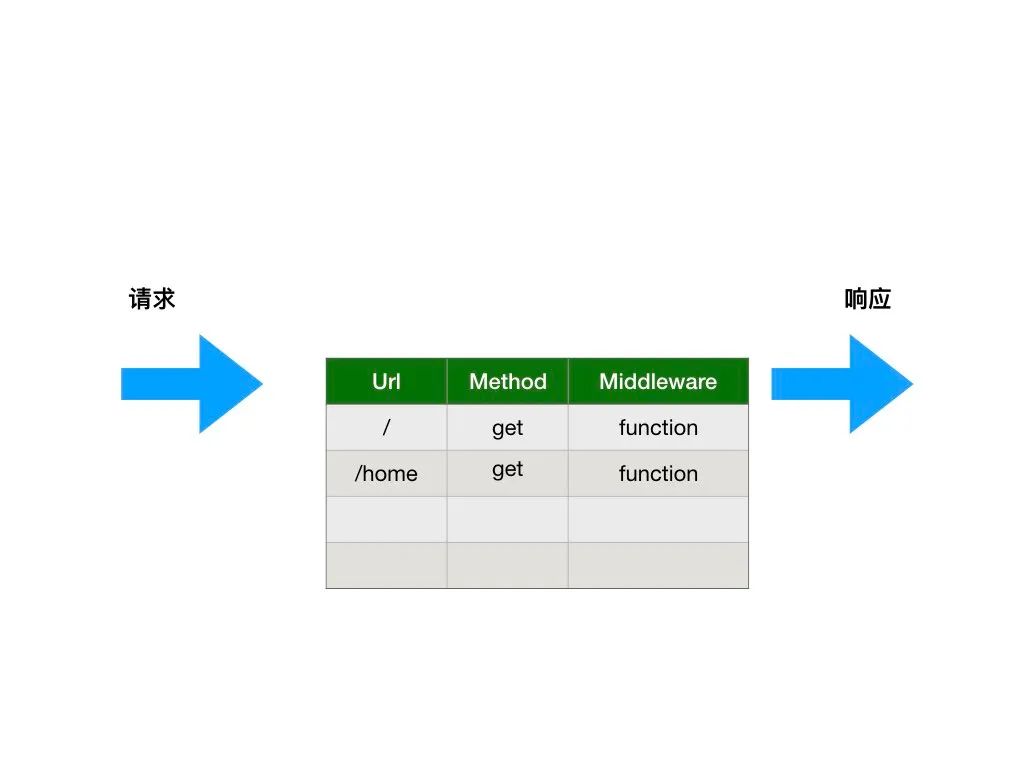
使用 Koa Router 和中间件组合
在实际项目中,通常会结合路由和中间件来处理不同的请求,并输出相应的 HTML,以下是一个结合 Koa Router 和中间件的示例。
安装 Koa Router
npm install @koa/router
使用 Koa Router 输出 HTML
const Koa = require('koa'); const Router = require('@koa/router'); const app = new Koa(); const router = new Router(); router.get('/', async (ctx) => { const html = ` <!DOCTYPE html> <html> <head> <title>Home</title> </head> <body> <h1>Welcome to the Home Page</h1> </body> </html> `; ctx.body = html; }); router.get('/about', async (ctx) => { const html = ` <!DOCTYPE html> <html> <head> <title>About</title> </head> <body> <h1>About Us</h1> </body> </html> `; ctx.body = html; }); app.use(router.routes()).use(router.allowedMethods()); app.listen(3000, () => { console.log('Server is running on http://localhost:3000'); });
优点:
- 结构清晰,易于管理多个路由。
- 可以结合中间件进行更复杂的处理。
缺点:
- 对于简单的页面,可能显得有些冗余。
- 需要学习和理解路由机制。
使用异步模板渲染(高级)
对于需要异步获取数据后再渲染 HTML 的场景,可以使用异步模板渲染,以下是一个结合数据库查询的示例(假设使用 Sequelize)。

const Koa = require('koa'); const path = require('path'); const ejs = require('ejs'); const app = new Koa(); // 假设有一个数据库模型 User const { User } = require('./models'); app.use(async (ctx) => { try { const users = await User.findAll(); // 异步获取数据 const html = await ejs.renderFile(path.join(__dirname, 'template.ejs'), { users: users.map(u => u.toJSON()) }, {}, (err, html) => { if (err) throw err; return html; }); ctx.body = html; } catch (error) { ctx.status = 500; ctx.body = 'Internal Server Error'; } }); app.listen(3000, () => { console.log('Server is running on http://localhost:3000'); });
优点:
- 支持复杂的数据处理和渲染逻辑。
- 适用于需要动态数据的应用。
缺点:
- 实现较为复杂,需要处理异步逻辑。
- 对错误处理要求较高。
方法对比表格
| 方法 | 优点 | 缺点 | 适用场景 |
|---|---|---|---|
| ctx.body 直接赋值 | 简单直接,无需额外依赖 | 维护复杂 HTML 困难,缺乏模板功能 | 简单页面,快速输出 |
| 使用模板引擎(EJS、Pug) | 支持动态数据渲染,易于维护 | 需要引入额外依赖,学习成本稍高 | 需要动态数据的应用 |
| Koa 静态资源中间件 | 简单易用,适合纯静态页面 | 无法动态渲染数据 | 纯静态页面,无需服务器端渲染 |
| Koa Router 和中间件组合 | 结构清晰,易于管理多个路由 | 对于简单页面可能冗余 | 多页面应用,需要路由管理 |
| 异步模板渲染 | 支持复杂数据处理和渲染 | 实现复杂,需处理异步逻辑 | 需要异步数据的应用 |
FAQs
Q1: Koa 中如何设置 HTML 的内容类型?
A1: Koa 默认会根据 ctx.body 的类型自动设置 Content-Type,如果手动设置,可以在响应头中指定。
ctx.type = 'text/html'; // 或者 'application/xhtml+xml' 等 MIME 类型 ctx.body = html;
Q2: Koa 如何处理 HTML 中的相对路径资源(如 CSS、JS、图片)?
A2: 确保在 HTML 中使用正确的相对路径,或者配置 Koa 的静态资源中间件来提供这些资源,将 CSS 文件放在 public 目录下,并使用 Koa 的静态中间件:
app.use(serve(path.join(__dirname, 'public')));
然后在 HTML 中引用:
<link rel="stylesheet" href="/styles.