上一篇
有了域名和服务器
有了域名和 服务器,下一步需备案、部署网站、配置DNS解析,测试无误
域名与服务器基础配置指南
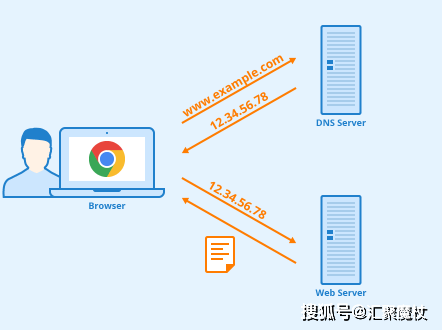
域名解析设置
登录域名管理控制台
进入域名注册商提供的管理后台(如阿里云/西西安全/Godaddy等),找到「DNS管理」或「域名解析」板块。
添加A记录
| 主机记录 | 记录类型 | 线路类型 | 记录值 | TTL |
|---|---|---|---|---|
| A记录 | 默认 | 服务器公网IP | 300s | |
| www | A记录 | 默认 | 服务器公网IP | 300s |
添加CNAME记录(可选)
若需使用CDN服务或绑定多个域名,可添加CNAME记录指向域名服务商提供的加速域名。

服务器基础环境配置
操作系统初始化
| 系统类型 | 必做操作 | 安全建议 |
|---|---|---|
| Linux | yum update -y / apt update | 修改SSH默认端口(22→2822) |
| Windows | 启用防火墙/安装安全组规则 | 禁用远程桌面(非必要不开) |
防火墙配置
# CentOS示例(firewalld) firewall-cmd --permanicular 80/tcp firewall-cmd --permanicular 443/tcp firewall-cmd --reload
Web服务部署方案
LAMP/LNMP环境搭建
| 组件 | 安装命令(Ubuntu) | 配置文件路径 |
|---|---|---|
| Apache | sudo apt install apache2 | /etc/apache2/ |
| Nginx | sudo apt install nginx | /etc/nginx/ |
| MySQL | sudo apt install mariadb-server | /etc/mysql/ |
| PHP | sudo apt install php-fpm | /etc/php/7.4/fpm/ |
网站文件部署
# 创建网站根目录 sudo mkdir -p /var/www/html/yoursite # 赋予权限 sudo chown -R www-data:www-data /var/www/html/yoursite # 配置Nginx虚拟主机 server { listen 80; server_name yourdomain.com www.yourdomain.com; root /var/www/html/yoursite; index index.php index.html; }
SSL证书配置
免费证书申请(Let’s Encrypt)
# 安装certbot sudo apt install certbot python3-certbot-nginx # 获取证书 sudo certbot --nginx -d yourdomain.com -d www.yourdomain.com # 自动续期配置 sudo certbot renew --dry-run
强制HTTPS配置
# Nginx配置示例 server { listen 80; server_name yourdomain.com; return 301 https://$host$request_uri; }
常见问题排查
域名解析验证
# 检查DNS记录 nslookup yourdomain.com # 验证HTTPS证书 curl -vI https://yourdomain.com
服务状态检查
# 检查Web服务状态 systemctl status nginx # 查看PHP-FPM状态 systemctl status php7.4-fpm # 检查MySQL运行情况 systemctl status mariadb
相关问题与解答
Q1:域名解析已设置但无法访问网站怎么办?
A1:按以下顺序排查:

- 检查服务器公网IP是否能ping通
- 确认防火墙已开放80/443端口
- 查看Web服务(Nginx/Apache)是否启动
- 检查网站根目录权限(通常需设置为www-data用户组)
- 查看服务器访问日志(/var/log/nginx/access.log)
Q2:如何提升服务器安全性?
A2:建议采取以下措施:
- 修改SSH登录端口(非必要不暴露22端口)
- 禁用root远程登录,创建专用运维用户
- 安装Fail2Ban防止暴力免费
- 配置UFW防火墙规则: sudo ufw allow OpenSSH sudo ufw allow 'Nginx Full' sudo ufw enable
- 定期更新系统补丁(`apt update && apt upgrade –