
上一篇
Apache多虚拟主机配置文件中,如何确保不同主机间配置互不干扰?
Apache是一款广泛使用的开源HTTP服务器软件,支持多虚拟主机配置,允许在一个服务器上运行多个网站,以下是一个详细的Apache多虚拟主机配置文件示例,包括配置步骤和说明。
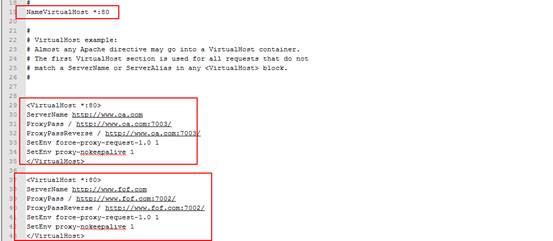
Apache多虚拟主机配置文件示例
| 配置文件部分 | 说明 |
|---|---|
| ServerName | 设置虚拟主机的域名 |
| DocumentRoot | 设置虚拟主机的根目录 |
| ServerAdmin | 设置虚拟主机的管理员邮箱地址 |
| ErrorLog | 设置虚拟主机的错误日志文件路径 |
| CustomLog | 设置虚拟主机的访问日志文件路径和格式 |
| DirectoryIndex | 设置虚拟主机的默认首页文件 |
| Directory | 设置虚拟主机的目录访问权限 |
| ScriptAlias | 设置虚拟主机的CGI脚本路径 |
| VirtualHost | 定义虚拟主机配置 |
示例配置
<VirtualHost *:80> ServerName example.com DocumentRoot /var/www/example.com ServerAdmin admin@example.com ErrorLog /var/log/apache2/example.comerror.log CustomLog /var/log/apache2/example.comaccess.log combined DirectoryIndex index.html index.htm index.php Directory /var/www/example.com { Options Indexes FollowSymLinks AllowOverride All Require all granted } ScriptAlias /cgibin/ /var/www/example.com/cgibin/ </VirtualHost> <VirtualHost *:80> ServerName anotherexample.com DocumentRoot /var/www/anotherexample.com ServerAdmin admin@anotherexample.com ErrorLog /var/log/apache2/anotherexample.comerror.log CustomLog /var/log/apache2/anotherexample.comaccess.log combined DirectoryIndex index.html index.htm index.php Directory /var/www/anotherexample.com { Options Indexes FollowSymLinks AllowOverride All Require all granted } ScriptAlias /cgibin/ /var/www/anotherexample.com/cgibin/ </VirtualHost>
FAQs
Q1:如何为Apache虚拟主机设置SSL证书?
A1: 要为Apache虚拟主机设置SSL证书,首先需要获取SSL证书文件(例如cert.pem)和私钥文件(例如privkey.pem),在虚拟主机配置文件中添加以下行:
<VirtualHost *:443> ServerName example.com DocumentRoot /var/www/example.com ServerAdmin admin@example.com ErrorLog /var/log/apache2/example.comerror.log CustomLog /var/log/apache2/example.comaccess.log combined DirectoryIndex index.html index.htm index.php SSLEngine on SSLCertificateFile /path/to/cert.pem SSLCertificateKeyFile /path/to/privkey.pem <Directory /var/www/example.com> Options Indexes FollowSymLinks AllowOverride All Require all granted </Directory> </VirtualHost>
Q2:如何配置Apache虚拟主机支持PHP?
A2: 要配置Apache虚拟主机支持PHP,首先需要安装PHP模块,在虚拟主机配置文件中添加以下行:
<VirtualHost *:80> ServerName example.com DocumentRoot /var/www/example.com ServerAdmin admin@example.com ErrorLog /var/log/apache2/example.comerror.log CustomLog /var/log/apache2/example.comaccess.log combined DirectoryIndex index.html index.htm index.php <Directory /var/www/example.com> Options Indexes FollowSymLinks AllowOverride All Require all granted AddType application/xhttpdphp .php AddType application/xhttpdphpsource .phps PHPIniDir /etc/php/7.4/apache2 </Directory> </VirtualHost>
是一个详细的Apache多虚拟主机配置文件示例,包括配置步骤和说明,希望对您有所帮助!








