上一篇
对象数组怎么用javascript
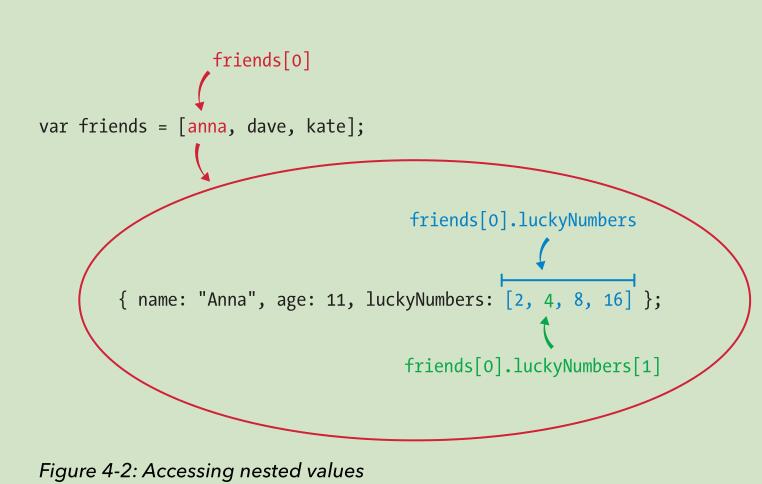
JavaScript中,对象数组可以通过创建包含多个对象的数组来使用,`let arr = [{name: ‘Alice’}, {name: ‘Bob’}];
JavaScript中,对象数组是一种非常常见的数据结构,它允许我们将多个对象存储在一个数组中,以便更方便地进行管理和操作,对象数组可以用于各种场景,如存储用户信息、产品列表、表单数据等,本文将详细介绍如何在JavaScript中使用对象数组,包括创建、访问、遍历、添加、删除、排序和过滤等操作。
创建对象数组
在JavaScript中,创建对象数组的方式与创建普通数组类似,只是数组中的元素是对象而不是基本数据类型,以下是几种常见的创建对象数组的方法:
1 直接初始化
const users = [ { id: 1, name: 'Alice', age: 25 }, { id: 2, name: 'Bob', age: 30 }, { id: 3, name: 'Charlie', age: 35 } ];
2 使用push方法动态添加对象
const products = []; products.push({ id: 1, name: 'Laptop', price: 1000 }); products.push({ id: 2, name: 'Phone', price: 500 }); products.push({ id: 3, name: 'Tablet', price: 300 });
3 使用Array构造函数
const items = new Array(3); items[0] = { id: 1, name: 'Item 1', quantity: 10 }; items[1] = { id: 2, name: 'Item 2', quantity: 5 }; items[2] = { id: 3, name: 'Item 3', quantity: 20 };
访问对象数组中的元素
对象数组中的元素可以通过索引访问,访问后可以像操作普通对象一样操作这些元素。
const firstUser = users[0]; console.log(firstUser.name); // 输出: Alice const secondProduct = products[1]; console.log(secondProduct.price); // 输出: 500
遍历对象数组
遍历对象数组的方式与遍历普通数组类似,可以使用for循环、forEach方法、map方法等。
1 使用for循环
for (let i = 0; i < users.length; i++) { console.log(users[i].name); }
2 使用forEach方法
users.forEach(user => { console.log(user.name); });
3 使用map方法
const userNames = users.map(user => user.name); console.log(userNames); // 输出: ['Alice', 'Bob', 'Charlie']
添加和删除对象数组中的元素
1 添加元素
可以使用push方法在数组末尾添加元素,或使用unshift方法在数组开头添加元素。
users.push({ id: 4, name: 'David', age: 40 }); users.unshift({ id: 0, name: 'Eve', age: 22 });
2 删除元素
可以使用pop方法删除数组末尾的元素,或使用shift方法删除数组开头的元素,也可以使用splice方法删除指定位置的元素。
const lastUser = users.pop(); // 删除最后一个元素 const firstUser = users.shift(); // 删除第一个元素 users.splice(1, 1); // 删除索引为1的元素
排序对象数组
可以使用sort方法对对象数组进行排序。sort方法接受一个比较函数作为参数,该函数定义了排序的规则。

过滤对象数组
可以使用filter方法根据条件过滤对象数组,返回符合条件的新数组。
// 过滤出年龄大于30的用户 const olderUsers = users.filter(user => user.age > 30); // 过滤出价格小于600的产品 const affordableProducts = products.filter(product => product.price < 600);
查找对象数组中的元素
可以使用find方法查找数组中第一个符合条件的元素,或使用findIndex方法查找第一个符合条件的元素的索引。
// 查找年龄为30的用户 const user30 = users.find(user => user.age === 30); // 查找价格为500的产品的索引 const productIndex = products.findIndex(product => product.price === 500);
更新对象数组中的元素
可以通过索引直接访问并更新对象数组中的元素,或使用map方法返回一个新的数组。
// 直接更新 users[0].age = 26; // 使用map方法返回一个新的数组 const updatedUsers = users.map(user => { if (user.id === 1) { return { ...user, age: 26 }; } return user; });
合并对象数组
可以使用concat方法将两个或多个数组合并为一个新数组。
const moreUsers = [ { id: 4, name: 'Frank', age: 28 }, { id: 5, name: 'Grace', age: 27 } ]; const allUsers = users.concat(moreUsers);
对象数组的常见应用场景
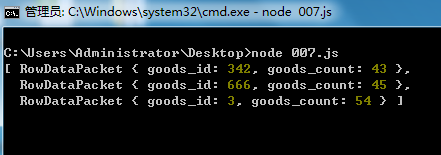
1 存储表单数据
在处理表单时,可以将表单中的输入数据存储为对象数组,以便后续处理或提交。
2 存储用户列表
在用户管理系统中,可以使用对象数组来存储用户信息,如ID、姓名、年龄、角色等。
const userList = [ { id: 1, name: 'Alice', role: 'admin' }, { id: 2, name: 'Bob', role: 'editor' }, { id: 3, name: 'Charlie', role: 'viewer' } ];
3 存储产品列表
在电商网站中,可以使用对象数组来存储产品信息,如ID、名称、价格、库存等。
const productList = [ { id: 1, name: 'Laptop', price: 1000, stock: 10 }, { id: 2, name: 'Phone', price: 500, stock: 20 }, { id: 3, name: 'Tablet', price: 300, stock: 15 } ];
对象数组的高级操作
1 使用reduce方法进行汇总操作
reduce方法可以将数组中的元素累积为一个单一的值,常用于汇总操作。
// 计算所有产品的总价格 const totalPrice = products.reduce((sum, product) => sum + product.price, 0); // 计算所有用户的平均年龄 const averageAge = users.reduce((sum, user) => sum + user.age, 0) / users.length;
2 使用some和every方法进行条件判断
some方法用于判断数组中是否至少有一个元素满足条件,every方法用于判断数组中的所有元素是否都满足条件。
// 判断是否有用户年龄大于40 const hasOldUser = users.some(user => user.age > 40); // 判断所有产品是否都有库存 const allInStock = products.every(product => product.stock > 0);
对象数组的性能优化
在处理大量数据时,对象数组的性能可能会成为瓶颈,以下是一些性能优化的建议:
- 避免频繁的数组操作:如push、pop、splice等操作在大量数据时可能会影响性能,尽量批量处理数据。
- 使用合适的数据结构:如果需要频繁查找或排序,可以考虑使用Map或Set等数据结构。
- 懒加载和分页:在处理大量数据时,可以使用懒加载或分页技术,避免一次性加载所有数据。
对象数组的常见错误及解决方法
1 访问未定义的索引
在访问数组元素时,如果索引超出范围,会返回undefined,为了避免这种情况,可以在访问前检查索引是否有效。
if (users.length > 0) { console.log(users[0].name); } else { console.log('数组为空'); }
2 修改对象数组时导致引用问题
在修改对象数组时,如果直接修改数组中的对象,可能会导致其他引用该对象的代码受到影响,为了避免这种情况,可以使用map方法返回一个新的数组。
// 不推荐的做法 users[0].age = 26; // 直接修改原数组中的对象 // 推荐的做法 const updatedUsers = users.map(user => { if (user.id === 1) { return { ...user, age: 26 }; } return user; });
对象数组的调试技巧
在调试对象数组时,可以使用以下技巧:
- 使用console.table:console.table可以将数组以表格形式输出,便于查看和分析。
console.table(users);
- 使用JSON.stringify:JSON.stringify可以将对象数组转换为JSON字符串,便于查看和调试。
console.log(JSON.stringify(users, null, 2));
- 使用浏览器开发者工具:在浏览器中,可以使用开发者工具的“Console”面板查看和调试对象数组。
对象数组的最佳实践
在使用对象数组时,以下是一些最佳实践:
- 保持数据一致性:确保数组中的每个对象具有相同的属性结构,便于统一处理。
- 避免直接修改原数组:尽量使用不可变操作(如map、filter)返回新的数组,避免直接修改原数组。
- 合理使用索引:在访问数组元素时,确保索引在有效范围内,避免越界访问。
- 优化性能:在处理大量数据时,注意性能优化,避免不必要的数组操作。
相关问答FAQs
Q1: 如何在JavaScript中合并两个对象数组?
A1: 在JavaScript中,可以使用concat方法将两个或多个数组合并为一个新数组。
const array1 = [{ id: 1, name: 'Alice' }, { id: 2, name: 'Bob' }]; const array2 = [{ id: 3, name: 'Charlie' }, { id: 4, name: 'David' }]; const mergedArray = array1.concat(array2); console.log(mergedArray); // 输出: [{ id: 1, name: 'Alice' }, { id: 2, name: 'Bob' }, { id: 3, name: 'Charlie' }, { id: 4, name: 'David' }]
Q2: 如何在JavaScript中查找对象数组中符合特定条件的元素?
A2: 在JavaScript中,可以使用find方法查找数组中第一个符合条件的元素,或使用filter方法查找所有符合条件的元素。
const users = [ { id: 1, name: 'Alice', age: 25 }, { id: 2, name: 'Bob', age: 30 }, { id: 3, name: 'Charlie', age: 35 } ]; // 查找年龄为30的用户 const user30 = users.find(user => user.age === 30); console.log(user30); // 输出: { id: 2, name: 'Bob', age: 30 } // 查找所有年龄大于30的用户 const olderUsers = users.filter(user => user.age > 30); console.log(olderUsers);