
上一篇
Java中如何正确读入并显示图片?方法详解与疑问解答
在Java中,要读入并显示一幅图片,可以通过以下几种方法实现,下面将详细介绍几种常用的方法,并给出相应的代码示例。
使用ImageIcon和JLabel
这是一种简单直观的方法,适用于大多数情况。
-
步骤:
- 创建一个ImageIcon对象。
- 将ImageIcon对象设置为JLabel的图标。
- 将JLabel添加到JFrame中。
-
代码示例:
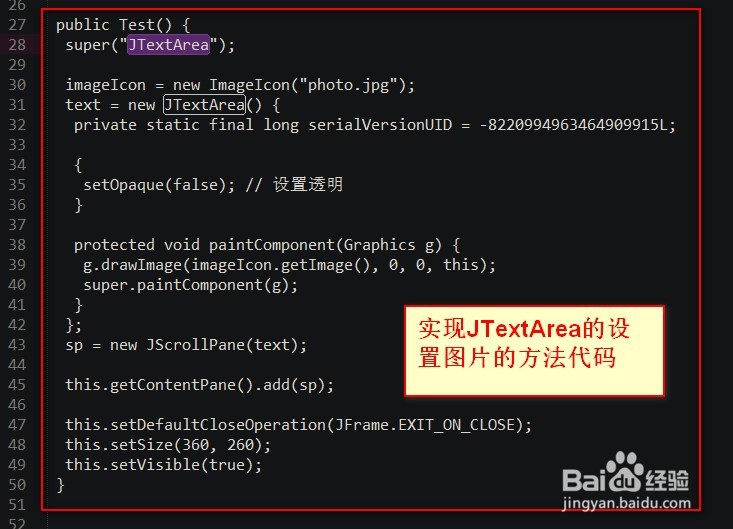
import javax.swing.ImageIcon; import javax.swing.JFrame; import javax.swing.JLabel; public class ImageDisplay { public static void main(String[] args) { JFrame frame = new JFrame("Image Display"); frame.setDefaultCloseOperation(JFrame.EXIT_ON_CLOSE); frame.setSize(500, 500); ImageIcon imageIcon = new ImageIcon("path/to/image.jpg"); JLabel label = new JLabel(imageIcon); frame.add(label); frame.setVisible(true); } }
使用BufferedImage和Graphics
这种方法提供了更多的灵活性,但需要一些额外的代码。
-
步骤:
- 使用ImageIO类读取图片。
- 创建一个BufferedImage对象。
- 创建一个Graphics对象。
- 使用Graphics对象将BufferedImage绘制到JPanel上。
-
代码示例:
-
步骤:
- 创建一个SwingWorker对象,用于读取图片。
- 在SwingWorker的doInBackground方法中读取图片。
- 在SwingWorker的finish方法中将图片显示到UI上。
-
代码示例:

使用SwingWorker
如果图片很大,使用SwingWorker可以提高应用程序的性能。
import javax.imageio.ImageIO; import javax.swing.*; import java.awt.*; import java.awt.image.BufferedImage; import java.io.File; import java.io.IOException; public class ImageDisplay { public static void main(String[] args) { JFrame frame = new JFrame("Image Display"); frame.setDefaultCloseOperation(JFrame.EXIT_ON_CLOSE); frame.setSize(500, 500); SwingWorker<BufferedImage, Void> worker = new SwingWorker<BufferedImage, Void>() { @Override protected BufferedImage doInBackground() throws Exception { return ImageIO.read(new File("path/to/image.jpg")); } @Override protected void done() { try { BufferedImage image = get(); JLabel label = new JLabel(new ImageIcon(image)); frame.add(label); } catch (Exception e) { e.printStackTrace(); } } }; worker.execute(); frame.setVisible(true); } }
FAQs
Q1:如何在Java中读取并显示GIF图片?
A1:GIF图片与JPEG或PNG图片的读取方式相同,只需将文件路径更改为GIF文件即可。
ImageIcon imageIcon = new ImageIcon("path/to/image.gif");
Q2:如何在Java中显示多张图片?
A2:可以通过循环创建多个JLabel对象并添加到JPanel或JFrame中来实现。
for (int i = 0; i < numberOfImages; i++) { ImageIcon imageIcon = new ImageIcon("path/to/image" + i + ".jpg"); JLabel label = new JLabel(imageIcon); frame.add(label); }















