
上一篇
asp.net怎么写api接口
ASP.NET Core API接口开发指南
在现代化Web应用开发中,API(应用程序编程接口)是连接前后端、实现模块解耦的核心载体,ASP.NET Core凭借其高性能、跨平台特性,成为开发RESTful API的首选框架,本文将系统介绍ASP.NET Core中API接口的创建流程、关键技术点及优化方案,帮助开发者高效构建稳定、可扩展的API服务。
环境准备
-
安装.NET SDK
- 访问官方下载页面下载并安装最新版本的.NET SDK(建议选择.NET 6或更高版本)。
- 安装后,通过命令行验证:dotnet --version。
-
创建ASP.NET Core Web API项目
- 打开Visual Studio(或使用命令行工具):
- Visual Studio:选择“创建新项目” → “ASP.NET Core Web 应用程序” → “API”模板 → 命名项目(如WebApiSample)→ 选择目标框架(如.NET 6)→ 点击“创建”。
- 命令行:dotnet new webapi -n WebApiSample。
- 项目初始化后,会自动生成Controllers文件夹(包含ValuesController示例)和Models、Data等核心文件。
- 打开Visual Studio(或使用命令行工具):
API核心开发流程
控制器设计
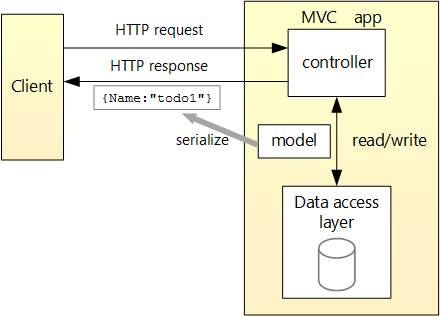
控制器是API接口的核心实现层,负责处理HTTP请求并返回响应,需遵循以下规范:
- 继承自Controller基类(或ControllerBase,适用于无视图的API)。
- 添加[ApiController]特性,启用API特定功能(如自动验证模型、响应格式处理)。
- 配置路由:通过[Route("api/[controller]")]实现默认路由(如Products路由映射为/api/products)。
示例代码(ProductController.cs):
[ApiController] // 启用API特性 [Route("api/[controller]")] // 默认路由模板 public class ProductsController : ControllerBase { private readonly IProductRepository _productRepo; public ProductsController(IProductRepository productRepo) { _productRepo = productRepo; } [HttpGet] // 处理GET请求 public async Task<ActionResult<IEnumerable<Product>>> GetProducts() { return await _productRepo.GetAllAsync(); } [HttpGet("{id}")] // 自定义路由参数 public async Task<ActionResult<Product>> GetProduct(int id) { var product = await _productRepo.GetByIdAsync(id); if (product == null) return NotFound(); return product; } [HttpPost] // 处理POST请求 [ProducesResponseType(StatusCodes.Status201Created)] public async Task<ActionResult<Product>> CreateProduct([FromBody] Product product) { if (!ModelState.IsValid) return BadRequest(ModelState); await _productRepo.AddAsync(product); return CreatedAtAction(nameof(GetProduct), new { id = product.Id }, product); } }
路由配置
ASP.NET Core支持两种路由模式:
- 默认路由:基于控制器名称自动生成(如/api/[controller])。
- 自定义路由:通过[Route]属性覆盖默认路径(如[Route("api/custom/products")])。
示例(自定义路由):
[ApiController] [Route("api/custom/products")] public class CustomProductsController : ControllerBase { [HttpGet] public IActionResult GetCustomProducts() => Ok("Custom route example"); }
数据操作(以EF Core为例)
使用Entity Framework Core(EF Core)实现数据持久化,需完成以下步骤:
-
定义数据模型:
-
创建数据上下文:
public class ApplicationDbContext : DbContext { public ApplicationDbContext(DbContextOptions<ApplicationDbContext> options) : base(options) { } public DbSet<Product> Products { get; set; } }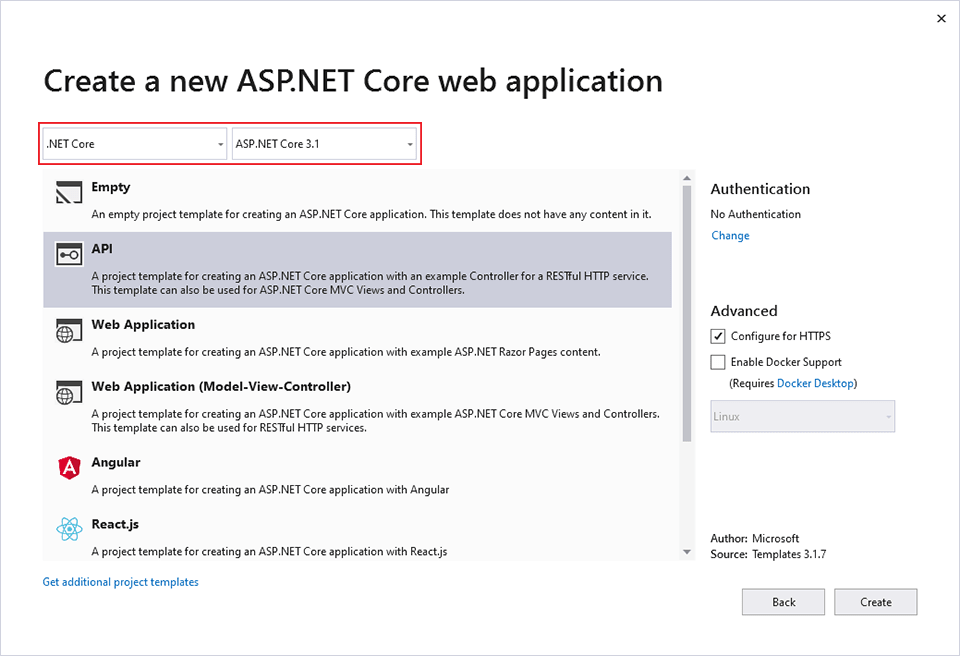
-
实现Repository模式:
public interface IProductRepository { Task<IEnumerable<Product>> GetAllAsync(); Task<Product> GetByIdAsync(int id); Task AddAsync(Product product); Task UpdateAsync(Product product); Task DeleteAsync(int id); } public class ProductRepository : IProductRepository { private readonly ApplicationDbContext _context; public ProductRepository(ApplicationDbContext context) { _context = context; } public async Task<IEnumerable<Product>> GetAllAsync() => await _context.Products.ToListAsync(); // 其他CRUD方法... } -
配置数据库连接:
在appsettings.json中添加数据库配置:
{ "ConnectionStrings": { "DefaultConnection": "Server=(localdb)\mssqllocaldb;Database=WebApiSampleDb;Trusted_Connection=True;MultipleActiveResultSets=true" } }
通过AddDbContext注册上下文:
services.AddDbContext<ApplicationDbContext>(options => options.UseSqlServer(Configuration.GetConnectionString("DefaultConnection"))); - 用户认证:集成ASP.NET Core Identity,支持用户注册/登录。
- JWT授权:生成Token验证用户身份,通过[Authorize]属性控制访问权限。
-
添加Identity服务:
services.AddIdentity<User, Role>(opts => { opts.User.RequireUniqueEmail = true; }) .AddEntityFrameworkStores<ApplicationDbContext>(); -
生成Token(TokenService.cs):
public class TokenService { private readonly IConfiguration _config; public TokenService(IConfiguration config) => _config = config; public string CreateToken(User user) { var claims = new List<Claim> { new(ClaimTypes.NameIdentifier, user.Id), new(ClaimTypes.Name, user.UserName), new(ClaimTypes.Email, user.Email) }; var key = new SymmetricSecurityKey(Encoding.UTF8.GetBytes(_config["Jwt:Key"])); var creds = new SigningCredentials(key, SecurityAlgorithms.HmacSha256); var token = new JwtSecurityToken( issuer: _config["Jwt:Issuer"], audience: _config["Jwt:Audience"], claims: claims, expires: DateTime.Now.AddMinutes(30), signingCredentials: creds); return new JwtSecurityTokenHandler().WriteToken(token); } } -
授权控制:
[ApiController] [Route("api/[controller]")] public class OrdersController : ControllerBase { [HttpGet] [Authorize] // 需认证 public IActionResult GetOrders() => Ok("Authorized access"); } - 安装包:dotnet add package Swashbuckle.AspNetCore
- 配置: services.AddSwaggerGen(c => { c.SwaggerDoc("v1", new OpenApiInfo { Title = "WebApiSample", Version = "v1" }); // 生成JWT密钥 c.AddSecurityDefinition("Bearer", new OpenApiSecurityScheme { In = ParameterLocation.Header, Description = "Please add JWT with Bearer into header", Name = "Authorization", Type = SecuritySchemeType.ApiKey }); c.AddSecurityRequirement(new OpenApiSecurityRequirement { { new OpenApiSecurityScheme { Reference = new OpenApiReference { Type = ReferenceType.SecurityScheme, Id = "Bearer" } }, new List<string>() } }); });
- 添加异常过滤器: public class GlobalExceptionHandler : IExceptionFilter { public void OnException(ExceptionContext context) { var errorResponse = new { success = false, message = "An error occurred", details = context.Exception.Message }; context.Result = new ObjectResult(errorResponse) { StatusCode = 500 }; } }
- 注册过滤器: services.AddControllers() .AddJsonOptions(options => options.JsonSerializerOptions.PropertyNamingPolicy = JsonNamingPolicy.CamelCase) .AddFilter<GlobalExceptionHandler>();
- 异步编程:使用async/await提升I/O操作效率(如数据库查询)。
- 缓存:对频繁访问的数据使用Redis或内存缓存(如IMemoryCache)。
- 压缩:启用Gzip压缩(通过中间件UseResponseCompression)。
-
模型定义:Product.cs
public class Product { public int Id { get; set; } [Required] public string Name { get; set; } [Range(0.01, double.MaxValue)] public decimal Price { get; set; } }
-
数据上下文:ApplicationDbContext.cs
-
Repository:ProductRepository.cs
public class ProductRepository : IProductRepository { private readonly ApplicationDbContext _context; public ProductRepository(ApplicationDbContext context) => _context = context; public async Task<Product> GetProductById(int id) => await _context.Products.FindAsync(id); public async Task<IEnumerable<Product>> GetAllProducts() => await _context.Products.ToListAsync(); public async Task AddProduct(Product product) => await _context.Products.AddAsync(product); public async Task UpdateProduct(Product product) => _context.Products.Update(product); public async Task DeleteProduct(int id) => await _context.Products.Where(p => p.Id == id).ExecuteDeleteAsync(); } -
控制器:ProductsController.cs
[ApiController] [Route("api/products")] public class ProductsController : ControllerBase { private readonly IProductRepository _productRepo; public ProductsController(IProductRepository productRepo) => _productRepo = productRepo; [HttpGet] public async Task<ActionResult<IEnumerable<Product>>> GetProducts() => Ok(await _productRepo.GetAllProducts()); [HttpGet("{id}")] public async Task<ActionResult<Product>> GetProduct(int id) { var product = await _productRepo.GetProductById(id); if (product == null) return NotFound(); return Ok(product); } [HttpPost] [ProducesResponseType(StatusCodes.Status201Created)] public async Task<ActionResult<Product>> CreateProduct([FromBody] Product product) { if (!ModelState.IsValid) return BadRequest(ModelState); await _productRepo.AddProduct(product); return CreatedAtAction(nameof(GetProduct), new { id = product.Id }, product); } [HttpPut("{id}")] public async Task<IActionResult> UpdateProduct(int id, [FromBody] Product product) { if (id != product.Id) return BadRequest(); if (!ModelState.IsValid) return BadRequest(ModelState); await _productRepo.UpdateProduct(product); return NoContent(); } [HttpDelete("{id}")] public async Task<IActionResult> DeleteProduct(int id) { await _productRepo.DeleteProduct(id); return NoContent(); } } -
如何处理API中的输入验证?
- 方法:
- 使用DataAnnotations(如[Required]、[StringLength])在模型属性上添加验证规则。
- 使用FluentValidation库实现更复杂的验证逻辑(需安装FluentValidation包)。
- 通过全局中间件(如AddValidationPipeline)统一处理验证失败。
- 示例: [ApiController] [Route("api/products")] public class ProductsController : ControllerBase { [HttpPost] public async Task<ActionResult<Product>> CreateProduct([FromBody] Product product) { if (!ModelState.IsValid) return BadRequest(ModelState); // 继续处理 } }
- 方法:
-
如何实现API的版本控制?
-
方法:
- URL路径版本:通过路由前缀区分版本(如/api/v1/products、/api/v2/products)。
- Header版本:通过请求头(如X-API-Version: 1)传递版本信息。
- Query参数版本:通过查询字符串(如/api/products?version=1)指定版本。
-
示例(URL路径版本):
[ApiController] [Route("api/v1/[controller]")] public class ProductsController : ControllerBase { [HttpGet] public IActionResult GetProducts() => Ok("Version 1"); } [ApiController] [Route("api/v2/[controller]")] public class ProductsController : ControllerBase { [HttpGet] public IActionResult GetProducts() => Ok("Version 2"); }
-
身份验证与授权
API需保护敏感操作(如修改数据),可通过以下方式实现:
示例(JWT配置):
高级特性优化
Swagger文档生成
集成Swashbuckle,自动生成API文档及测试接口:
启动项目后,访问/swagger/v1/swagger.json即可查看文档,支持实时测试。
异常处理
全局异常处理中间件可统一捕获错误,返回标准化响应:
性能优化
完整示例:产品管理API
以下为包含CRUD操作的产品管理API实现:
常见问题解答(FAQs)
通过以上步骤,开发者可系统掌握ASP.NET Core API的开发流程,从基础控制器到高级特性,逐步构建高性能、可扩展的API服务。















