上一篇
java定时器怎么关闭
Java中,关闭定时器可以通过调用`Timer.
Java中,定时器(Timer)是一种用于在指定时间或周期性地执行任务的工具,在某些情况下,我们可能需要关闭定时器,例如在应用程序关闭时或者不再需要定时任务时,本文将详细介绍如何在Java中关闭定时器。
使用Timer类的cancel()方法
java.util.Timer类提供了一个cancel()方法,用于终止定时器的任务,调用此方法后,定时器将不再执行任何已安排的任务,并且无法再安排新的任务。
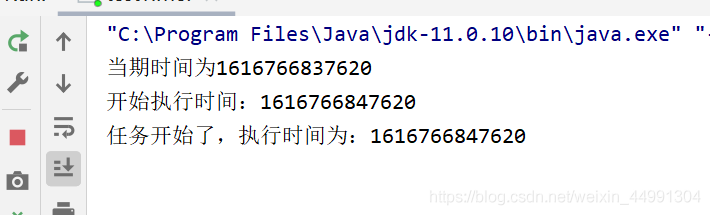
示例代码:
import java.util.Timer; import java.util.TimerTask; public class TimerExample { public static void main(String[] args) { Timer timer = new Timer(); TimerTask task = new TimerTask() { @Override public void run() { System.out.println("Task executed at: " + System.currentTimeMillis()); } }; timer.scheduleAtFixedRate(task, 0, 2000); // 每2秒执行一次 try { Thread.sleep(5000); // 主线程休眠5秒 } catch (InterruptedException e) { e.printStackTrace(); } System.out.println("Cancelling the timer..."); timer.cancel(); } }
解释:
- 创建一个Timer实例和一个TimerTask实例。
- 使用scheduleAtFixedRate方法安排任务每2秒执行一次。
- 主线程休眠5秒后,调用timer.cancel()方法关闭定时器。
- 关闭后,定时器将不再执行任何任务。
使用ScheduledExecutorService的shutdown()方法
java.util.concurrent.ScheduledExecutorService是Java并发包中的一个接口,提供了更灵活和强大的定时任务调度功能,与Timer相比,ScheduledExecutorService更加推荐使用,因为它可以更好地处理异常和线程管理。
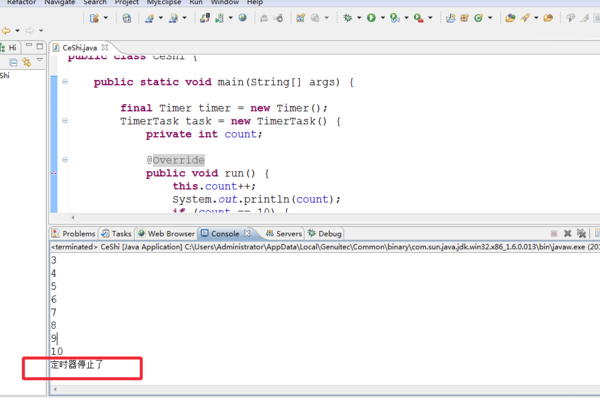
示例代码:
import java.util.concurrent.Executors; import java.util.concurrent.ScheduledExecutorService; import java.util.concurrent.TimeUnit; public class ScheduledExecutorExample { public static void main(String[] args) { ScheduledExecutorService scheduler = Executors.newScheduledThreadPool(1); Runnable task = () -> System.out.println("Task executed at: " + System.currentTimeMillis()); scheduler.scheduleAtFixedRate(task, 0, 2, TimeUnit.SECONDS); // 每2秒执行一次 try { Thread.sleep(5000); // 主线程休眠5秒 } catch (InterruptedException e) { e.printStackTrace(); } System.out.println("Shutting down the scheduler..."); scheduler.shutdown(); try { if (!scheduler.awaitTermination(1, TimeUnit.SECONDS)) { scheduler.shutdownNow(); } } catch (InterruptedException e) { scheduler.shutdownNow(); } } }
解释:
- 创建一个ScheduledExecutorService实例,并安排任务每2秒执行一次。
- 主线程休眠5秒后,调用scheduler.shutdown()方法关闭调度器。
- shutdown()方法会等待已提交的任务完成执行后再关闭,而shutdownNow()会立即尝试停止所有正在执行的任务。
比较Timer和ScheduledExecutorService
| 特性 | Timer | ScheduledExecutorService |
|---|---|---|
| 线程管理 | 内部使用单个线程 | 可以配置多个线程 |
| 异常处理 | 如果任务抛出异常,定时器会停止 | 可以继续执行其他任务 |
| 灵活性 | 较低 | 较高,支持多种调度方式 |
| 资源管理 | 不提供显式的关闭方法 | 提供shutdown()和shutdownNow()方法 |
| 推荐使用场景 | 简单定时任务 | 复杂定时任务和多线程环境 |
何时关闭定时器
关闭定时器通常在以下几种情况下进行:
- 应用程序关闭:在应用程序正常退出时,应确保所有定时器都已关闭,以释放系统资源。
- 不再需要定时任务:当某个功能模块不再需要定时任务时,应及时关闭定时器。
- 避免内存泄漏:未正确关闭的定时器可能导致内存泄漏,尤其是在长时间运行的应用程序中。
注意事项
- 线程安全:在多线程环境中,确保对定时器的访问是线程安全的。
- 任务取消:在关闭定时器之前,确保所有需要取消的任务都已正确处理。
- 资源释放:关闭定时器后,相关的线程资源会被释放,确保没有悬挂的线程。
FAQs
问题1:如何在Java中正确关闭定时器?
答:在Java中,关闭定时器的方法取决于你使用的是Timer还是ScheduledExecutorService,对于Timer,可以调用其cancel()方法;对于ScheduledExecutorService,可以调用shutdown()方法,并可选地调用shutdownNow()来立即停止所有任务。
问题2:关闭定时器后,已安排的任务还会执行吗?
答:对于Timer,调用cancel()方法后,定时器将不再执行任何已安排的任务,对于ScheduledExecutorService,调用shutdown()方法后,已提交的任务会继续执行,但不会接受新的任务;