
上一篇
aspnet Repeater实现高效数据分页的秘诀是什么?
在ASP.NET开发中,数据分页是处理大量数据时常用的技术,Repeater控件作为ASP.NET中的一种常用控件,能够帮助我们轻松实现数据的分页显示,本文将详细介绍ASP.NET Repeater控件在数据分页方面的优势和应用。

Repeater控件简介
Repeater控件是ASP.NET中一个非常有用的数据绑定控件,它能够重复显示数据列表,Repeater控件本身不提供任何数据绑定功能,但通过与数据源结合,可以展示动态数据。
Repeater数据分页的优势
- 轻量级:Repeater控件是轻量级的,不需要额外的资源,对服务器性能影响较小。
- 灵活性强:Repeater控件没有固定的布局,可以通过模板自定义显示格式。
- 易于实现:Repeater控件的数据分页实现相对简单,易于上手。
Repeater数据分页实现步骤
准备数据源
我们需要准备一个数据源,这里以SQL Server数据库为例。
string connectionString = "Data Source=your_server;Initial Catalog=your_database;Integrated Security=True"; string query = "SELECT * FROM your_table"; SqlConnection connection = new SqlConnection(connectionString); SqlCommand command = new SqlCommand(query, connection); SqlDataAdapter adapter = new SqlDataAdapter(command); DataSet dataSet = new DataSet(); adapter.Fill(dataSet, "your_table");
创建Repeater控件
在ASPX页面中添加Repeater控件。
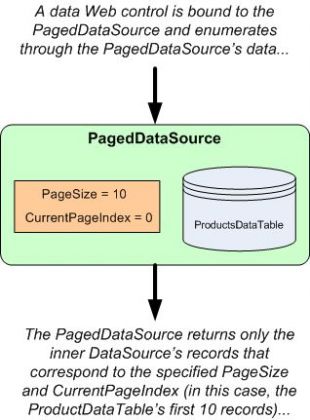
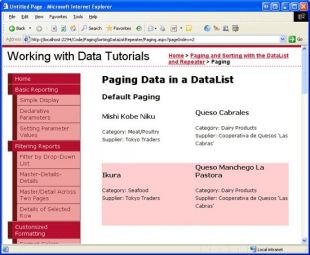
<asp:Repeater ID="repeater" runat="server"> <ItemTemplate> <tr> <td><%# DataBinder.Eval(Container.DataItem, "column1") %></td> <td><%# DataBinder.Eval(Container.DataItem, "column2") %></td> <!-- 添加更多列 --> </tr> </ItemTemplate> </asp:Repeater>
实现分页逻辑
在代码-behind文件中,编写分页逻辑。
public partial class YourPage : System.Web.UI.Page { protected void Page_Load(object sender, EventArgs e) { if (!IsPostBack) { BindData(1); } } private void BindData(int pageNumber) { string connectionString = "Data Source=your_server;Initial Catalog=your_database;Integrated Security=True"; string query = "SELECT * FROM your_table"; SqlCommand command = new SqlCommand(query, new SqlConnection(connectionString)); command.CommandText = "SELECT * FROM (SELECT ROW_NUMBER() OVER (ORDER BY column1) AS RowNum, * FROM your_table) AS RowConstrainedResult WHERE RowNum BETWEEN @StartRow AND @EndRow"; command.Parameters.AddWithValue("@StartRow", (pageNumber - 1) * pageSize + 1); command.Parameters.AddWithValue("@EndRow", pageNumber * pageSize); SqlDataAdapter adapter = new SqlDataAdapter(command); DataSet dataSet = new DataSet(); adapter.Fill(dataSet, "your_table"); repeater.DataSource = dataSet; repeater.DataBind(); } protected void btnFirstPage_Click(object sender, EventArgs e) { BindData(1); } protected void btnPreviousPage_Click(object sender, EventArgs e) { int currentPage = Convert.ToInt32(hdnCurrentPage.Value); if (currentPage > 1) { BindData(currentPage - 1); } } protected void btnNextPage_Click(object sender, EventArgs e) { int currentPage = Convert.ToInt32(hdnCurrentPage.Value); int totalPages = (int)Math.Ceiling((double)dataSet.Tables["your_table"].Rows.Count / pageSize); if (currentPage < totalPages) { BindData(currentPage + 1); } } protected void btnLastPage_Click(object sender, EventArgs e) { int totalPages = (int)Math.Ceiling((double)dataSet.Tables["your_table"].Rows.Count / pageSize); BindData(totalPages); } }
表格示例
以下是一个简单的分页表格示例:
| 列1 | 列2 |
|---|---|
| 数据1 | 数据2 |
| 数据3 | 数据4 |
| 数据5 | 数据6 |
FAQs
Q1:Repeater控件是否支持缓存?
A1:是的,Repeater控件支持缓存,通过设置Caching属性,可以缓存控件的内容,从而提高页面加载速度。
Q2:如何自定义Repeater控件的分页样式?
A2:可以通过修改Repeater控件的模板来实现自定义分页样式,可以添加自定义的按钮和样式,以适应特定的设计需求。















