
上一篇
Java服务器关闭方法有哪些?常见操作步骤详解?
在Java中,关闭服务器通常意味着停止服务器程序或停止服务器进程,以下是一些常用的方法来关闭Java服务器:
使用System.exit()
这是最简单的方法,通过调用System.exit(int status)来终止Java虚拟机(JVM),你可以传递一个状态码,该状态码通常为0表示正常退出,非0表示异常退出。
使用Runtime类
Runtime类提供了操作当前Java虚拟机的方法,使用Runtime.getRuntime().exit(int status)可以达到与System.exit()相同的效果。
public class Server { public static void main(String[] args) { // 服务器初始化代码 // ... // 在适当的时候关闭服务器 Runtime.getRuntime().exit(0); // 正常退出 // Runtime.getRuntime().exit(1); // 异常退出 } }
使用shutdown钩子
通过注册一个RuntimeShutdownHook,你可以在JVM关闭时执行一些清理工作。
public class Server { public static void main(String[] args) { // 服务器初始化代码 // ... // 注册shutdown钩子 Runtime.getRuntime().addShutdownHook(new Thread(() > { // 执行清理工作 System.out.println("Server is shutting down..."); })); // 在适当的时候关闭服务器 System.exit(0); } }
使用Servlet API
如果你使用的是Servlet容器(如Tomcat),你可以通过Servlet API来关闭服务器。
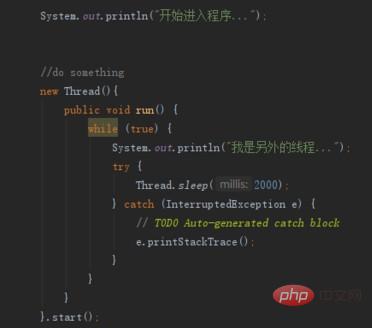
import javax.servlet.ServletException; import javax.servlet.http.HttpServlet; import javax.servlet.http.HttpServletRequest; import javax.servlet.http.HttpServletResponse; import java.io.IOException; public class ShutdownServlet extends HttpServlet { @Override protected void doGet(HttpServletRequest req, HttpServletResponse resp) throws ServletException, IOException { // 服务器关闭逻辑 System.exit(0); } }
使用JMX(Java Management Extensions)
JMX是一个用于管理Java应用程序的技术,你可以使用JMX来远程关闭服务器。
import javax.management.MBeanServer; import javax.management.MBeanServerFactory; import javax.management.ObjectName; public class Server { public static void main(String[] args) { try { MBeanServer server = MBeanServerFactory.createMBeanServer(); ObjectName name = new ObjectName("java.lang:type=Runtime"); server.invoke(name, "shutdown", null, null); } catch (Exception e) { e.printStackTrace(); } } }
使用Spring Boot Actuator
如果你使用Spring Boot,可以使用Spring Boot Actuator来关闭服务器。
import org.springframework.boot.SpringApplication; import org.springframework.boot.autoconfigure.SpringBootApplication; import org.springframework.boot.actuate.autoconfigure.endpoint.web.CorsEndpointProperties; import org.springframework.boot.actuate.autoconfigure.endpoint.web EndpointWebProperties; import org.springframework.boot.actuate.autoconfigure.web.server.ManagementPortType; import org.springframework.boot.autoconfigure.web.ServerProperties; import org.springframework.context.ConfigurableApplicationContext; @SpringBootApplication public class Server { public static void main(String[] args) { ConfigurableApplicationContext context = SpringApplication.run(Server.class, args); // 假设有一个shutdown端点 context.close(); } }
| 方法 | 描述 | 代码示例 |
|---|---|---|
| System.exit() | 终止JVM | System.exit(0); |
| Runtime.exit() | 终止JVM | Runtime.getRuntime().exit(0); |
| RuntimeShutdownHook | 在JVM关闭时执行代码 | Runtime.getRuntime().addShutdownHook(new Thread(() > {...})); |
| Servlet API | 通过Servlet关闭服务器 | ShutdownServlet |
| JMX | 使用JMX关闭服务器 | MBeanServer |
| Spring Boot Actuator | 使用Spring Boot Actuator关闭服务器 | SpringApplication.run() |
FAQs
Q1: 如何在Java中优雅地关闭服务器?
A1: 优雅地关闭服务器通常意味着确保所有资源都被正确释放,例如关闭数据库连接、关闭文件流等,你可以通过注册RuntimeShutdownHook来实现这一点,在JVM关闭前执行必要的清理工作。
Q2: 如果服务器正在处理请求,如何优雅地关闭它?
A2: 如果服务器正在处理请求,你可以通过设置一个标志来通知服务器停止接受新的请求,并逐渐完成当前请求,这通常涉及到在服务器配置中设置一个超时时间,或者在代码中添加逻辑来处理正在进行的请求,一旦所有请求都完成,你就可以关闭服务器。















