上一篇
html如何使文本居中
HTML中,可以使用CSS来使文本居中,对于块级元素,可以设置 text-align: center;。,“`html,
HTML中,使文本居中有多种方法,具体取决于你希望文本在页面中的哪个部分居中,以下是几种常见的方法:
使用<center>
<center>标签是HTML中最简单直接的居中方式,但它已经被废弃,不推荐在现代网页中使用,为了兼容性和简单性,它仍然可以工作。
<!DOCTYPE html> <html lang="en"> <head> <meta charset="UTF-8"> <meta name="viewport" content="width=device-width, initial-scale=1.0">Center Text Example</title> </head> <body> <center>This text is centered using the <code><center></code> tag.</center> </body> </html>使用CSS的text-align属性
更现代和推荐的方式是使用CSS的text-align属性,你可以将text-align: center;应用于父元素,使其内部的文本居中。
使用Flexbox
Flexbox是一种强大的布局模式,可以轻松地将元素居中,你可以使用justify-content和align-items属性来水平和垂直居中文本。
<!DOCTYPE html> <html lang="en"> <head> <meta charset="UTF-8"> <meta name="viewport" content="width=device-width, initial-scale=1.0">Center Text Example</title> <style> .flex-container { display: flex; justify-content: center; align-items: center; height: 100vh; / Full viewport height / } </style> </head> <body> <div class="flex-container">This text is centered using Flexbox.</div> </body> </html>
使用Grid布局
CSS Grid布局也是一种强大的布局工具,可以轻松地将元素居中,你可以使用place-items属性来同时水平和垂直居中文本。
<!DOCTYPE html> <html lang="en"> <head> <meta charset="UTF-8"> <meta name="viewport" content="width=device-width, initial-scale=1.0">Center Text Example</title> <style> .grid-container { display: grid; place-items: center; height: 100vh; / Full viewport height / } </style> </head> <body> <div class="grid-container">This text is centered using CSS Grid.</div> </body> </html>
使用<table>
虽然不推荐用于布局,但你也可以使用表格来居中文本,将文本放在表格的单元格中,并设置表格的align属性为center。
<!DOCTYPE html> <html lang="en"> <head> <meta charset="UTF-8"> <meta name="viewport" content="width=device-width, initial-scale=1.0">Center Text Example</title> </head> <body> <table style="width: 100%;"> <tr> <td align="center">This text is centered using a table.</td> </tr> </table> </body> </html>使用<div>和margin
你还可以使用<div>元素和margin属性来居中文本,通过设置margin: 0 auto;,你可以水平居中一个块级元素。
<!DOCTYPE html> <html lang="en"> <head> <meta charset="UTF-8"> <meta name="viewport" content="width=device-width, initial-scale=1.0">Center Text Example</title> <style> .center-div { width: 50%; margin: 0 auto; text-align: center; } </style> </head> <body> <div class="center-div">This text is centered using a <code><div></code> and <code>margin: 0 auto;</code>.</div> </body> </html>
使用<p>标签和text-align属性
对于段落文本,你可以直接在<p>标签上应用text-align: center;样式。
<!DOCTYPE html> <html lang="en"> <head> <meta charset="UTF-8"> <meta name="viewport" content="width=device-width, initial-scale=1.0">Center Text Example</title> <style> p.center-paragraph { text-align: center; } </style> </head> <body> <p class="center-paragraph">This paragraph is centered using <code>text-align: center;</code> on a <code><p></code> tag.</p> </body> </html>
使用<h1>到<h6>标签和text-align属性你也可以直接在<h1>到<h6>标签上应用text-align: center;样式。
<!DOCTYPE html> <html lang="en"> <head> <meta charset="UTF-8"> <meta name="viewport" content="width=device-width, initial-scale=1.0">Center Text Example</title> <style> h1.center-header { text-align: center; } </style> </head> <body> <h1 class="center-header">This header is centered using <code>text-align: center;</code> on an <code><h1></code> tag.</h1> </body> </html>
使用<span>标签和text-align属性
对于行内元素,如<span>,你需要将其包含在一个块级元素中,然后对该块级元素应用text-align: center;样式。
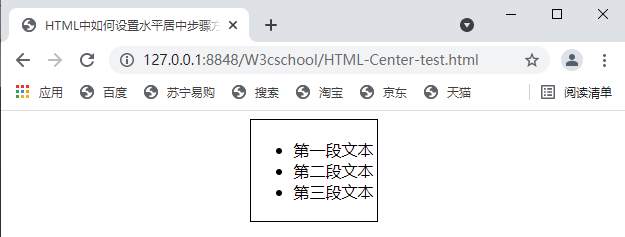
<!DOCTYPE html> <html lang="en"> <head> <meta charset="UTF-8"> <meta name="viewport" content="width=device-width, initial-scale=1.0">Center Text Example</title> <style> .center-span { display: block; text-align: center; } </style> </head> <body> <span class="center-span">This span is centered using a block-level container with <code>text-align: center;</code>.</span> </body> </html>
使用<div>和display: table
你还可以使用<div>元素和display: table属性来模拟表格布局,从而居中文本。
<!DOCTYPE html> <html lang="en"> <head> <meta charset="UTF-8"> <meta name="viewport" content="width=device-width, initial-scale=1.0">Center Text Example</title> <style> .table-container { display: table; width: 100%; } .table-cell { display: table-cell; vertical-align: middle; text-align: center; } </style> </head> <body> <div class="table-container"> <div class="table-cell">This text is centered using <code>display: table;</code>.</div> </div> </body> </html>
相关问答FAQs
Q1: 如何在HTML中垂直居中文本?
A1: 要在HTML中垂直居中文本,你可以使用多种方法,一种常见的方法是使用Flexbox布局,通过设置display: flex; justify-content: center; align-items: center;来实现,另一种方法是使用CSS Grid布局,通过设置display: grid; place-items: center;来实现,你还可以使用<table>标签或<div>元素结合margin属性来实现垂直居中。
Q2: 为什么不建议使用<center>
A2: <center>标签在HTML5中已经被废弃,因为它不符合现代网页设计的最佳实践,使用CSS的text-align: center;属性或其他布局方法(如Flexbox或Grid)可以更好地控制文本的对齐方式,并且这些方法更具灵活性和可维护性。