
上一篇
邮件服务器搭建教程中,有哪些关键步骤和注意事项容易忽视?
准备工作
-
服务器硬件要求:
- CPU:至少2核
- 内存:至少4GB
- 硬盘:至少100GB
- 网络带宽:至少1Mbps
-
操作系统要求:
- CentOS 7.x
- Ubuntu 18.04
-
软件要求:
- Postfix:邮件服务器软件
- Dovecot:邮件客户端软件
- MySQL:数据库软件(可选)
搭建步骤
安装Postfix
(1)在服务器上安装Postfix:
sudo yum install postfix
(2)配置Postfix:
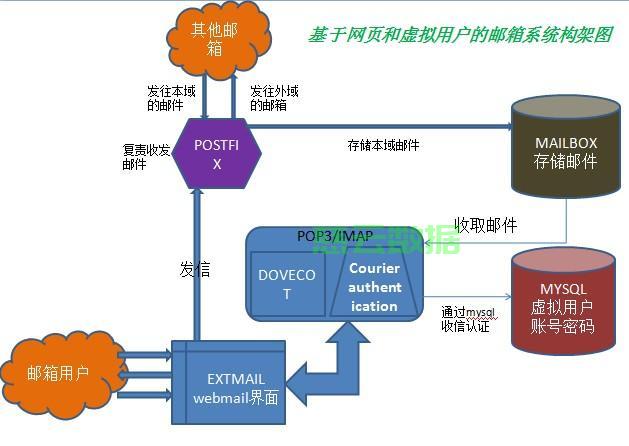
编辑/etc/postfix/main.cf文件,修改以下参数:
myhostname = mail.example.com mydomain = example.com myorigin = $mydomain inet_interfaces = all mydestination = $myhostname, localhost.$mydomain, $mydomain, www.$mydomain mynetworks = 127.0.0.0/8, 192.168.0.0/16
安装Dovecot
(1)在服务器上安装Dovecot:
sudo yum install dovecot
(2)配置Dovecot:
编辑/etc/dovecot/dovecot.conf文件,修改以下参数:
listen = *:143, *:993 ssl = yes ssl_cert = /etc/ssl/certs/dovecot.pem ssl_key = /etc/ssl/private/dovecot.key
配置MySQL(可选)
(1)安装MySQL:
sudo yum install mariadbserver
(2)配置MySQL:
编辑/etc/my.cnf文件,修改以下参数:
[mysqld] datadir = /var/lib/mysql socket = /var/lib/mysql/mysql.sock user = mysql max_connections = 100
启动MySQL服务:
sudo systemctl start mysqld
创建邮件用户:
mysql u root p CREATE DATABASE mail; CREATE USER 'mailuser'@'localhost' IDENTIFIED BY 'password'; GRANT ALL PRIVILEGES ON mail.* TO 'mailuser'@'localhost'; FLUSH PRIVILEGES; EXIT;
重启Postfix和Dovecot服务
sudo systemctl restart postfix sudo systemctl restart dovecot
测试邮件服务器
-
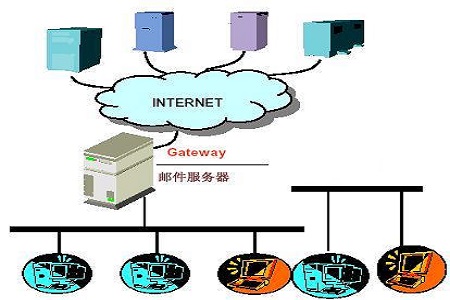
使用邮件客户端连接邮件服务器,测试发送和接收邮件。
-
使用Webmail登录测试,例如使用Horde或SquirrelMail。
FAQs
Q1:如何配置邮件服务器接收邮件?
A1:在Postfix配置文件/etc/postfix/main.cf中,添加以下参数:
inet_interfaces = all mydestination = $myhostname, localhost.$mydomain, $mydomain, www.$mydomain mynetworks = 127.0.0.0/8, 192.168.0.0/16
Q2:如何配置邮件服务器发送邮件?
A2:在Postfix配置文件/etc/postfix/main.cf中,添加以下参数:
inet_interfaces = all myhostname = mail.example.com mydomain = example.com myorigin = $mydomain mynetworks = 127.0.0.0/8, 192.168.0.0/16







