
上一篇
机房交换机配置,如何确保高效稳定运行?
机房交换机配置指南
交换机基础知识
1 交换机类型
交换机根据其工作层次可分为二层交换机、三层交换机和多层交换机,二层交换机主要处理MAC地址,三层交换机可以处理IP地址,多层交换机则结合了二三层交换机的功能。
2 交换机接口
交换机接口分为电口和光口,电口主要用于连接铜缆,光口用于连接光纤,根据传输速率,接口可分为10/100Mbps、1Gbps、10Gbps等。
交换机配置步骤
1 初始化交换机
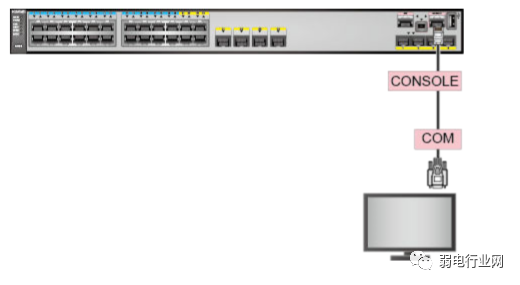
将交换机电源开启,进入命令行界面,输入命令enable进入特权模式,再输入命令configure terminal进入全局配置模式。
2 配置交换机名称
在全局配置模式下,使用命令hostname <name>为交换机设置名称。
3 配置交换机IP地址
在全局配置模式下,使用命令interface vlan <vlan_id>进入VLAN接口配置模式,然后使用命令ip address <ip_address> <subnet_mask>为VLAN接口配置IP地址。
4 配置交换机端口
在全局配置模式下,使用命令interface fastethernet <interface_number>进入端口配置模式,然后使用命令speed <speed>和duplex <duplex_mode>设置端口速率和双工模式。
5 配置VLAN
在全局配置模式下,使用命令vlan <vlan_id>进入VLAN配置模式,然后使用命令name <vlan_name>为VLAN命名。
6 配置端口所属VLAN
在端口配置模式下,使用命令switchport mode access设置端口为接入模式,然后使用命令switchport access vlan <vlan_id>将端口分配到指定VLAN。
7 配置STP(生成树协议)
在全局配置模式下,使用命令spanning-tree mode <mode>设置STP模式,然后使用命令spanning-tree [portfast]配置端口。

8 配置端口安全
在端口配置模式下,使用命令switchport port-security启用端口安全功能,然后使用命令switchport port-security maximum <max_mac>设置最大MAC地址数量。
交换机配置实例
以下是一个简单的交换机配置实例:
R1> enable R1# configure terminal R1(config)# hostname R1 R1(config)# interface vlan 10 R1(config-if)# ip address 192.168.10.1 255.255.255.0 R1(config-if)# exit R1(config)# interface fastethernet 0/1 R1(config-if)# speed 100 R1(config-if)# duplex full R1(config-if)# switchport mode access R1(config-if)# switchport access vlan 10 R1(config-if)# exit R1(config)# vlan 10 R1(config-vlan)# name VLAN10 R1(config-vlan)# exit R1(config)# spanning-tree mode pvst R1(config)# spanning-tree [portfast] R1(config)# end R1# show running-config Building configuration... Current configuration : 522 bytes ! version 15.1 no service pad service timestamps debug datetime msec service timestamps log datetime msec service 641 no service password-recovery hostname R1 ! boot-startup-config file "C:Program FilesciscoIOSbinstartshbootconfig.txt" ! ! interface vlan 10 ip address 192.168.10.1 255.255.255.0 ! interface FastEthernet0/1 description FastEthernet0/1 speed 100 duplex full switchport mode access switchport access vlan 10 ! vlan 10 name VLAN10 ! spanning-tree mode pvst spanning-tree [portfast] ! end
FAQs
Q1:如何查看交换机的配置信息?
A1:使用命令show running-config可以查看交换机的当前配置信息。
Q2:如何备份交换机的配置文件?
A2:使用命令copy running-config startup-config可以将交换机的当前配置信息保存到启动配置文件中。








