上一篇
Java URL如何高效添加自定义请求头?
在Java中,当你需要向URL发送请求时,可能会需要添加额外的HTTP头信息,这可以通过使用HttpURLConnection类来实现,以下是如何在Java中向URL增加HTTP头的详细步骤和示例代码。
步骤1:创建URL对象
你需要创建一个URL对象,指向你想要发送请求的地址。
URL url = new URL("http://example.com");
步骤2:打开连接
使用HttpURLConnection类打开与URL的连接。
步骤3:设置请求方法
根据需要,设置HTTP请求方法,如GET、POST等。
connection.setRequestMethod("GET");
步骤4:添加HTTP头
使用setRequestProperty方法添加HTTP头信息,以下是一个表格,列出了几个常用的HTTP头及其用途:
| HTTP头 | 用途 |
|---|---|
| UserAgent | 表示发出请求的浏览器或客户端类型 |
| ContentType | 表示请求体的MIME类型 |
| Accept | 表示客户端可以接受的响应内容类型 |
| Authorization | 表示客户端提供的认证信息 |
| Cookie | 表示客户端存储的会话信息 |
| Connection | 表示客户端与服务器之间的连接类型,如keepalive或close |
以下是如何添加一些HTTP头的示例:
connection.setRequestProperty("UserAgent", "Mozilla/5.0"); connection.setRequestProperty("ContentType", "application/json"); connection.setRequestProperty("Accept", "application/json"); connection.setRequestProperty("Authorization", "Bearer your_access_token");
步骤5:发送请求并接收响应
发送请求并接收响应,以下是如何发送GET请求并读取响应的示例:
connection.connect(); int responseCode = connection.getResponseCode(); System.out.println("Response Code: " + responseCode); if (responseCode == HttpURLConnection.HTTP_OK) { BufferedReader in = new BufferedReader(new InputStreamReader(connection.getInputStream())); String inputLine; StringBuffer response = new StringBuffer(); while ((inputLine = in.readLine()) != null) { response.append(inputLine); } in.close(); System.out.println(response.toString()); } else { System.out.println("GET request not worked"); }
步骤6:关闭连接
不要忘记关闭连接。
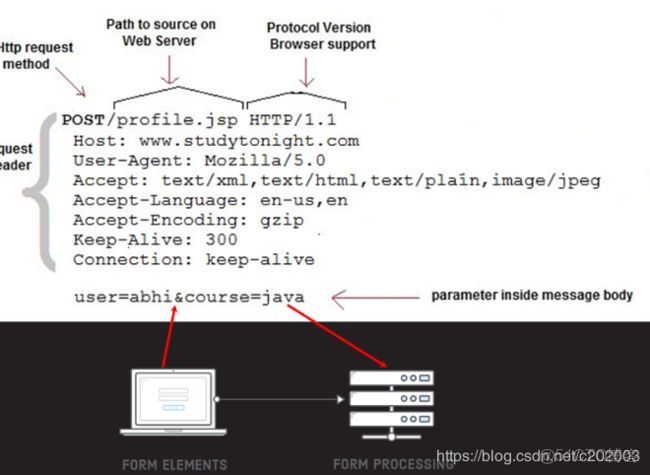
connection.disconnect();
FAQs
Q1:如何向POST请求添加HTTP头?
A1:向POST请求添加HTTP头的方法与GET请求相同,只需在设置请求方法为POST之后,添加所需的HTTP头即可。
connection.setRequestMethod("POST"); connection.setRequestProperty("ContentType", "application/json"); // 其他HTTP头
Q2:如何在Java中获取响应头信息?
A2:要获取响应头信息,可以使用getHeaderField方法,以下是如何获取响应头“ContentType”的示例:
String contentType = connection.getHeaderField("ContentType"); System.out.println("ContentType: " + contentType);