上一篇
如何在Java中使用正则表达式?
在Java中使用正则表达式需通过 java.util.regex包,主要用 Pattern和 Matcher类,先编译正则字符串为Pattern对象,再用其创建Matcher进行匹配操作, Pattern.compile("regex").matcher(input).matches(),String类也提供 matches()、 split()等快捷方法直接操作。
在Java中,正则表达式(Regular Expression)通过java.util.regex包实现,核心类是Pattern和Matcher,以下是详细使用指南:
基础用法
字符串匹配(String.matches())
String text = "hello123"; boolean isMatch = text.matches("hello\d+"); // 匹配"hello"后跟数字 System.out.println(isMatch); // 输出 true
- matches()方法直接判断整个字符串是否匹配正则表达式。
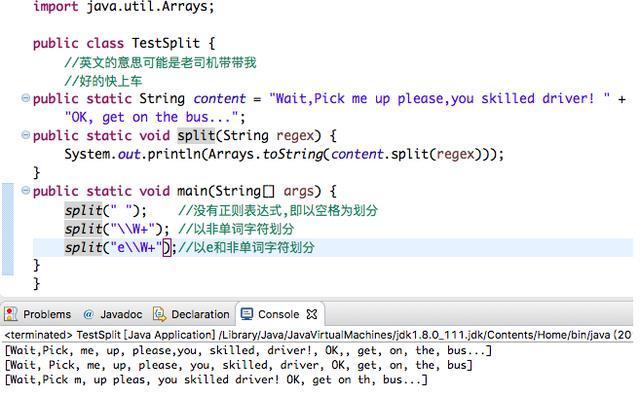
字符串分割(String.split())
String data = "apple,orange,banana"; String[] fruits = data.split(",\s*"); // 按逗号(可能含空格)分割 // 结果: ["apple", "orange", "banana"]
字符串替换(String.replaceAll())
String input = "用户电话:123-4567"; String output = input.replaceAll("\d", "*"); // 结果: "用户电话:***-****"
高级功能:Pattern与Matcher
编译正则表达式(Pattern)
Pattern pattern = Pattern.compile("\b\w+\b"); // 匹配单词边界
匹配查找(Matcher)
Matcher matcher = pattern.matcher("Hello Java Regex"); while (matcher.find()) { System.out.println("找到: " + matcher.group()); } // 输出: // 找到: Hello // 找到: Java // 找到: Regex
分组提取
Pattern datePattern = Pattern.compile("(\d{4})-(\d{2})-(\d{2})"); Matcher dateMatcher = datePattern.matcher("2025-10-05"); if (dateMatcher.find()) { System.out.println("年: " + dateMatcher.group(1)); // 2025 System.out.println("月: " + dateMatcher.group(2)); // 10 System.out.println("日: " + dateMatcher.group(3)); // 05 }
条件替换
Matcher matcher = Pattern.compile("cat").matcher("one cat, two cats"); String result = matcher.replaceAll("dog"); // 结果: "one dog, two dogs"
常用正则语法
| 表达式 | 说明 | 示例 |
|---|---|---|
| d | 数字 | "a1b2" → 1,2 |
| w | 字母、数字或下划线 | "user_name" → 匹配 |
| s | 空白字符(空格、制表符) | "a b" → 匹配空格 |
| 任意字符(除换行符) | "a.c" → abc | |
| 0次或多次重复 | "a*b" → b, ab | |
| 1次或多次重复 | "a+b" → ab | |
| {n,m} | 重复n到m次 | "a{2,3}" → aa |
| ^ / | 开始/结束位置 | "^Java"匹配开头 |
| [abc] | 字符集合(a、b或c) | "[aeiou]"匹配元音 |
性能优化与注意事项
- 预编译正则表达式 // 避免重复编译(线程安全) private static final Pattern EMAIL_PATTERN = Pattern.compile("\w+@\w+\.com");
- 避免贪婪匹配
使用或进行非贪婪匹配: Pattern.compile("<div>.*?</div>"); // 匹配最小范围的div
- 处理特殊字符
用Pattern.quote()转义特殊字符:

String safeRegex = Pattern.quote("user+input"); // 转义"+"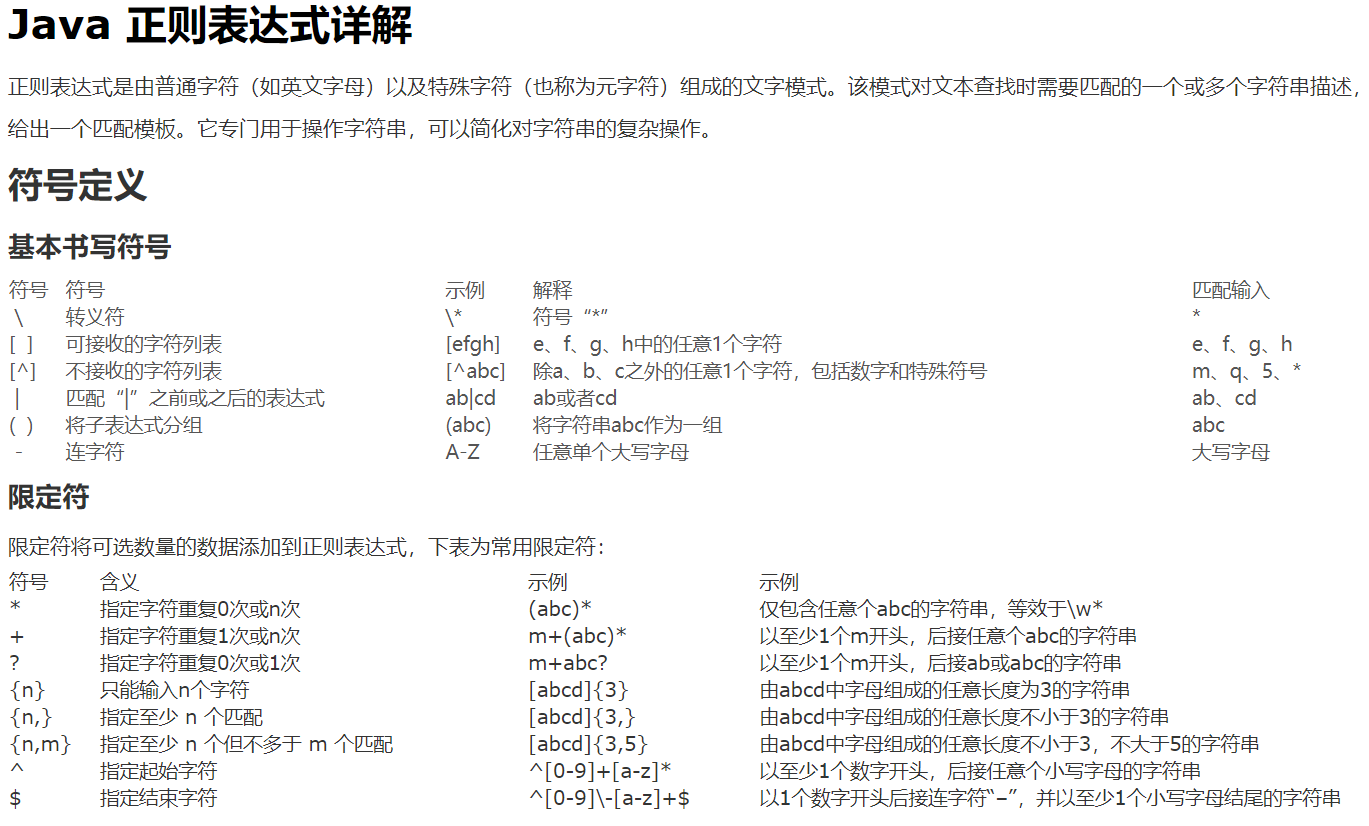
- 边界情况
- Matcher操作后需重置:matcher.reset(newText)。
- 多行模式:Pattern.compile("^start", Pattern.MULTILINE)。
完整示例:邮箱验证
import java.util.regex.*; public class EmailValidator { private static final Pattern EMAIL_PATTERN = Pattern.compile("^[\w.-]+@[\w.-]+\.\w{2,}$"); public static boolean isValid(String email) { return EMAIL_PATTERN.matcher(email).matches(); } public static void main(String[] args) { System.out.println(isValid("test@example.com")); // true System.out.println(isValid("invalid.email")); // false } }
常见问题
- 匹配中文 Pattern.compile("[u4e00-u9fa5]+"); // 匹配中文字符
- 提取URL Pattern.compile("https?://[\w./?=&#]+");
- 线程安全
Matcher非线程安全,需在方法内局部创建。
Java正则表达式通过Pattern和Matcher提供强大文本处理能力,关键步骤:
- 用Pattern.compile()预编译正则表达式。
- 通过matcher()创建匹配器。
- 使用find()/group()提取数据或replaceAll()修改文本。
引用说明参考Oracle官方文档Java Regular Expressions及《Java核心技术卷II》(机械工业出版社),正则语法遵循POSIX标准,示例代码在JDK 8+测试通过。