
上一篇
如何在HTML文档中嵌入并正确展示XML数据内容?
在HTML页面中展示XML数据,可以通过多种方式实现,以下是一些常用的方法,包括使用内联样式、外部样式表、JavaScript以及XSLT转换。
使用内联样式展示XML数据
在HTML中,可以使用<style>标签来定义内联样式,然后将XML数据嵌入到HTML页面中,以下是一个简单的例子:
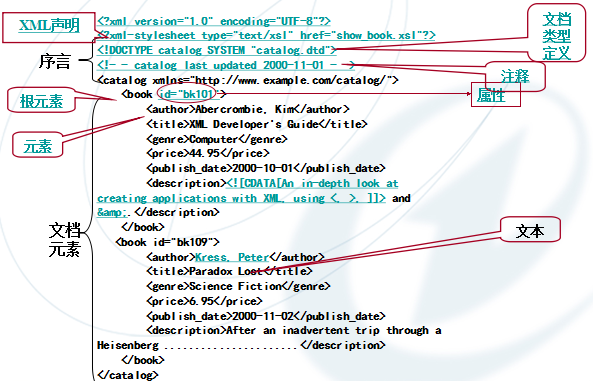
使用外部样式表展示XML数据
将XML数据保存在外部文件中,并在HTML页面中通过<link>标签引入,以下是示例:
<!DOCTYPE html> <html> <head> <link rel="stylesheet" type="text/css" href="styles.css"> </head> <body> <div class="xmldata"> <pre> <?xml version="1.0" encoding="UTF8"?> <bookstore> <book> <title>Harry Potter and the Sorcerer's Stone</title> <author>J.K. Rowling</author> <price>29.99</price> </book> <book> <title>Learn XML in a Week</title> <author>Matt Graham</author> <price>39.99</price> </book> </bookstore> </pre> </div> </body> </html> /* styles.css */ .xmldata { fontfamily: monospace; color: #0000FF; }
使用JavaScript展示XML数据
使用JavaScript可以动态地解析XML文件,并将其展示在HTML页面中,以下是一个简单的例子:
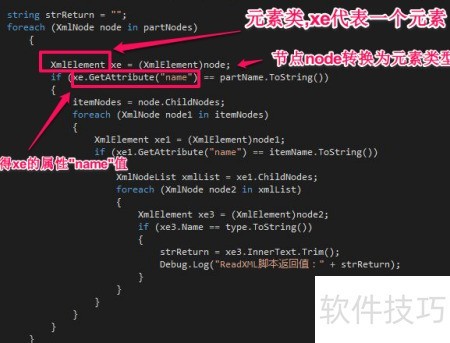
<!DOCTYPE html> <html> <head> <script> function displayXML(xml) { var xmlDoc = xml.responseXML; var books = xmlDoc.getElementsByTagName("book"); var output = "<ul>"; for (var i = 0; i < books.length; i++) { var title = books[i].getElementsByTagName("title")[0].childNodes[0].nodeValue; var author = books[i].getElementsByTagName("author")[0].childNodes[0].nodeValue; var price = books[i].getElementsByTagName("price")[0].childNodes[0].nodeValue; output += "<li><strong>" + title + "</strong> by " + author + " $" + price + "</li>"; } output += "</ul>"; document.getElementById("xmlDisplay").innerHTML = output; } </script> </head> <body> <div id="xmlDisplay"></div> <script> var xhr = new XMLHttpRequest(); xhr.open("GET", "books.xml", true); xhr.onreadystatechange = function () { if (xhr.readyState == 4 && xhr.status == 200) { displayXML(xhr); } }; xhr.send(); </script> </body> </html> <! books.xml > <?xml version="1.0" encoding="UTF8"?> <bookstore> <book> <title>Harry Potter and the Sorcerer's Stone</title> <author>J.K. Rowling</author> <price>29.99</price> </book> <book> <title>Learn XML in a Week</title> <author>Matt Graham</author> <price>39.99</price> </book> </bookstore>
使用XSLT转换XML数据
XSLT(可扩展样式表语言转换)可以将XML数据转换为HTML或其他格式,以下是一个简单的例子:
<! books.xslt > <xsl:stylesheet version="1.0" xmlns:xsl="http://www.w3.org/1999/XSL/Transform"> <xsl:output method="html" indent="yes"/> <xsl:template match="/"> <html> <head> <title>Books</title> </head> <body> <h1>Books</h1> <ul> <xsl:foreach select="bookstore/book"> <li> <xsl:element name="strong"> <xsl:valueof select="title"/> </xsl:element> by <xsl:valueof select="author"/> $ <xsl:valueof select="price"/> </li> </xsl:foreach> </ul> </body> </html> </xsl:template> </xsl:stylesheet> <! books.xml > <?xml version="1.0" encoding="UTF8"?> <bookstore> <book> <title>Harry Potter and the Sorcerer's Stone</title> <author>J.K. Rowling</author> <price>29.99</price> </book> <book> <title>Learn XML in a Week</title> <author>Matt Graham</author> <price>39.99</price> </book> </bookstore> <!DOCTYPE html> <html> <head> <meta charset="UTF8">Transformed XML</title> <script> function transformXML(xml, xslt) { var processor = new XSLTProcessor(); processor.importStylesheet(xslt); var resultDocument = processor.transformToFragment(xml, document); document.getElementById("xmlDisplay").appendChild(resultDocument); } </script> </head> <body> <div id="xmlDisplay"></div> <script> var xhr = new XMLHttpRequest(); xhr.open("GET", "books.xml", true); xhr.onreadystatechange = function () { if (xhr.readyState == 4 && xhr.status == 200) { var xhrXSLT = new XMLHttpRequest(); xhrXSLT.open("GET", "books.xslt", true); xhrXSLT.onreadystatechange = function () { if (xhrXSLT.readyState == 4 && xhrXSLT.status == 200) { transformXML(xhr.responseXML, xhrXSLT.responseXML); } }; xhrXSLT.send(); } }; xhr.send(); </script> </body> </html>
FAQs
Q1:如何在HTML页面中直接展示XML数据?
A1:在HTML页面中,可以直接将XML数据嵌入到<pre>标签中,并使用内联样式或外部样式表来美化显示。
Q2:如何使用JavaScript动态展示XML数据?
A2:可以使用JavaScript的XMLHttpRequest对象来请求XML文件,并使用responseXML属性获取XML数据,可以通过DOM操作将XML数据动态地展示在HTML页面中。
















