
上一篇
如何用Python提取图片文字 | PIL识别图片文字教程
要使用 Python 识别图片中的文字,推荐使用 Pillow (PIL) 配合 Tesseract OCR 引擎(通过 pytesseract 库),以下是详细步骤:
步骤 1:安装依赖
-
安装 Tesseract OCR(核心引擎):
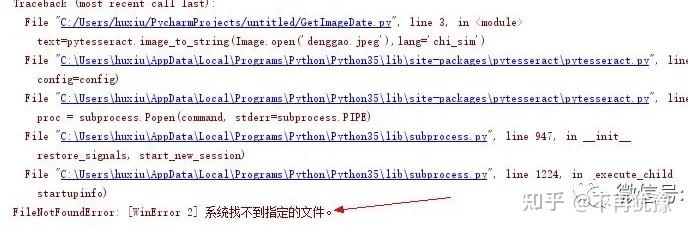
- Windows:下载安装包 UB-Mannheim/tesseract
- MacOS:brew install tesseract
- Linux (Debian/Ubuntu):sudo apt install tesseract-ocr
- 语言包(如需要中文):
sudo apt install tesseract-ocr-chi-sim(简体中文)
sudo apt install tesseract-ocr-chi-tra(繁体中文)
-
安装 Python 库:
pip install pillow pytesseract
步骤 2:Python 示例代码
from PIL import Image import pytesseract # 设置 Tesseract 路径(Windows 需要指定安装路径) # pytesseract.pytesseract.tesseract_cmd = r'C:Program FilesTesseract-OCRtesseract.exe' # 打开图片 image = Image.open('your_image.jpg') # 替换为你的图片路径 # 识别文字(默认英文) text = pytesseract.image_to_string(image) # 识别中文(简体) # text = pytesseract.image_to_string(image, lang='chi_sim') print("识别结果:") print(text)
常见问题解决
-
中文识别不准确:

- 确保安装了中文语言包(如 tesseract-ocr-chi-sim)。
- 使用 lang='chi_sim' 参数。
- 优化图片质量(清晰、无反光、正对拍摄)。
-
报错 tesseract is not installed:
- 检查 tesseract 是否在系统路径中。
- Windows 需手动设置路径(取消注释代码中的 tesseract_cmd)。
-
提高识别精度:
- 预处理图片:转为灰度、二值化、降噪。
- 调整图片:使用图像处理库(如 OpenCV)增强对比度。
- 指定区域识别:通过 image.crop((x, y, width, height)) 裁剪局部区域。
- 百度 OCR:高精度中文识别(有免费额度)
- Google Vision:英文识别效果好
- 腾讯 OCR:支持多语言
预处理增强示例
from PIL import Image, ImageFilter # 打开图片并预处理 image = Image.open('your_image.jpg') image = image.convert('L') # 转为灰度 image = image.filter(ImageFilter.SHARPEN) # 锐化 image = image.point(lambda x: 0 if x < 140 else 255) # 二值化 # 识别文字 text = pytesseract.image_to_string(image, lang='chi_sim') print(text)
替代方案:第三方 API
如果本地识别效果不佳,可使用在线 OCR API:
提示:在线 API 需处理网络请求和隐私问题。








