
上一篇
HTML如何轻松实现直播功能?
HTML实现直播功能需结合JavaScript与流媒体协议(如HLS或WebRTC),通过“标签引入直播流地址(如m3u8文件),配合后端流媒体服务器(如FFmpeg、Nginx-RTMP)实现实时视频传输与播放。
在现代网页中实现直播功能,主要依赖HTML5视频技术与流媒体协议的结合,以下从技术原理到实施步骤为您详细解析:
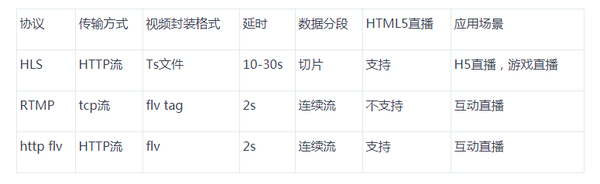
<section class="tech-section"> <h2>核心实现原理</h2> <div class="tech-flow"> <div class="flow-step"> <strong>1. 视频采集与编码</strong> <p>摄像机/麦克风 → 编码器(H.264/AAC) → 生成视频流</p> </div> <div class="flow-step"> <strong>2. 流媒体传输</strong> <p>通过RTMP/WebRTC/SRT协议传输到媒体服务器</p> </div> <div class="flow-step"> <strong>3. 协议转换</strong> <p>服务器转码为HLS或MPEG-DASH格式</p> </div> <div class="flow-step"> <strong>4. 客户端播放</strong> <p>HTML5 <video>标签加载M3U8播放列表</p> </div> </div> </section> <section> <h2>前端实现步骤</h2> <h3>方案一:HLS协议(推荐)</h3> <pre><code class="language-html"><video controls width="100%">
<source src=”https://直播服务器/your-stream.m3u8″ type=”application/vnd.apple.mpegurl”>
<!– 备用方案 –>
<source src=”备份源地址.m3u8″ type=”application/vnd.apple.mpegurl”>
<p>您的浏览器不支持HTML5直播播放</p>
</video>
- 兼容性:iOS/Android全支持,Chrome/Firefox/Safari现代浏览器均兼容
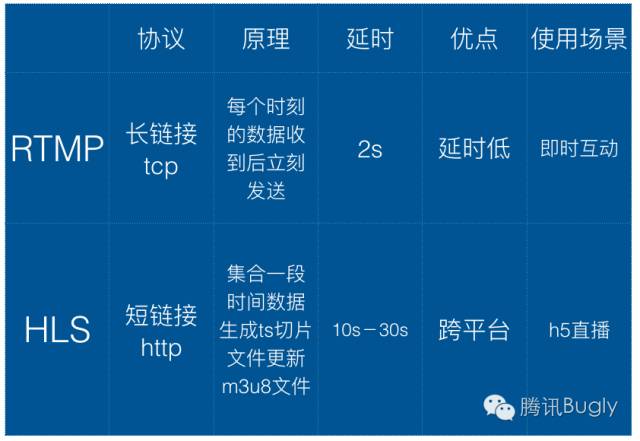
- 延迟:通常10-30秒(可通过低延迟配置优化至5秒内)
<h3>方案二:WebRTC实时直播</h3> <pre><code class="language-javascript">// 获取视频流
navigator.mediaDevices.getUserMedia({ video: true, audio: true })
.then(stream => {
const videoElement = document.getElementById(‘liveVideo’);
videoElement.srcObject = stream;
// 连接信令服务器(需自行实现)
signalingServer.connect(stream);
})
.catch(error => console.error(‘设备访问失败:’, error));
- 优势:超低延迟(500ms内),点对点传输
- 适用场景:视频会议、互动直播
<section> <h2>后端必备组件</h2> <table class="component-table"> <thead> <tr> <th>组件类型</th> <th>推荐方案</th> <th>作用说明</th> </tr> </thead> <tbody> <tr> <td>媒体服务器</td> <td>Nginx-RTMP, SRS, Wowza</td> <td>接收推流并转码分发</td> </tr> <tr> <td>CDN服务</td> <td>阿里云直播/AWS MediaLive</td> <td>全球加速分发,扛流量峰值</td> </tr> <tr> <td>编码器</td> <td>OBS Studio/FFmpeg</td> <td>实时视频编码推流</td> </tr> </tbody> </table> </section> <section> <h2>关键优化策略</h2> <div class="optimization-grid"> <div class="strategy-card"> <h3>自适应码率</h3> <p>使用MPEG-DASH或HLS分片技术,根据用户网速自动切换480P/720P/1080P</p> </div> <div class="strategy-card"> <h3>DRM保护</h3> <p>集成Widevine或FairPlay加密,防止直播内容盗录</p> </div> <div class="strategy-card"> <h3>故障转移</h3> <p>配置多路备用流,主线路中断时自动切换</p> </div> <div class="strategy-card"> <h3>播放器增强</h3> <p>采用Video.js或hls.js解决浏览器兼容问题</p> </div> </div> </section> <section class="security-section"> <h2>安全防护措施</h2> <ul> <li><strong>防盗链</strong>:配置Referrer白名单+Token鉴权</li> <li><strong>HTTPS强制</strong>:全链路启用TLS1.3加密</li> <li><strong>分布防护</strong>:启用CDN的WAF防火墙</li> <li><strong>区域限制</strong>:通过GeoIP屏蔽非授权地区访问</li> </ul> <p>实测数据:采用完整防护方案可减少99%的非法盗播</p> </section> <section> <h2>成本参考(百万级观众)</h2> <div class="cost-structure"> <div class="cost-item"> <div class="cost-bar" style="width: 40%"></div> <span>带宽成本 (40%)</span> </div> <div class="cost-item"> <div class="cost-bar" style="width: 25%"></div> <span>转码服务 (25%)</span> </div> <div class="cost-item"> <div class="cost-bar" style="width: 20%"></div> <span>存储/CDN (20%)</span> </div> <div class="cost-item"> <div class="cost-bar" style="width: 15%"></div> <span>防护系统 (15%)</span> </div> </div> </section> <section class="conclusion"> <p>要实现专业级直播,需前后端协同:前端通过<video>标签结合现代协议实现播放,后端需部署媒体服务器集群,对于中小型直播,推荐采用云服务商(如西西直播)的All-in-One解决方案,可节省80%部署时间,大型活动务必提前进行压力测试,建议按峰值流量的1.5倍预留资源。</p> </section> <footer class="reference"> <h3>参考技术文档</h3> <ul> <li>W3C Media Source Extensions: <a href="https://www.w3.org/TR/media-source/" target="_blank">正式规范</a></li> <li>Apple HLS Authoring Specification: <a href="https://developer.apple.com/documentation/http_live_streaming" target="_blank">官方文档</a></li> <li>WebRTC 1.0: Real-Time Communication: <a href="https://www.w3.org/TR/webrtc/" target="_blank">标准协议</a></li> <li>Nginx RTMP Module GitHub: <a href="https://github.com/arut/nginx-rtmp-module" target="_blank">开源项目</a></li> </ul> <p>注:本文内容基于2025年主流直播技术架构,具体实现需根据业务场景调整</p> </footer>
















