
上一篇
如何用Java快速导入Excel数据
在Java中导入数据库表通常有两种方式:使用JDBC直接执行SQL脚本,或通过ORM框架(如Hibernate)的实体类映射,关键步骤包括:建立数据库连接、读取SQL文件内容、执行CREATE TABLE等DDL语句,或配置@Entity注解实现自动建表。
在Java中导入表通常涉及两种场景:导入表结构(创建数据库表) 或 导入表数据(将外部数据写入数据库),以下是详细实现方法,涵盖常见需求:
导入表结构(执行SQL脚本创建表)
通过Java执行SQL脚本文件(如 .sql),在数据库中创建表结构。
步骤与代码示例
-
准备SQL脚本文件(如 schema.sql):

-
Java代码执行SQL脚本:
import java.io.BufferedReader; import java.io.FileReader; import java.sql.Connection; import java.sql.DriverManager; import java.sql.Statement; public class ImportTableSchema { public static void main(String[] args) { String jdbcUrl = "jdbc:mysql://localhost:3306/your_database"; String username = "root"; String password = "password"; try (Connection conn = DriverManager.getConnection(jdbcUrl, username, password); Statement stmt = conn.createStatement()) { // 读取SQL脚本 BufferedReader reader = new BufferedReader(new FileReader("path/to/schema.sql")); String line; StringBuilder sql = new StringBuilder(); while ((line = reader.readLine()) != null) { sql.append(line); } reader.close(); // 执行SQL(支持多语句) stmt.execute(sql.toString()); System.out.println("表结构导入成功!"); } catch (Exception e) { e.printStackTrace(); } } }
- 依赖库:需JDBC驱动(如MySQL:mysql-connector-java)。
- 事务处理:建议添加事务回滚(conn.setAutoCommit(false))。
- 批量执行:若脚本过大,按分号拆分语句逐条执行。
-
添加依赖(Maven):
-
Java代码:
import java.io.FileInputStream; import java.sql.Connection; import java.sql.DriverManager; import java.sql.PreparedStatement; import org.apache.poi.ss.usermodel.*; public class ImportExcelToTable { public static void main(String[] args) { String excelFile = "path/to/data.xlsx"; String jdbcUrl = "jdbc:mysql://localhost:3306/your_database"; String username = "root"; String password = "password"; String sql = "INSERT INTO users (name, email) VALUES (?, ?)"; try (Connection conn = DriverManager.getConnection(jdbcUrl, username, password); PreparedStatement pstmt = conn.prepareStatement(sql); FileInputStream fis = new FileInputStream(excelFile); Workbook workbook = WorkbookFactory.create(fis)) { Sheet sheet = workbook.getSheetAt(0); // 第一个工作表 for (Row row : sheet) { if (row.getRowNum() == 0) continue; // 跳过标题行 String name = row.getCell(0).getStringCellValue(); String email = row.getCell(1).getStringCellValue(); pstmt.setString(1, name); pstmt.setString(2, email); pstmt.executeUpdate(); } System.out.println("Excel数据导入成功!"); } catch (Exception e) { e.printStackTrace(); } } }
- 性能优化:
- 批量插入时启用 rewriteBatchedStatements=true(MySQL)。
- 分批次提交(每1000条执行一次 executeBatch())。
- 错误处理:
- 捕获 SQLException 并回滚事务。
- 验证文件格式(如CSV分隔符、Excel单元格类型)。
- 安全风险:
- 防止SQL载入:必须使用 PreparedStatement。
- 文件路径校验:避免任意文件读取漏洞。
- 依赖管理:
- 数据库驱动需与数据库版本匹配。
- 大型文件导入时增加JVM内存(-Xmx1024m)。
- Liquibase/Flyway:专业数据库版本管理工具(适合表结构迁移)。
- Apache Commons CSV:简化CSV解析。
- EasyExcel:高性能Excel处理(避免OOM)。
- MySQL JDBC驱动:Official MySQL Connector/J Documentation
- Apache POI:POI Official Website
- 批量插入优化:MySQL Batch Insert Performance
关键点
导入表数据(从文件导入数据库)
将外部数据文件(如CSV、Excel)导入到数据库表中。
场景1:从CSV文件导入
import java.io.BufferedReader; import java.io.FileReader; import java.sql.Connection; import java.sql.DriverManager; import java.sql.PreparedStatement; public class ImportCSVToTable { public static void main(String[] args) { String csvFile = "path/to/data.csv"; String jdbcUrl = "jdbc:mysql://localhost:3306/your_database"; String username = "root"; String password = "password"; String sql = "INSERT INTO users (name, email) VALUES (?, ?)"; try (Connection conn = DriverManager.getConnection(jdbcUrl, username, password); PreparedStatement pstmt = conn.prepareStatement(sql); BufferedReader br = new BufferedReader(new FileReader(csvFile))) { String line; br.readLine(); // 跳过CSV标题行 while ((line = br.readLine()) != null) { String[] data = line.split(","); pstmt.setString(1, data[0]); // name pstmt.setString(2, data[1]); // email pstmt.addBatch(); // 加入批处理 } pstmt.executeBatch(); // 批量执行 System.out.println("CSV数据导入成功!"); } catch (Exception e) { e.printStackTrace(); } } }
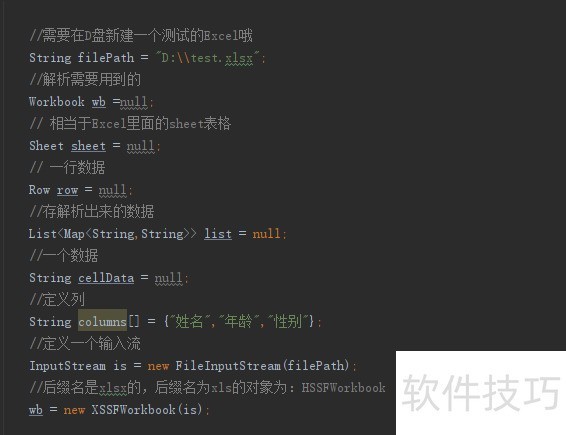
场景2:从Excel导入(使用Apache POI)
注意事项
工具推荐
引用说明
通过以上方法,您可灵活实现Java中的表导入操作,根据实际场景选择方案,并注意性能与安全!















