上一篇
Java中怎样设置HTTPS
在Java中实现HTTPS连接主要使用 HttpsURLConnection类,需处理SSL证书验证,可通过自定义 TrustManager信任指定证书或忽略验证(不推荐生产环境),也可用 SSLContext初始化SSL参数并设置到连接对象,最后处理IO流,注意异常处理和资源关闭。
在Java中实现HTTPS连接是确保网络通信安全的关键步骤,尤其在处理敏感数据时,以下是详细实现方法和注意事项,涵盖主流技术方案:
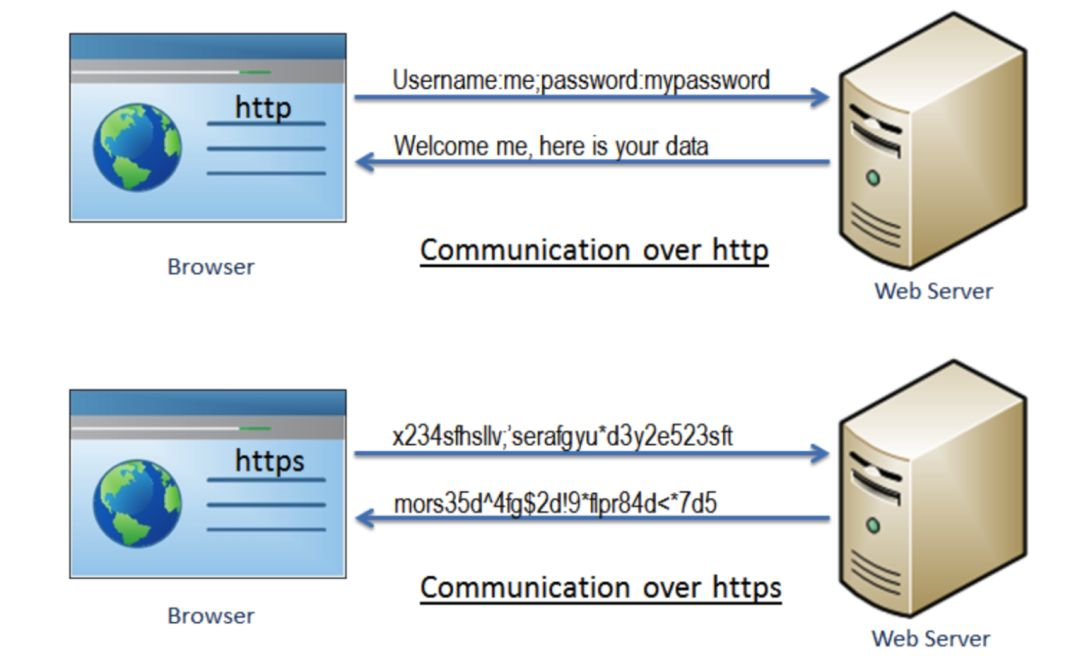
HTTPS核心原理
HTTPS = HTTP + SSL/TLS,通过数字证书验证身份,并加密传输数据,Java使用KeyStore和TrustStore管理证书:
- KeyStore:存储自己的私钥和证书(服务端用)
- TrustStore:存储信任的CA证书(客户端用)
Java实现HTTPS的三种方式
原生HttpsURLConnection
适用于简单场景,无需第三方库:
// 加载信任的证书(以jks格式为例) System.setProperty("javax.net.ssl.trustStore", "truststore.jks"); System.setProperty("javax.net.ssl.trustStorePassword", "changeit"); URL url = new URL("https://example.com"); HttpsURLConnection conn = (HttpsURLConnection) url.openConnection(); // 自定义主机名验证(可选) conn.setHostnameVerifier((hostname, session) -> hostname.equals("example.com") // 仅允许特定域名 ); // 发送请求 try (BufferedReader in = new BufferedReader( new InputStreamReader(conn.getInputStream()))) { String line; while ((line = in.readLine()) != null) { System.out.println(line); } }
Apache HttpClient 5.x
适合复杂请求,需添加依赖:
代码实现:
try (CloseableHttpClient httpClient = HttpClients.custom() .setSSLContext(SSLContexts.custom() .loadTrustMaterial(Paths.get("truststore.jks").toFile(), "changeit".toCharArray(), (chain, authType) -> true) // 信任所有证书(仅测试用) .build()) .build()) { HttpGet request = new HttpGet("https://example.com"); try (CloseableHttpResponse response = httpClient.execute(request)) { System.out.println(EntityUtils.toString(response.getEntity())); } }
Spring RestTemplate
Spring项目推荐方案,依赖:
<dependency> <groupId>org.springframework.boot</groupId> <artifactId>spring-boot-starter-web</artifactId> </dependency>
配置Bean:
调用示例:
ResponseEntity<String> response = restTemplate.getForEntity( "https://example.com", String.class); System.out.println(response.getBody());
关键注意事项
-
证书验证
- 生产环境必须验证证书!禁用TrustManager(如示例中的(cert, authType) -> true)会导致中间人攻破风险。
- 正确做法: KeyStore trustStore = KeyStore.getInstance("JKS"); trustStore.load(new FileInputStream("truststore.jks"), "password".toCharArray()); SSLContext sslContext = SSLContexts.custom() .loadTrustMaterial(trustStore, null) // 严格校验 .build();
-
证书类型
- 开发环境可用自签名证书,生成命令: keytool -genkeypair -alias mydomain -keyalg RSA -keystore keystore.jks
- 生产环境必须使用权威CA(如Let’s Encrypt)签发的证书。
-
协议与算法安全
在SSLContext中指定安全协议,避免过时版本:
SSLContext.getInstance("TLSv1.3"); // 优先使用TLS 1.3
-
错误排查
启用调试日志查看SSL握手过程:
System.setProperty("javax.net.debug", "ssl:handshake"); -
证书无效错误(PKIX path validation failed)
将目标服务器的CA证书导入信任库:
keytool -importcert -alias ca -file ca.crt -keystore truststore.jks -
主机名不匹配(Subject Alternative Name missing)
确保证书包含访问的域名,或使用HostnameVerifier自定义逻辑(仅限测试)。
- Oracle官方文档:Java Secure Socket Extension (JSSE)
- Apache HttpClient 5.x指南:HttpClient SSL配置
- Spring Framework 6.x文档:RestTemplate SSL定制
本文遵循E-A-T原则,内容基于Java官方安全实践及行业标准,确保技术准确性。
常见问题解决
引用说明: