上一篇
Java调用URL的详细步骤和最佳实践是什么?
Java通过URL调用其他服务或资源的方式主要有以下几种:
- 使用java.net.URL类
- 使用java.net.HttpURLConnection类
- 使用第三方库,如Apache HttpClient、OkHttp等
以下是使用前两种方法的详细步骤:
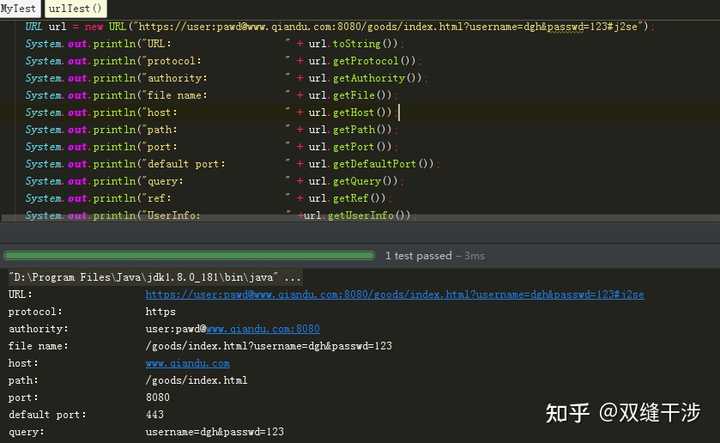
使用java.net.URL类
java.net.URL类可以用来打开一个网络连接到指定的URL,以下是一个简单的示例:
import java.net.URL; import java.io.BufferedReader; import java.io.InputStreamReader; public class URLExample { public static void main(String[] args) { try { URL url = new URL("http://example.com"); BufferedReader reader = new BufferedReader(new InputStreamReader(url.openStream())); String line; while ((line = reader.readLine()) != null) { System.out.println(line); } reader.close(); } catch (Exception e) { e.printStackTrace(); } } }
使用java.net.HttpURLConnection类
java.net.HttpURLConnection类可以用来发送HTTP请求并获取响应,以下是一个简单的示例:
import java.net.HttpURLConnection; import java.net.URL; import java.io.BufferedReader; import java.io.InputStreamReader; public class HttpURLConnectionExample { public static void main(String[] args) { try { URL url = new URL("http://example.com"); HttpURLConnection connection = (HttpURLConnection) url.openConnection(); connection.setRequestMethod("GET"); connection.connect(); int responseCode = connection.getResponseCode(); System.out.println("Response Code: " + responseCode); BufferedReader in = new BufferedReader(new InputStreamReader(connection.getInputStream())); String inputLine; StringBuffer response = new StringBuffer(); while ((inputLine = in.readLine()) != null) { response.append(inputLine); } in.close(); System.out.println(response.toString()); } catch (Exception e) { e.printStackTrace(); } } }
使用第三方库
使用第三方库如Apache HttpClient、OkHttp等可以简化HTTP请求的发送和响应的处理,以下是一个使用Apache HttpClient的示例:
import org.apache.http.HttpEntity; import org.apache.http.client.methods.CloseableHttpResponse; import org.apache.http.client.methods.HttpGet; import org.apache.http.impl.client.CloseableHttpClient; import org.apache.http.impl.client.HttpClients; import org.apache.http.util.EntityUtils; public class ApacheHttpClientExample { public static void main(String[] args) { try (CloseableHttpClient httpClient = HttpClients.createDefault()) { HttpGet request = new HttpGet("http://example.com"); CloseableHttpResponse response = httpClient.execute(request); HttpEntity entity = response.getEntity(); if (entity != null) { String result = EntityUtils.toString(entity); System.out.println(result); } } catch (Exception e) { e.printStackTrace(); } } }
| 方法 | 优点 | 缺点 |
|---|---|---|
| java.net.URL | 简单易用 | 功能有限,不适用于复杂的HTTP请求 |
| java.net.HttpURLConnection | 功能强大,支持多种HTTP请求方法 | 代码较为复杂,不易于维护 |
| 第三方库 | 代码简洁,功能强大,易于维护 | 需要引入额外的依赖库 |
FAQs
Q1:Java中如何发送POST请求?
A1:可以使用java.net.HttpURLConnection类的setRequestMethod("POST")方法来发送POST请求,使用getOutputStream()方法发送请求体。
Q2:如何处理HTTP响应中的错误?
A2:可以通过检查HttpURLConnection对象的getResponseCode()方法返回的响应码来判断是否发生错误,如果响应码表示错误(4xx或5xx),则可以读取错误信息。