
上一篇
html如何跳转到固定div
HTML中,可以使用锚链接( #id)结合目标 div的 id属性,通过` 标签或location.
HTML中,有多种方法可以实现页面跳转到固定的div元素,以下是详细的介绍和示例:
使用锚点(Anchor)链接
原理
HTML中的锚点链接通过id属性标记目标位置,并使用#id的形式创建指向该位置的链接,当用户点击链接时,浏览器会自动滚动到对应的id元素所在的位置。
实现步骤
-
为目标div添加id属性:需要在你希望跳转到的div元素上设置一个唯一的id。
<div id="targetSection"> <!-目标内容 --> </div> -
创建链接指向该id:在页面的其他位置创建一个链接,使用#id作为href的值。
<a href="#targetSection">跳转到目标部分</a>
示例
<!DOCTYPE html> <html lang="zh-CN"> <head> <meta charset="UTF-8">锚点跳转示例</title> <style> body { height: 2000px; / 增加页面高度以便测试滚动 / padding: 20px; } #targetSection { margin-top: 1000px; background-color: #f0f0f0; padding: 20px; border: 1px solid #ccc; } </style> </head> <body> <h1>页面顶部</h1> <p>点击下面的链接跳转到页面中的特定部分。</p> <a href="#targetSection">跳转到目标部分</a> <div id="targetSection"> <h2>目标部分</h2> <p>你已成功跳转到这个部分。</p> </div> </body> </html>
优点
- 简单易用,无需额外的JavaScript。
- 兼容性好,所有浏览器都支持。
缺点
- 只能在同一页面内跳转,无法跨页面。
- 无法实现复杂的动画效果或控制滚动行为。
使用JavaScript进行跳转
scrollIntoView()
原理
scrollIntoView()是Element接口提供的一个方法,可以滚动元素的父容器,使该元素在可视区域内显示。
实现步骤
-
为目标div添加id属性:与锚点方法相同。
<div id="targetSection"> <!-目标内容 --> </div>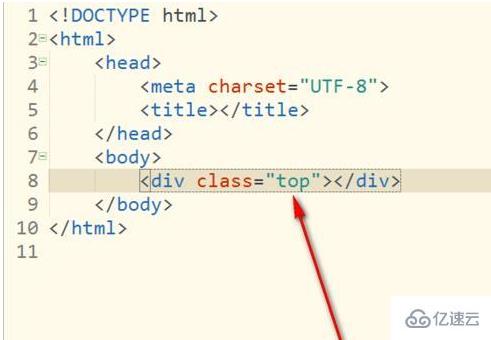
-
创建按钮并添加点击事件:使用JavaScript获取目标元素并调用scrollIntoView()方法。
<button id="jumpButton">跳转到目标部分</button> <script> document.getElementById('jumpButton').addEventListener('click', function() { document.getElementById('targetSection').scrollIntoView({ behavior: 'smooth' }); }); </script>
示例
<!DOCTYPE html> <html lang="zh-CN"> <head> <meta charset="UTF-8">JavaScript 跳转示例</title> <style> body { height: 2000px; padding: 20px; } #targetSection { margin-top: 1000px; background-color: #e0f7fa; padding: 20px; border: 1px solid #00bcd4; } #jumpButton { margin-top: 20px; padding: 10px 20px; background-color: #00bcd4; color: white; border: none; cursor: pointer; } #jumpButton:hover { background-color: #0097a7; } </style> </head> <body> <h1>页面顶部</h1> <p>点击按钮跳转到页面中的特定部分。</p> <button id="jumpButton">跳转到目标部分</button> <div id="targetSection"> <h2>目标部分</h2> <p>你已通过JavaScript跳转到这个部分。</p> </div> <script> document.getElementById('jumpButton').addEventListener('click', function() { document.getElementById('targetSection').scrollIntoView({ behavior: 'smooth' }); }); </script> </body> </html>
优点
- 可以控制滚动行为,如平滑滚动。
- 适用于动态内容或需要更复杂交互的场景。
缺点
- 需要编写JavaScript代码。
- 对不支持JavaScript的用户提供降级方案较为复杂。
使用URL参数和脚本跳转
原理
通过在URL中添加参数,然后在页面加载时解析URL参数,自动滚动到指定部分,这种方法适用于跨页面跳转。
实现步骤
-
在目标页面的URL中添加参数:page.html?section=targetSection。
-
在目标页面中使用JavaScript解析URL参数并跳转:
<script> // 函数获取URL参数 function getQueryParam(param) { const urlParams = new URLSearchParams(window.location.search); return urlParams.get(param); } // 获取参数并跳转 const sectionId = getQueryParam('section'); if (sectionId) { const element = document.getElementById(sectionId); if (element) { element.scrollIntoView({ behavior: 'smooth' }); } } </script>
示例
假设有两个页面:page1.html和page2.html。
page1.html
<!DOCTYPE html> <html lang="zh-CN"> <head> <meta charset="UTF-8">页面1</title> </head> <body> <h1>这是页面1</h1> <a href="page2.html?section=targetSection">跳转到页面2的目标部分</a> </body> </html>
page2.html
<!DOCTYPE html> <html lang="zh-CN"> <head> <meta charset="UTF-8">页面2</title> <style> body { height: 2000px; padding: 20px; } #targetSection { margin-top: 1000px; background-color: #ffebee; padding: 20px; border: 1px solid #ff5722; } </style> </head> <body> <h1>页面2顶部</h1> <div id="targetSection"> <h2>目标部分</h2> <p>你通过跨页面跳转到达这里。</p> </div> <script> // 函数获取URL参数 function getQueryParam(param) { const urlParams = new URLSearchParams(window.location.search); return urlParams.get(param); } // 获取参数并跳转 const sectionId = getQueryParam('section'); if (sectionId) { const element = document.getElementById(sectionId); if (element) { element.scrollIntoView({ behavior: 'smooth' }); } } </script> </body> </html>
优点
- 适用于跨页面跳转,提升用户体验。
- 灵活性高,可以根据不同参数跳转到不同部分。
缺点
- 需要处理URL参数,增加了复杂性。
- 如果用户直接访问目标页面,可能需要额外的逻辑处理。
使用CSS进行跳转(仅辅助)
虽然CSS本身无法实现跳转功能,但可以结合HTML的锚点链接,通过CSS进行样式上的优化,例如改变滚动条的行为或添加过渡效果,核心的跳转功能仍需依赖HTML或JavaScript。
使用第三方库(如jQuery)
如果项目中已经引入了jQuery或其他前端框架,可以利用其提供的方法简化跳转操作,使用jQuery的animate方法实现自定义滚动效果,对于简单的跳转需求,原生JavaScript已经足够。
归纳对比
| 方法 | 优点 | 缺点 |
|---|---|---|
| 锚点链接 | 简单易用,兼容性好 | 仅限于同一页面,无法控制滚动行为 |
| JavaScript scrollIntoView() | 可控制滚动行为,如平滑滚动,适用于动态内容 | 需要编写JavaScript代码 |
| URL参数加脚本跳转 | 适用于跨页面跳转,提升用户体验 | 需要处理URL参数,增加复杂性 |
| CSS(辅助) | 可用于样式优化,提升用户体验 | 无法独立实现跳转功能 |
| 第三方库(如jQuery) | 提供丰富的动画和方法,简化开发 | 需要引入额外的库,增加加载时间 |
FAQs
问题1:如何在点击链接时实现平滑滚动到指定div?
解答:要实现平滑滚动,可以使用JavaScript的scrollIntoView()方法,并设置behavior选项为'smooth'。
document.getElementById('yourLink').addEventListener('click', function(e) { e.preventDefault(); // 防止默认跳转行为 document.getElementById('targetSection').scrollIntoView({ behavior: 'smooth' }); });
这样,用户点击链接时会平滑滚动到目标div。
问题2:如何在不同页面之间跳转到指定的div?
解答:可以通过在目标页面的URL中添加参数来指示要跳转的div,然后在目标页面使用JavaScript解析URL参数并执行跳转。
-
在源页面的链接中添加参数:
<a href="targetPage.html?section=targetSection">跳转到目标部分</a> -
在目标页面targetPage.html中添加以下脚本:
// 获取URL参数的函数 function getQueryParam(param) { const urlParams = new URLSearchParams(window.location.search); return urlParams.get(param); } // 获取参数并跳转 const sectionId = getQueryParam('section'); if (sectionId) { const element = document.getElementById(sectionId); if (element) { element.scrollIntoView({ behavior: 'smooth' }); } }
这样,用户点击链接后会跳转到`targetPage.
















