上一篇
Java如何高效构建并部署为稳定后台服务系统?
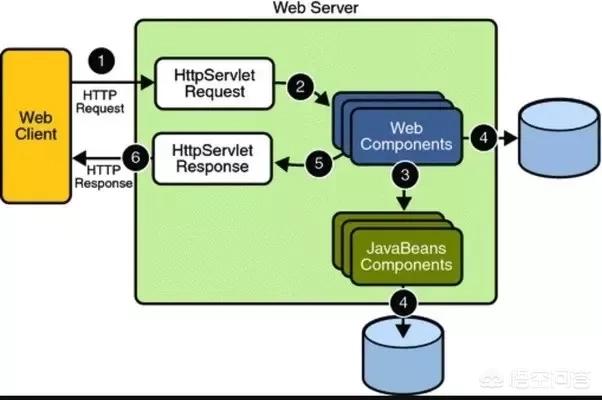
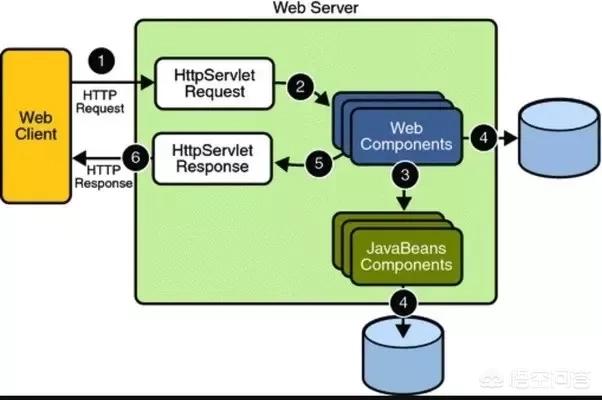
在Java中创建后台服务通常涉及以下几个步骤,以下是一个详细的指南,包括使用Java Servlet、Spring Boot和Spring Cloud等技术栈的示例。
环境准备
确保你的计算机上安装了以下软件:
- Java Development Kit (JDK)
- Integrated Development Environment (IDE) 如 IntelliJ IDEA 或 Eclipse
- Maven 或 Gradle(用于依赖管理)
创建项目
使用Maven创建Spring Boot项目
- 打开终端或命令提示符。
- 使用Maven命令创建一个新的Spring Boot项目:
mvn archetype:generate DgroupId=com.example DartifactId=mybackendservice DarchetypeArtifactId=springbootstarterparent DarchetypeVersion=2.3.4.RELEASE
进入项目目录:
添加依赖
在pom.xml文件中添加以下依赖:
<dependencies> <dependency> <groupId>org.springframework.boot</groupId> <artifactId>springbootstarterweb</artifactId> </dependency> <dependency> <groupId>org.springframework.boot</groupId> <artifactId>springbootstarterdatajpa</artifactId> </dependency> <dependency> <groupId>org.springframework.boot</groupId> <artifactId>springbootstartersecurity</artifactId> </dependency> <dependency> <groupId>org.springframework.boot</groupId> <artifactId>springbootstartertest</artifactId> <scope>test</scope> </dependency> </dependencies>
配置文件
在src/main/resources/application.properties中配置数据库连接和其他属性:
spring.datasource.url=jdbc:mysql://localhost:3306/mydatabase spring.datasource.username=root spring.datasource.password=password spring.jpa.hibernate.ddlauto=update
创建实体类
在src/main/java/com/example/mybackendservice目录下创建实体类User.java:
创建Repository接口
在src/main/java/com/example/mybackendservice目录下创建UserRepository.java:
package com.example.mybackendservice; import org.springframework.data.jpa.repository.JpaRepository; public interface UserRepository extends JpaRepository<User, Long> { }
创建Service类
在src/main/java/com/example/mybackendservice目录下创建UserService.java:
package com.example.mybackendservice; import org.springframework.beans.factory.annotation.Autowired; import org.springframework.stereotype.Service; import java.util.List; import java.util.Optional; @Service public class UserService { @Autowired private UserRepository userRepository; public List<User> getAllUsers() { return userRepository.findAll(); } public Optional<User> getUserById(Long id) { return userRepository.findById(id); } public User saveUser(User user) { return userRepository.save(user); } public void deleteUser(Long id) { userRepository.deleteById(id); } }
创建Controller类
在src/main/java/com/example/mybackendservice目录下创建UserController.java:
package com.example.mybackendservice; import org.springframework.beans.factory.annotation.Autowired; import org.springframework.web.bind.annotation.*; import java.util.List; @RestController @RequestMapping("/api/users") public class UserController { @Autowired private UserService userService; @GetMapping public List<User> getAllUsers() { return userService.getAllUsers(); } @GetMapping("/{id}") public Optional<User> getUserById(@PathVariable Long id) { return userService.getUserById(id); } @PostMapping public User createUser(@RequestBody User user) { return userService.saveUser(user); } @DeleteMapping("/{id}") public void deleteUser(@PathVariable Long id) { userService.deleteUser(id); } }
运行应用
在IDE中运行com.example.mybackendservice.Application类,或者使用Maven命令:
mvn springboot:run
FAQs
Q1: 如何在Spring Boot中配置数据库连接?
A1: 在src/main/resources/application.properties文件中配置数据库连接信息,如URL、用户名和密码。
Q2: 如何在Spring Boot中创建RESTful API?
A2: 创建一个Controller类,使用@RestController注解,并使用@RequestMapping注解来指定API的URL,使用@GetMapping、@PostMapping等注解来处理HTTP请求。