上一篇
Java如何读取文档
在Java中读取文档常用 java.io和 java.nio包,通过 BufferedReader读取文本文件内容,或使用 Files.readAllLines()(Java 7+)直接获取行列表,二进制文件可用 FileInputStream处理,注意异常处理和资源关闭(或使用try-with-resources)。
在Java中读取文档是常见的文件操作任务,涵盖文本文件(如TXT、CSV)、二进制文件(如图片)及结构化文档(如PDF、Word),以下是详细方法及最佳实践,符合Java标准API和行业规范:
读取文本文件(TXT、CSV等)
使用 java.nio.file.Files(推荐,Java 7+)
import java.nio.file.Files; import java.nio.file.Paths; import java.util.List; public class ReadTextFile { public static void main(String[] args) { try { // 读取整个文件为字符串 String content = Files.readString(Paths.get("example.txt")); System.out.println(content); // 按行读取为列表 List<String> lines = Files.readAllLines(Paths.get("data.csv")); lines.forEach(System.out::println); } catch (Exception e) { e.printStackTrace(); } } }
优势:代码简洁,自动处理编码(默认UTF-8),适合中小文件。
使用 BufferedReader(大文件流式读取)
import java.io.BufferedReader; import java.io.FileReader; public class ReadLargeFile { public static void main(String[] args) { try (BufferedReader br = new BufferedReader(new FileReader("large.log"))) { String line; while ((line = br.readLine()) != null) { System.out.println(line); // 逐行处理 } } catch (Exception e) { e.printStackTrace(); } } }
优势:内存高效,适用于GB级文件。
读取二进制文件(图片、视频等)
import java.nio.file.Files; import java.nio.file.Paths; public class ReadBinaryFile { public static void main(String[] args) { try { byte[] bytes = Files.readAllBytes(Paths.get("image.png")); // 字节数据可用于写入新文件或网络传输 } catch (Exception e) { e.printStackTrace(); } } }
注意:大文件建议用 BufferedInputStream 分块读取。
读取结构化文档(PDF、Word、Excel)
需借助第三方库,确保Maven依赖:
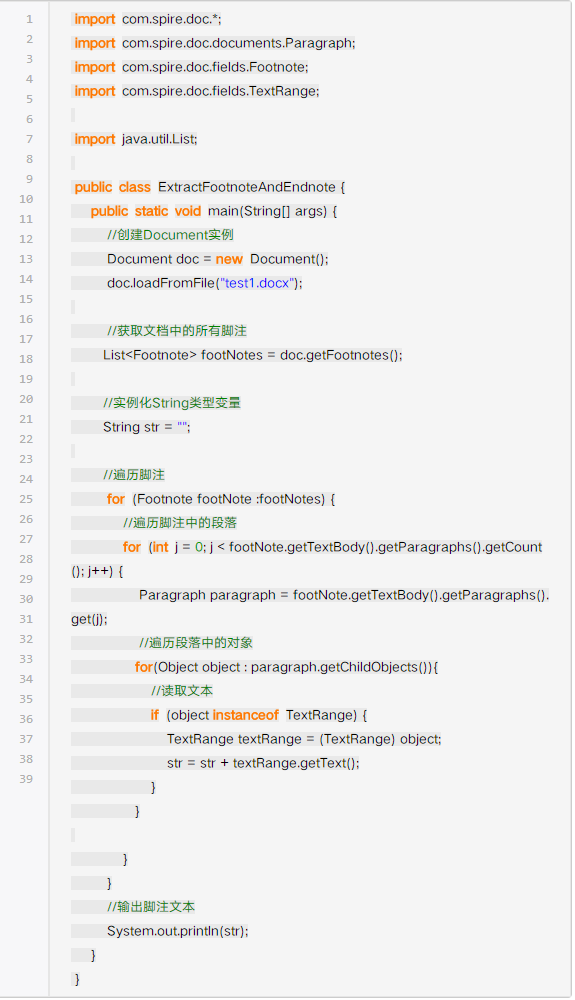
PDF文档(Apache PDFBox)
<dependency> <groupId>org.apache.pdfbox</groupId> <artifactId>pdfbox</artifactId> <version>2.0.27</version> </dependency> import org.apache.pdfbox.pdmodel.PDDocument; import org.apache.pdfbox.text.PDFTextStripper; public class ReadPDF { public static void main(String[] args) { try (PDDocument doc = PDDocument.load(Paths.get("doc.pdf").toFile())) { PDFTextStripper stripper = new PDFTextStripper(); String text = stripper.getText(doc); System.out.println(text); } catch (Exception e) { e.printStackTrace(); } } }
Word文档(Apache POI)
<dependency> <groupId>org.apache.poi</groupId> <artifactId>poi</artifactId> <version>5.2.3</version> </dependency> import org.apache.poi.xwpf.extractor.XWPFWordExtractor; import org.apache.poi.xwpf.usermodel.XWPFDocument; public class ReadWord { public static void main(String[] args) { try (XWPFDocument doc = new XWPFDocument(Files.newInputStream(Paths.get("report.docx"))); XWPFWordExtractor extractor = new XWPFWordExtractor(doc)) { System.out.println(extractor.getText()); } catch (Exception e) { e.printStackTrace(); } } }
Excel文件(Apache POI)
import org.apache.poi.ss.usermodel.*; public class ReadExcel { public static void main(String[] args) { try (Workbook workbook = WorkbookFactory.create(Files.newInputStream(Paths.get("data.xlsx")))) { Sheet sheet = workbook.getSheetAt(0); for (Row row : sheet) { for (Cell cell : row) { System.out.print(cell.toString() + "t"); } System.out.println(); } } catch (Exception e) { e.printStackTrace(); } } }
关键注意事项
-
异常处理:
必须捕获 IOException,使用 try-with-resources(如上例)自动关闭资源,避免内存泄漏。
-
文件编码:
文本文件需明确字符集(如GBK):
BufferedReader br = new BufferedReader( new InputStreamReader(new FileInputStream("file.txt"), StandardCharsets.GBK) );
-
性能优化:
- 大文本文件:用 BufferedReader 缓冲流。
- 大二进制文件:用 BufferedInputStream 分块读取。
-
路径安全:
使用 Paths.get() 或 new File() 时,验证文件是否存在:
Path path = Paths.get("user_input.txt"); if (Files.exists(path)) { // 读取操作 }
- 文本/二进制文件:优先选 java.nio.file.Files(简单场景)或缓冲流(大文件)。
- 结构化文档:用成熟第三方库(如PDFBox、Apache POI)。
- 健壮性:始终处理异常、指定编码、关闭资源。
- Oracle官方文件教程:Java NIO Files
- Apache PDFBox官网:PDFBox | Apache
- Apache POI官网:POI | Apache
- 编码处理参考:Java Charset类
引用说明: