
上一篇
java怎么创建session对象
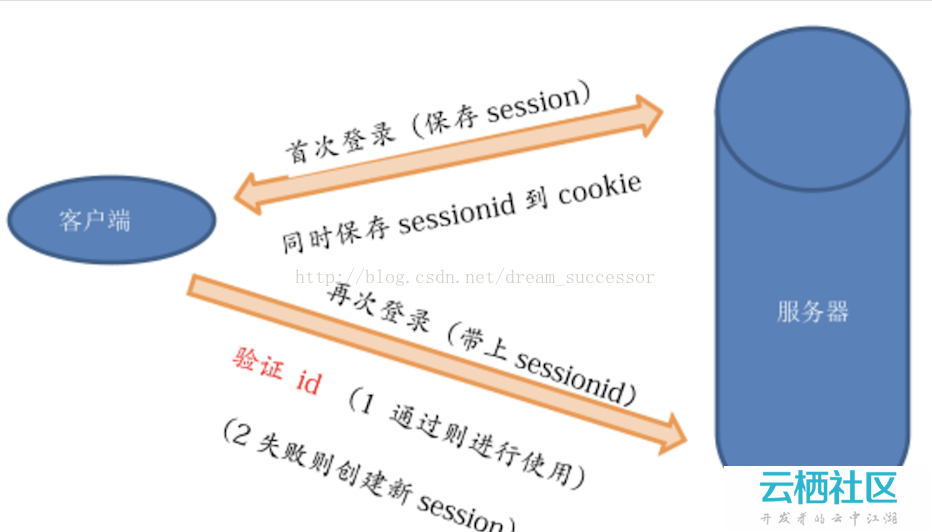
通过 HttpServletRequest 对象的 getSession() 方法创建或获取 Session 对象
在Java Web开发中,Session(会话) 是一种用于维护客户端与服务器之间状态信息的机制,通过创建和使用Session对象,开发者可以在多个HTTP请求之间保存用户特定的数据(如登录凭证、购物车内容等),以下是关于如何在Java中创建和管理Session对象的详细说明,涵盖核心原理、具体实现步骤、常见场景及最佳实践。
理解Session的基本概念
1 什么是Session?
- 定义:Session是服务器端为单个用户创建的临时存储空间,用于跟踪该用户的活动状态。
- 作用域:仅对当前浏览器窗口/标签页有效(基于Cookie或URL重写)。
- 生命周期:从创建到超时(默认30分钟)或主动销毁为止。
- 唯一标识:每个Session由服务器生成唯一的ID(JSESSIONID),并通过Cookie发送给客户端。
2 为什么需要Session?
| 问题 | 解决方案 |
|---|---|
| HTTP协议无状态性 | 通过Session弥补状态缺失 |
| 多请求间共享数据 | 存储用户专属信息(如用户名、权限等级) |
| 防止重复提交表单 | 记录已提交状态 |
| 实现个性化服务 | 根据用户历史行为推荐内容 |
在Servlet中创建和管理Session
1 基础步骤
// 获取HttpServletRequest对象(由容器自动载入) HttpServletRequest request = ...; // 方法1:获取现有Session(若不存在则新建) HttpSession session = request.getSession(); // 等价于request.getSession(true) // 方法2:仅获取现有Session(不新建) HttpSession sessionExisting = request.getSession(false); if (sessionExisting == null) { // 处理未登录或首次访问的情况 }
2 关键方法详解
| 方法 | 功能 | 示例 |
|---|---|---|
| setAttribute(String name, Object value) | 向Session存入数据 | session.setAttribute("user", currentUser); |
| getAttribute(String name) | 从Session读取数据 | User user = (User) session.getAttribute("user"); |
| removeAttribute(String name) | 删除指定属性 | session.removeAttribute("cartItems"); |
| invalidate() | 立即销毁Session | session.invalidate(); |
| getCreationTime() | 获取创建时间戳 | long createTime = session.getCreationTime(); |
| getMaxInactiveInterval() | 获取最大空闲时间(秒) | int maxInactive = session.getMaxInactiveInterval(); |
3 配置Session超时时间
在web.xml中通过<session-config>标签设置全局超时时间(单位:分钟):
<web-app> <session-config> <session-timeout>60</session-timeout> <!-60分钟后失效 --> </session-config> </web-app>
也可通过编程方式动态调整:
session.setMaxInactiveInterval(1800); // 设置为30分钟(1800秒)
在Spring MVC框架中的Session管理
1 控制器直接操作Session
@Controller public class UserController { @PostMapping("/login") public String login(HttpServletRequest request, @RequestParam String username) { HttpSession session = request.getSession(); session.setAttribute("loggedInUser", username); return "dashboard"; } }
2 使用@SessionAttributes注解批量绑定模型属性到Session
@Controller @SessionAttributes({"currentUser", "shoppingCart"}) // 声明需要持久化的模型属性 public class ProductController { @ModelAttribute("shoppingCart") private ShoppingCart cart; // 自动同步到Session }
3 Spring Security集成Session管理
@Configuration @EnableWebSecurity public class SecurityConfig extends WebSecurityConfigurerAdapter { @Override protected void configure(HttpSecurity http) throws Exception { http.sessionManagement() .maximumSessions(1) // 单设备登录限制 .expiredUrl("/expired") // 会话过期跳转页面 .sessionRegistry(sessionRegistry()); // 注册Session监听器 } }
高级技巧与最佳实践
1 分布式系统中的Session共享方案
| 方案 | 适用场景 | 优点 | 缺点 |
|---|---|---|---|
| 数据库存储 | 多实例部署 | 数据持久化 | 性能较低 |
| Redis缓存 | 高并发场景 | 读写速度快 | 需额外组件 |
| Sticky Sticky Session | 负载均衡环境 | 简单易行 | 单点故障风险 |
2 防止Session截持的安全措施
- 启用HTTPS:加密传输JSESSIONID Cookie。
- 定期更新Session ID:每次敏感操作后重新生成ID。
- 验证IP地址:检查请求来源IP是否与Session绑定一致。
- 设置SameSite属性:response.setHeader("Set-Cookie", "JSESSIONID=...; SameSite=Lax");
3 清理无效Session
// 定时任务扫描过期Session(示例:每天凌晨执行) @Scheduled(cron = "0 0 0 ?") public void cleanExpiredSessions() { Enumeration<HttpSession> sessions = request.getSessionContext().getActiveSessions(); while (sessions.hasMoreElements()) { HttpSession session = sessions.nextElement(); if (System.currentTimeMillis() session.getLastAccessedTime() > MAX_INACTIVITY) { session.invalidate(); } } }
完整示例:用户登录流程
@WebServlet("/login") public class LoginServlet extends HttpServlet { protected void doPost(HttpServletRequest request, HttpServletResponse response) throws ServletException, IOException { String username = request.getParameter("username"); String password = request.getParameter("password"); // 验证成功则创建Session if (authenticate(username, password)) { HttpSession session = request.getSession(); // 新建Session session.setAttribute("user", new User(username)); session.setMaxInactiveInterval(30 60); // 30分钟超时 response.sendRedirect("welcome.jsp"); } else { response.sendError(HttpServletResponse.SC_UNAUTHORIZED); } } private boolean authenticate(String username, String password) { // 实际应查询数据库验证 return "admin".equals(username) && "password".equals(password); } }
相关问答FAQs
Q1: 如何判断当前请求是否已有关联的Session?
A: 使用request.getSession(false)方法,如果返回null则表示没有现有Session,示例代码:
HttpSession session = request.getSession(false); if (session != null) { // 存在现有Session } else { // 新用户首次访问,可引导至登录页 }
Q2: 为什么有时会出现”IllegalStateException: No session exists”错误?
A: 这个错误通常发生在以下两种情况:
- 显式禁用Session:在web.xml中设置了<session-config><session-timeout>-1</session-timeout></session-config>,完全禁用了Session功能。
- 错误调用时机:在过滤器链早期阶段尝试访问尚未初始化的Session,解决方案是确保在doPost/doGet方法中获取Session,而非在`init()















