上一篇
如何通过AJAX技术将数据有效传递给Java后端?
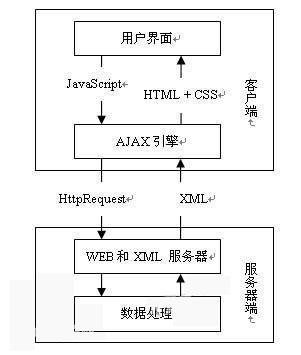
Ajax(Asynchronous JavaScript and XML)是一种在无需重新加载整个网页的情况下,与服务器交换数据和更新部分网页的技术,在Ajax中,通常使用JavaScript来发送请求,并使用XML或JSON等格式来传递数据,以下是如何使用Ajax将值传递给Java服务器的详细步骤:
创建Ajax请求
你需要创建一个Ajax请求,这可以通过JavaScript中的XMLHttpRequest对象或更现代的fetch API来实现。
使用XMLHttpRequest:
var xhr = new XMLHttpRequest(); xhr.open("POST", "yourserverendpoint", true); xhr.setRequestHeader("ContentType", "application/json"); xhr.onreadystatechange = function () { if (xhr.readyState == 4 && xhr.status == 200) { // 处理响应 var response = JSON.parse(xhr.responseText); console.log(response); } }; var data = JSON.stringify({ key: "value" }); xhr.send(data);
使用fetch API:
fetch("yourserverendpoint", { method: "POST", headers: { "ContentType": "application/json", }, body: JSON.stringify({ key: "value" }), }) .then((response) => response.json()) .then((data) => { console.log(data); }) .catch((error) => { console.error("Error:", error); });
创建Java服务器端点
在Java中,你需要创建一个Servlet或使用其他框架(如Spring Boot)来处理Ajax请求,以下是一个简单的Servlet示例:
import javax.servlet.ServletException; import javax.servlet.annotation.WebServlet; import javax.servlet.http.HttpServlet; import javax.servlet.http.HttpServletRequest; import javax.servlet.http.HttpServletResponse; import java.io.IOException; import java.io.PrintWriter; @WebServlet("/yourendpoint") public class AjaxServlet extends HttpServlet { protected void doPost(HttpServletRequest request, HttpServletResponse response) throws ServletException, IOException { response.setContentType("application/json"); PrintWriter out = response.getWriter(); String key = request.getParameter("key"); String value = request.getParameter("value"); // 处理业务逻辑 String result = "Processed: " + key + " = " + value; out.print(result); out.flush(); } }
处理请求和响应
在Java服务器端,你可以通过HttpServletRequest对象获取传递的参数,并根据需要进行处理,处理完成后,你可以使用HttpServletResponse对象来发送响应。
测试
在完成上述步骤后,你可以通过浏览器或Postman等工具发送Ajax请求,并检查Java服务器是否正确处理了请求。
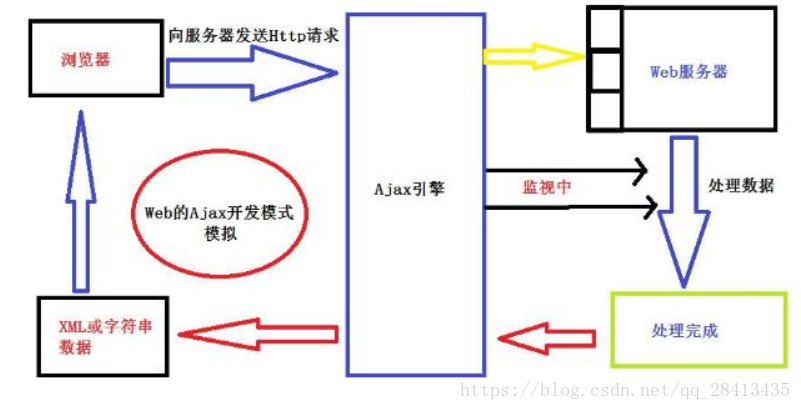
表格示例
| 步骤 | JavaScript | Java |
|---|---|---|
| 1 | 创建XMLHttpRequest或使用fetch API发送请求 | 创建Servlet或使用框架处理请求 |
| 2 | 设置请求类型、URL、头部和请求体 | 获取请求参数,处理业务逻辑 |
| 3 | 发送请求 | 处理请求,发送响应 |
| 4 | 处理响应 | 处理请求,发送响应 |
FAQs
Q1:为什么使用Ajax而不是传统的表单提交?
A1:Ajax允许在不重新加载整个网页的情况下与服务器交换数据和更新部分网页,这可以提高用户体验,减少页面加载时间,并使应用程序更加响应。
Q2:如何处理跨域请求?
A2:在Java服务器端,你可以使用@CrossOrigin注解来允许跨域请求。
import org.springframework.web.bind.annotation.CrossOrigin; import org.springframework.web.bind.annotation.PostMapping; import org.springframework.web.bind.annotation.RequestBody; import org.springframework.web.bind.annotation.RestController; @RestController @CrossOrigin(origins = "http://yourclientorigin") public class AjaxController { @PostMapping("/yourendpoint") public String handleRequest(@RequestBody Map<String, String> data) { // 处理请求 return "Processed"; } }
这样,Java服务器就会允许来自指定客户端的跨域请求。