上一篇
maximumvps-64m内存KVM简单测评
主机测评上才发布maximumvps的文章不久(maximumvps-kvm全面上货,最低8.5美元年付)我这里就自己买了个想做个测评发给大家看看,如实从节约的理念出发买了个64M内存的最便宜的。洛杉矶数据中心,系统里面里面有ISO和net-install版本的debian、centos等,但是没有我喜欢的minimal,全面的评价一下就是这价格还是可以了,建站没啥问题的,慢慢开始折腾吧:
top – 03:56:40 up 16 min, 1 user, load average: 0.00, 0.00, 0.00
Tasks: 53 total, 1 running, 52 sleeping, 0 stopped, 0 zombie
Cpu(s): 0.0%us, 0.0%sy, 0.0%ni,100.0%id, 0.0%wa, 0.0%hi, 0.0%si, 0.0%st
Mem: 59920k total, 27348k used, 32572k free, 1712k buffers
Swap: 115704k total, 0k used, 115704k free, 14664k cached
PID USER PR NI VIRT RES SHR S %CPU %MEM TIME+ COMMAND
1064 root 20 0 2336 1112 900 R 0.3 1.9 0:00.02 top
1 root 20 0 2036 716 620 S 0.0 1.2 0:00.72 init
2 root 20 0 0 0 0 S 0.0 0.0 0:00.00 kthreadd
3 root RT 0 0 0 0 S 0.0 0.0 0:00.00 migration/0
4 root 20 0 0 0 0 S 0.0 0.0 0:00.00 ksoftirqd/0
5 root RT 0 0 0 0 S 0.0 0.0 0:00.00 watchdog/0
6 root 20 0 0 0 0 S 0.0 0.0 0:00.01 events/0
7 root 20 0 0 0 0 S 0.0 0.0 0:00.00 cpuset
8 root 20 0 0 0 0 S 0.0 0.0 0:00.00 khelper
9 root 20 0 0 0 0 S 0.0 0.0 0:00.00 netns
10 root 20 0 0 0 0 S 0.0 0.0 0:00.00 async/mgr
内存情况:(等会让自己加点swap)
root@debian:~# free -m
total used free shared buffers cached
Mem: 58 26 31 0 1 14
-/+ buffers/cache: 10 47
Swap: 112 0 112
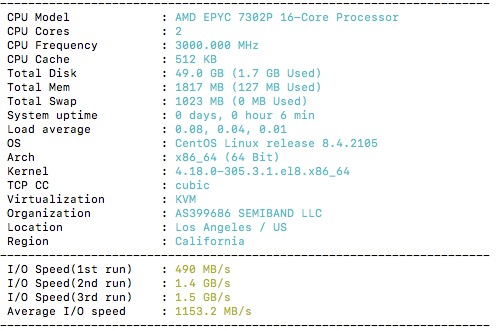
看看CPU,其实官方公布了为Dual L5420
root@debian:~# cat /proc/cpuinfo
processor : 0
vendor_id : GenuineIntel
cpu family : 6
model : 13
model name : QEMU Virtual CPU version (cpu64-rhel6)
stepping : 3
cpu MHz : 2500.088
cache size : 4096 KB
fdiv_bug : no
hlt_bug : no
f00f_bug : no
coma_bug : no
fpu : yes
fpu_exception : yes
cpuid level : 4
wp : yes
flags : fpu de pse tsc msr pae mce cx8 apic sep mtrr pge mca cmov pse36 clflush mmx fxsr sse sse2 syscall nx lm up
pni cx16 hypervisor lahf_lm
bogomips : 5000.17
clflush size : 64
cache_alignment : 64
address sizes : 38 bits physical, 48 bits virtual
power management:

安装好系统后就这情况:
root@debian:~# df -lh
Filesystem Size Used Avail Use% Mounted on
/dev/sda1 4.9G 506M 4.1G 11% /
tmpfs 30M 0 30M 0% /lib/init/rw
udev 25M 80K 25M 1% /dev
tmpfs 30M 0 30M 0% /dev/shm
下载测试一把速度:
root@debian:~# wget http://cachefly.cachefly.net/100mb.test
–2014-02-16 03:59:24– http://cachefly.cachefly.net/100mb.test
Resolving cachefly.cachefly.net… 205.234.175.175
Connecting to cachefly.cachefly.net|205.234.175.175|:80… connected.
HTTP request sent, awaiting response… 200 OK
Length: 104857600 (100M) [application/octet-stream]
Saving to: “100mb.test”
100%[======================================>] 104,857,600 25.5M/s in 3.9s
2014-02-16 03:59:28 (25.9 MB/s) – “100mb.test” saved [104857600/104857600]
DD测试,后面有90多M
root@debian:~# dd if=/dev/zero of=test bs=64k count=16k conv=fdatasync
16384+0 records in
16384+0 records out
1073741824 bytes (1.1 GB) copied, 13.3748 s, 80.3 MB/s
跑个比较全面的脚本:
root@debian:~# wget freevps.us/downloads/bench.sh -O – -o /dev/null|bash
CPU model : QEMU Virtual CPU version (cpu64-rhel6)
Number of cores : 1
CPU frequency : 2500.088 MHz
Total amount of ram : 58 MB
Total amount of swap : 112 MB
System uptime : 20 min,
Download speed from CacheFly: 24.1MB/s
Download speed from Coloat, Atlanta GA: 1022KB/s
Download speed from Softlayer, Dallas, TX: 1.87MB/s
Download speed from Linode, Tokyo, JP: 591KB/s
Download speed from i3d.net, Rotterdam, NL: 285KB/s
Download speed from Leaseweb, Haarlem, NL: 146KB/s
Download speed from Softlayer, Singapore: 383KB/s
Download speed from Softlayer, Seattle, WA: 2.34MB/s
Download speed from Softlayer, San Jose, CA: 6.22MB/s
Download speed from Softlayer, Washington, DC: 1017KB/s
I/O speed : 90.1 MB/s