上一篇
java怎么自己写数据库
Java中,可以通过JDBC(Java Database Connectivity)来操作数据库。
Java中,自己写数据库是一项复杂但有趣的任务,这涉及到数据结构、文件操作、索引管理等多个方面,下面将详细介绍如何用Java实现一个简单的数据库。
设计思路
- 数据存储结构:
- 表结构:使用文件来存储表数据,每个表对应一个文件,文件中每一行代表一条记录,字段之间用特定分隔符(如逗号)分开。
- 索引结构:为了提高查询效率,可以建立索引,索引可以是简单的哈希表或者B树结构,用于快速定位数据。
- 数据操作:
- 增删改查:实现基本的CRUD(Create, Read, Update, Delete)操作。
- 事务管理:保证数据的一致性和完整性。
- 数据库管理系统(DBMS)功能:
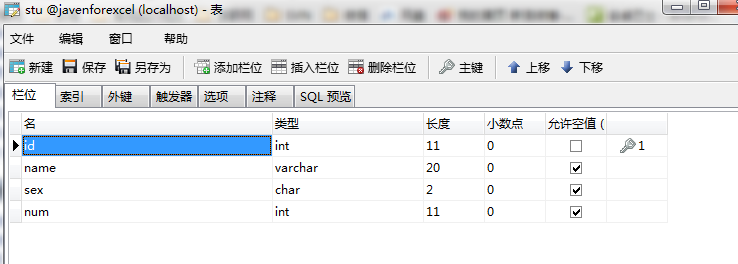
- DDL(数据定义语言):创建、删除表等操作。
- DML(数据操作语言):插入、更新、删除数据。
- 查询优化:通过索引等方式提高查询效率。
实现步骤
定义数据模型
我们需要定义数据模型,包括表结构和字段类型。
class Table { private String name; private List<String> columns; private List<Row> rows; // Constructor, getters, and setters } class Row { private Map<String, String> data; // Constructor, getters, and setters }
创建表
创建表时,需要指定表名和列名。
public void createTable(String tableName, List<String> columns) { Table table = new Table(); table.setName(tableName); table.setColumns(columns); // Save table to file or in-memory storage }
插入数据
插入数据时,需要将数据写入到对应的表中。
查询数据
查询数据时,可以根据条件检索表中的数据。
public List<Row> queryData(String tableName, Map<String, String> conditions) { Table table = getTable(tableName); List<Row> result = new ArrayList<>(); for (Row row : table.getRows()) { boolean match = true; for (Map.Entry<String, String> entry : conditions.entrySet()) { if (!row.getData().get(entry.getKey()).equals(entry.getValue())) { match = false; break; } } if (match) { result.add(row); } } return result; }
更新数据
更新数据时,需要找到符合条件的记录并修改其值。
public void updateData(String tableName, Map<String, String> conditions, Map<String, String> newValues) { Table table = getTable(tableName); for (Row row : table.getRows()) { boolean match = true; for (Map.Entry<String, String> entry : conditions.entrySet()) { if (!row.getData().get(entry.getKey()).equals(entry.getValue())) { match = false; break; } } if (match) { for (Map.Entry<String, String> entry : newValues.entrySet()) { row.getData().put(entry.getKey(), entry.getValue()); } } } // Update file or in-memory storage }
删除数据
删除数据时,需要移除符合条件的记录。
索引管理
为了提高查询效率,可以引入索引机制,常见的索引结构有哈希表和B树。
哈希索引
哈希索引适用于等值查询,但不适用于范围查询。
class HashIndex { private Map<String, List<Row>> index; public HashIndex() { index = new HashMap<>(); } public void addRow(String key, Row row) { index.computeIfAbsent(key, k -> new ArrayList<>()).add(row); } public List<Row> getRows(String key) { return index.getOrDefault(key, Collections.emptyList()); } }
B树索引
B树索引适用于范围查询和排序操作。
class BTreeIndex { private TreeMap<String, List<Row>> index; public BTreeIndex() { index = new TreeMap<>(); } public void addRow(String key, Row row) { index.computeIfAbsent(key, k -> new ArrayList<>()).add(row); } public List<Row> getRows(String key) { return index.getOrDefault(key, Collections.emptyList()); } }
事务管理
为了保证数据的一致性和完整性,需要实现事务管理,事务管理包括开始事务、提交事务和回滚事务。
public void beginTransaction() { // Start a new transaction } public void commitTransaction() { // Commit the current transaction } public void rollbackTransaction() { // Rollback the current transaction }
持久化存储
为了保证数据在程序重启后仍然存在,需要将数据持久化到磁盘上,可以使用文件系统或数据库来存储数据。
public void saveToFile(String tableName) { Table table = getTable(tableName); try (BufferedWriter writer = new BufferedWriter(new FileWriter(tableName + ".txt"))) { for (String column : table.getColumns()) { writer.write(column + ","); } writer.newLine(); for (Row row : table.getRows()) { for (String value : row.getData().values()) { writer.write(value + ","); } writer.newLine(); } } catch (IOException e) { e.printStackTrace(); } }
通过以上步骤,我们实现了一个简单的Java数据库,这个数据库支持基本的CRUD操作、索引管理和事务管理,这只是一个基础版本,实际应用中还需要考虑更多的细节和优化,例如并发控制、数据压缩、备份恢复等。
FAQs
Q1: 如何在Java中实现一个简单的数据库?
A1: 可以通过定义数据模型、实现CRUD操作、建立索引和管理事务来实现一个简单的数据库,具体步骤包括创建表、插入数据、查询数据、更新数据和删除数据,还可以通过文件系统或数据库来持久化存储数据。
Q2: 为什么需要索引?如何实现索引?
A2: 索引可以提高查询效率,特别是在大数据量的情况下,常见的索引结构有哈希表和B树,哈希索引适用于等值查询,但不适用于范围查询;B树索引适用于范围查询和排序操作。