
上一篇
digitalocean-2g内存/旧金山/简单测评
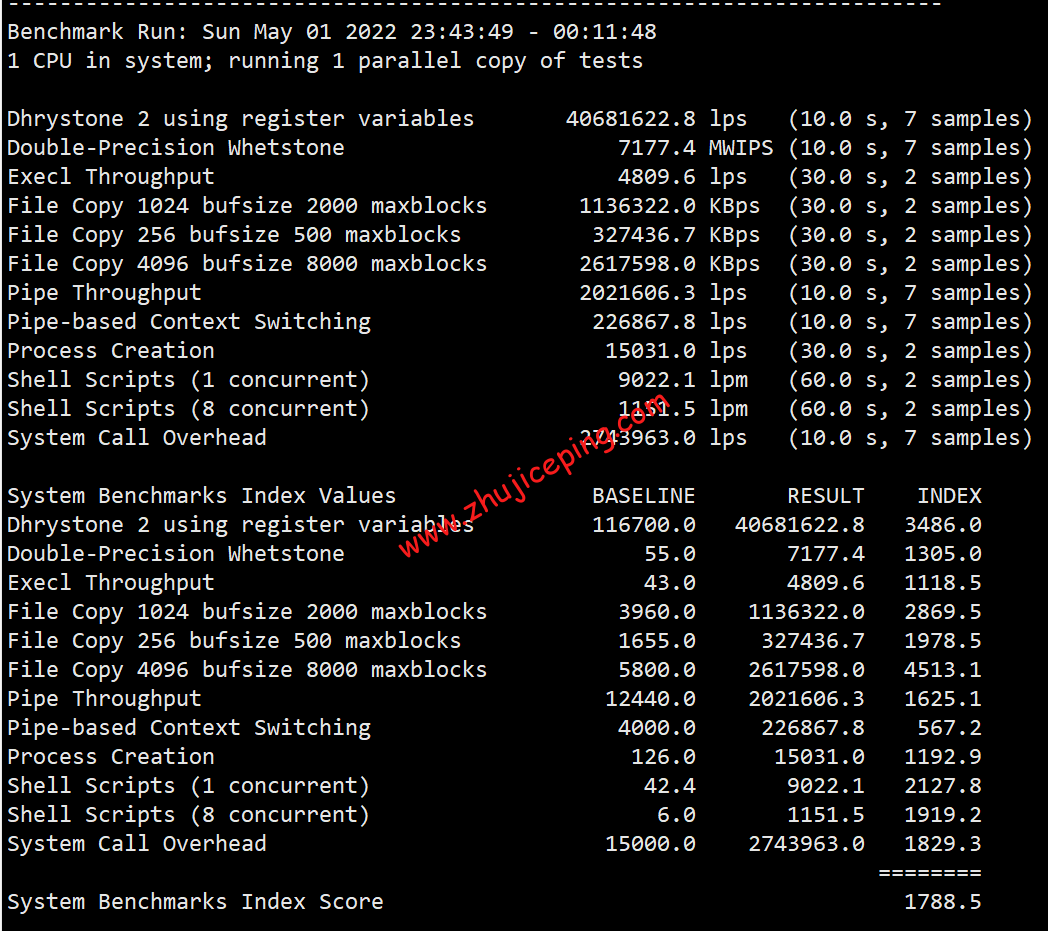
digitalocean在目前来说性价比应该也是数一数二了的,当然这只是我个人的观点不一定对!之前写过digitalocean的那款512M内存的检测测评,这里想看看在CPU加了1核而且内存扩大的情况下会不会有些变化,有兴趣的可以在本帖反馈下你们的结果,说说情况如何?!官方网站:www.digitalocean.com 具体大家看看下面的这些数据吧:
基本信息:基于KVM,2G内存,40G SSD硬盘,2核【cpu MHz : 2299.998】,美国西海岸的 旧金山数据中心,操作系统为debian7[64],无swap【可自行修改,本帖测试默认无】!
top – 06:58:07 up 35 min, 1 user, load average: 0.00, 0.01, 0.05
Tasks: 53 total, 1 running, 52 sleeping, 0 stopped, 0 zombie
%Cpu(s): 0.0 us, 0.0 sy, 0.0 ni,100.0 id, 0.0 wa, 0.0 hi, 0.0 si, 0.0 st
KiB Mem: 2061180 total, 930648 used, 1130532 free, 8512 buffers
KiB Swap: 0 total, 0 used, 0 free, 827888 cached
PID USER PR NI VIRT RES SHR S %CPU %MEM TIME+ COMMAND
2862 root 20 0 23168 1456 1084 R 0.3 0.1 0:00.02 top
1 root 20 0 10648 808 672 S 0.0 0.0 0:00.59 init
2 root 20 0 0 0 0 S 0.0 0.0 0:00.00 kthreadd
3 root 20 0 0 0 0 S 0.0 0.0 0:00.00 ksoftirqd/0
5 root 20 0 0 0 0 S 0.0 0.0 0:00.00 kworker/u:0
6 root rt 0 0 0 0 S 0.0 0.0 0:00.01 migration/0
7 root rt 0 0 0 0 S 0.0 0.0 0:00.01 watchdog/0
8 root rt 0 0 0 0 S 0.0 0.0 0:00.01 migration/1
10 root 20 0 0 0 0 S 0.0 0.0 0:00.05 ksoftirqd/1
11 root 20 0 0 0 0 S 0.0 0.0 0:00.14 kworker/0:1
12 root rt 0 0 0 0 S 0.0 0.0 0:00.01 watchdog/1
13 root 0 -20 0 0 0 S 0.0 0.0 0:00.00 cpuset
14 root 0 -20 0 0 0 S 0.0 0.0 0:00.00 khelper
15 root 20 0 0 0 0 S 0.0 0.0 0:00.00 kdevtmpfs
16 root 0 -20 0 0 0 S 0.0 0.0 0:00.00 netns
17 root 20 0 0 0 0 S 0.0 0.0 0:00.00 sync_supers
18 root 20 0 0 0 0 S 0.0 0.0 0:00.00 bdi-default
19 root 0 -20 0 0 0 S 0.0 0.0 0:00.00 kintegrityd
20 root 0 -20 0 0 0 S 0.0 0.0 0:00.00 kblockd
21 root 20 0 0 0 0 S 0.0 0.0 0:00.10 kworker/1:1
22 root 20 0 0 0 0 S 0.0 0.0 0:00.00 khungtaskd
23 root 20 0 0 0 0 S 0.0 0.0 0:00.41 kswapd0
24 root 25 5 0 0 0 S 0.0 0.0 0:00.00 ksmd
25 root 39 19 0 0 0 S 0.0 0.0 0:00.00 khugepaged
26 root 20 0 0 0 0 S 0.0 0.0 0:00.00 fsnotify_mark
27 root 0 -20 0 0 0 S 0.0 0.0 0:00.00 crypto
101 root 0 -20 0 0 0 S 0.0 0.0 0:00.00 ata_sff
105 root 20 0 0 0 0 S 0.0 0.0 0:00.00 scsi_eh_0
118 root 20 0 0 0 0 S 0.0 0.0 0:00.00 scsi_eh_1
119 root 20 0 0 0 0 S 0.0 0.0 0:00.00 kworker/u:1
158 root 20 0 0 0 0 S 0.0 0.0 0:00.11 kworker/1:2
172 root 20 0 0 0 0 S 0.0 0.0 0:00.08 jbd2/vda-8
173 root 0 -20 0 0 0 S 0.0 0.0 0:00.00 ext4-dio-unwrit
316 root 20 0 21220 1192 740 S 0.0 0.1 0:00.03 udevd
467 root 0 -20 0 0 0 S 0.0 0.0 0:00.00 kpsmoused
471 root 20 0 0 0 0 S 0.0 0.0 0:00.14 kworker/0:3
1900 root 20 0 52640 1504 1092 S 0.0 0.1 0:00.01 rsyslogd
1985 daemon 20 0 16668 152 0 S 0.0 0.0 0:00.00 atd
看看内存情况:
root@test:~# free -m
total used free shared buffers cached
Mem: 2012 79 1933 0 5 40
-/+ buffers/cache: 33 1979
Swap: 0 0 0
root@test:~# vmstat
procs ———–memory———- —swap– —–io—- -system– —-cpu—-
r b swpd free buff cache si so bi bo in cs us sy id wa
0 0 0 1130656 8512 827904 0 0 42 1004 46 529 0 1 99 0
不知道是什么类型的U:
root@test:~# cat /proc/cpuinfo
processor : 0
vendor_id : GenuineIntel
cpu family : 6
model : 2
model name : QEMU Virtual CPU version 1.0
stepping : 3
microcode : 0x1
cpu MHz : 2299.998
cache size : 4096 KB
fpu : yes
fpu_exception : yes
cpuid level : 4
wp : yes
flags : fpu de pse tsc msr pae mce cx8 apic sep mtrr pge mca cmov pse36 clflush mmx fxsr sse sse2 syscall nx lm rep_good nopl pni vmx cx16 popcnt hypervisor lahf_lm
bogomips : 4599.99
clflush size : 64
cache_alignment : 64
address sizes : 40 bits physical, 48 bits virtual
power management:
processor : 1
vendor_id : GenuineIntel
cpu family : 6
model : 2
model name : QEMU Virtual CPU version 1.0
stepping : 3
microcode : 0x1
cpu MHz : 2299.998
cache size : 4096 KB
fpu : yes
fpu_exception : yes
cpuid level : 4
wp : yes
flags : fpu de pse tsc msr pae mce cx8 apic sep mtrr pge mca cmov pse36 clflush mmx fxsr sse sse2 syscall nx lm rep_good nopl pni vmx cx16 popcnt hypervisor lahf_lm
bogomips : 4599.99
clflush size : 64
cache_alignment : 64
address sizes : 40 bits physical, 48 bits virtual
power management:
root@test:~# cat /proc/meminfo
MemTotal: 2061180 kB
MemFree: 1979540 kB
Buffers: 5624 kB
Cached: 41916 kB
SwapCached: 0 kB
Active: 25276 kB
Inactive: 30224 kB
Active(anon): 7988 kB
Inactive(anon): 104 kB
Active(file): 17288 kB
Inactive(file): 30120 kB
Unevictable: 0 kB
Mlocked: 0 kB
SwapTotal: 0 kB
SwapFree: 0 kB
Dirty: 0 kB
Writeback: 0 kB
AnonPages: 8004 kB
Mapped: 7068 kB
Shmem: 128 kB
Slab: 10516 kB
SReclaimable: 3816 kB
SUnreclaim: 6700 kB
KernelStack: 1000 kB
PageTables: 1292 kB
NFS_Unstable: 0 kB
Bounce: 0 kB
WritebackTmp: 0 kB
CommitLimit: 1030588 kB
Committed_AS: 60716 kB
VmallocTotal: 34359738367 kB
VmallocUsed: 8884 kB
VmallocChunk: 34359729423 kB
HardwareCorrupted: 0 kB
AnonHugePages: 0 kB
HugePages_Total: 0
HugePages_Free: 0
HugePages_Rsvd: 0
HugePages_Surp: 0
Hugepagesize: 2048 kB
DirectMap4k: 42996 kB
DirectMap2M: 2054144 kB
本人默认安装的是debian 7的64位:
root@test:~# df -lh
Filesystem Size Used Avail Use% Mounted on
rootfs 40G 846M 37G 3% /
udev 10M 0 10M 0% /dev
tmpfs 202M 124K 202M 1% /run
/dev/disk/by-label/DOROOT 40G 846M 37G 3% /
tmpfs 5.0M 0 5.0M 0% /run/lock
tmpfs 403M 0 403M 0% /run/shm
都说是G口,第一次测试有点小遗憾:
root@test:~# wget http://cachefly.cachefly.net/100mb.test
–2013-12-08 06:27:03– http://cachefly.cachefly.net/100mb.test
Resolving cachefly.cachefly.net (cachefly.cachefly.net)… 205.234.175.175
Connecting to cachefly.cachefly.net (cachefly.cachefly.net)|205.234.175.175|:80… connected.
HTTP request sent, awaiting response… 200 OK
Length: 104857600 (100M) [application/octet-stream]
Saving to: `100mb.test’
100%[======================================>] 104,857,600 16.3M/s in 8.1s
2013-12-08 06:27:11 (12.4 MB/s) – `100mb.test’ saved [104857600/104857600]
这里基本恢复G口该有的速度:
root@test:~# wget http://yum.phx.singlehop.com/singlehop/500megabytefile.tar.gz
–2013-12-08 06:27:44– http://yum.phx.singlehop.com/singlehop/500megabytefile.tar.gz
Resolving yum.phx.singlehop.com (yum.phx.singlehop.com)… 108.178.62.202
Connecting to yum.phx.singlehop.com (yum.phx.singlehop.com)|108.178.62.202|:80… connected.
HTTP request sent, awaiting response… 200 OK
Length: 500000000 (477M) [application/x-gzip]
Saving to: `500megabytefile.tar.gz’
100%[======================================>] 500,000,000 76.4M/s in 6.6s
2013-12-08 06:27:51 (71.8 MB/s) – `500megabytefile.tar.gz’ saved [500000000/500000000]
拖日本的数据能有这样该知足了:
root@test:~# wget http://speedtest.tokyo.linode.com/100MB-tokyo.bin
–2013-12-08 06:28:13– http://speedtest.tokyo.linode.com/100MB-tokyo.bin
Resolving speedtest.tokyo.linode.com (speedtest.tokyo.linode.com)… 106.187.96.148, 2400:8900::4b
Connecting to speedtest.tokyo.linode.com (speedtest.tokyo.linode.com)|106.187.96.148|:80… connected.
HTTP request sent, awaiting response… 200 OK
Length: 104857600 (100M) [application/octet-stream]
Saving to: `100MB-tokyo.bin’
100%[======================================>] 104,857,600 28.0M/s in 5.7s
2013-12-08 06:28:19 (17.7 MB/s) – `100MB-tokyo.bin’ saved [104857600/104857600]
拖欧洲的数据,还不错:
root@test:~# wget http://speedtest.london.linode.com/100MB-london.bin
–2013-12-08 06:28:43– http://speedtest.london.linode.com/100MB-london.bin
Resolving speedtest.london.linode.com (speedtest.london.linode.com)… 176.58.107.39, 2a01:7e00::4b
Connecting to speedtest.london.linode.com (speedtest.london.linode.com)|176.58.107.39|:80… connected.
HTTP request sent, awaiting response… 200 OK
Length: 104857600 (100M) [application/octet-stream]
Saving to: `100MB-london.bin’
100%[======================================>] 104,857,600 17.6M/s in 8.7s
2013-12-08 06:28:52 (11.5 MB/s) – `100MB-london.bin’ saved [104857600/104857600]
拖美国西海岸的sanjose:
root@test:~# wget http://sj.cheapvpsllc.com/1000mb.test
–2013-12-08 06:29:15– http://sj.cheapvpsllc.com/1000mb.test
Resolving sj.cheapvpsllc.com (sj.cheapvpsllc.com)… 50.117.7.3
Connecting to sj.cheapvpsllc.com (sj.cheapvpsllc.com)|50.117.7.3|:80… connected.
HTTP request sent, awaiting response… 200 OK
Length: 1048576000 (1000M) [text/plain]
Saving to: `1000mb.test’
100%[====================================>] 1,048,576,000 90.3M/s in 13s
2013-12-08 06:29:27 (77.7 MB/s) – `1000mb.test’ saved [1048576000/1048576000]
测试下I/O:
dd if=/dev/zero of=test bs=64k count=16k conv=fdatasync
16384+0 records in
16384+0 records out
1073741824 bytes (1.1 GB) copied, 1.68154 s, 639 MB/s
用freevps家的脚本泡一下:
root@test:~# wget freevps.us/downloads/bench.sh -O – -o /dev/null|bash
CPU model : QEMU Virtual CPU version 1.0
Number of cores : 2
CPU frequency : 2299.998 MHz
Total amount of ram : 2012 MB
Total amount of swap : 0 MB
System uptime : 10 min,
Download speed from CacheFly: 13.1MB/s
Download speed from Coloat, Atlanta GA: 16.8MB/s
Download speed from Softlayer, Dallas, TX: 38.0MB/s
Download speed from Linode, Tokyo, JP: 3.97MB/s
Download speed from i3d.net, NL:
Download speed from Leaseweb, Haarlem, NL: 10.8MB/s
Download speed from Softlayer, Singapore: 9.58MB/s
Download speed from Softlayer, Seattle, WA: 65.2MB/s
Download speed from Softlayer, San Jose, CA: 54.1MB/s
Download speed from Softlayer, Washington, DC: 24.6MB/s
I/O speed : 508 MB/s
相关文章
-
![digitalocean怎么样?[2022年]Digitalocean英国机房简单测评](https://img.xixizhuji.com/zb_users/upload/2026/08/20260818045101178699986124820.png)
digitalocean怎么样?[2022年]Digitalocean英国机房简单测评
-
![digitalocean怎么样?[2022年]Digitalocean荷兰机房简单测评](https://img.xixizhuji.com/zb_users/upload/2026/08/20260818044256178699937699251.png)
digitalocean怎么样?[2022年]Digitalocean荷兰机房简单测评
-

Digitalocean、Vultr、Linode,均已经列装AMD系列高性能云服务器
-
![digitalocean怎么样?[2022年]Digitalocean印度机房简单测评](https://img.xixizhuji.com/zb_users/upload/2026/08/20260818044139178699929995098.png)
digitalocean怎么样?[2022年]Digitalocean印度机房简单测评
-
![digitalocean怎么样?[2022年]Digitalocean新加坡机房简单测评](https://img.xixizhuji.com/zb_users/upload/2026/08/20260818044135178699929523899.png)
digitalocean怎么样?[2022年]Digitalocean新加坡机房简单测评
-
![digitalocean怎么样?[2022年]Digitalocean加拿大机房简单测评](https://img.xixizhuji.com/zb_users/upload/2026/08/20260818044126178699928682657.jpg)
digitalocean怎么样?[2022年]Digitalocean加拿大机房简单测评
-
![digitalocean怎么样?[2022年]Digitalocean德国机房简单测评](https://img.xixizhuji.com/zb_users/upload/2026/08/20260818044028178699922895340.png)
digitalocean怎么样?[2022年]Digitalocean德国机房简单测评
-
![digitalocean怎么样?[2022年]Digitalocean旧金山机房简单测评](https://img.xixizhuji.com/zb_users/upload/2026/08/20260818043947178699918733816.png)
digitalocean怎么样?[2022年]Digitalocean旧金山机房简单测评







