
上一篇
asp.net下获取远程网页内容之二,如何解决请求异常或内容解析问题?
ASP.NET下获取远程网页的内容之二
基于WebClient的远程内容获取与优化
WebClient是ASP.NET早期提供的类,用于从远程URL下载内容,尽管现代开发中更推荐使用HttpClient,但了解WebClient的用法仍有必要,尤其是在维护旧项目时。
基本用法
通过构造WebClient实例并调用DownloadString方法,可直接获取远程网页的文本内容:
using System.Net; using System.Text; public string GetRemoteContentViaWebClient(string url) { using (var client = new WebClient()) { client.Timeout = 10000; // 设置超时(单位:毫秒) client.Encoding = Encoding.UTF8; // 处理编码(避免乱码) return client.DownloadString(url); } }
该方法适用于简单的同步请求,但存在以下局限:
- 无异步支持:无法直接使用async/await,需通过Task.Run包装。
- 性能较低:单线程操作,不适合高并发场景。
- 配置灵活性差:超时、编码等配置需手动设置。
优化方向
针对上述问题,可通过以下方式优化:
- 异步包装:将WebClient操作封装为异步方法,提升响应速度: public async Task<string> GetRemoteContentAsyncViaWebClient(string url) { var client = new WebClient(); client.Timeout = 10000; client.Encoding = Encoding.UTF8; return await Task.Run(() => client.DownloadString(url)); }
- 超时与重试:在WebClient中设置Timeout属性,并在异常时实现重试逻辑(如指数退避算法)。
使用HttpClient的进阶实践
HttpClient是现代ASP.NET推荐使用的类,相比WebClient,其异步支持、配置灵活性和安全性更优,适用于复杂场景。
创建与配置
通过HttpClient或HttpClientFactory(ASP.NET Core)创建实例,并进行配置:
// 基础创建 using var client = new HttpClient(); client.Timeout = TimeSpan.FromSeconds(10); // 设置请求超时 client.DefaultRequestHeaders.UserAgent.ParseAdd("MyApp/1.0"); // 添加User-Agent // ASP.NET Core HttpClientFactory示例 var factory = new HttpClientFactory(); var client = factory.CreateClient("RemoteContentClient"); client.BaseAddress = new Uri("https://api.example.com/"); client.DefaultRequestHeaders.Add("Authorization", "Bearer your-token");
异步请求与响应处理
HttpClient内置异步方法(如GetAsync、PostAsync),适合异步编程模型:
- 响应处理:通过Content.ReadAsStringAsync()获取字符串内容,或ReadAsStreamAsync()获取流。
- 压缩支持:HttpClient自动处理Gzip/Deflate压缩,无需额外处理。
高级配置(认证、重试)
- 认证:通过DefaultRequestHeaders添加认证头(如Bearer Token)或使用HttpClientHandler处理基本认证。
- 重试机制:通过HttpClientHandler的AutomaticDecompression和RetryPolicy实现自动重试: var handler = new HttpClientHandler { AutomaticDecompression = DecompressionMethods.GZip | DecompressionMethods.Deflate, RetryPolicy = new RetryPolicy() }; var client = new HttpClient(handler);
异常处理与错误应对
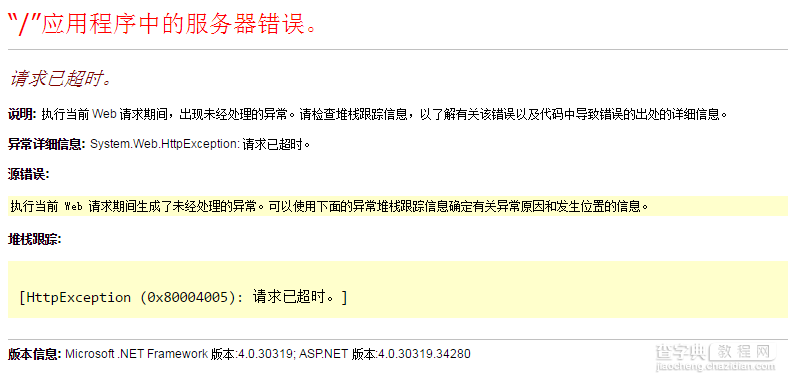
网络请求中常见异常包括WebException(网络错误)、HttpRequestException(HTTP错误)和TimeoutException(超时),合理处理这些异常可提升系统的健壮性。
异常捕获示例
public string GetRemoteContentWithExceptionHandling(string url) { try { using (var client = new HttpClient()) { HttpResponseMessage response = client.GetAsync(url).Result; // 同步调用(仅示例) response.EnsureSuccessStatusCode(); // 抛出异常若状态码非2xx return response.Content.ReadAsStringAsync().Result; } } catch (HttpRequestException ex) when (ex.StatusCode == System.Net.HttpStatusCode.NotFound) { // 处理404错误 return $"Error: Resource not found ({ex.Message})"; } catch (TimeoutException) { return "Error: Request timed out."; } catch (Exception ex) { // 其他异常处理 return $"Unexpected error: {ex.Message}"; } }
自定义重试逻辑
实现指数退避重试机制,避免频繁请求导致服务器过载:
public async Task<string> GetRemoteContentWithRetry(string url, int maxRetries = 3) { int retryCount = 0; while (retryCount < maxRetries) { try { using (var client = new HttpClient()) { HttpResponseMessage response = await client.GetAsync(url); response.EnsureSuccessStatusCode(); return await response.Content.ReadAsStringAsync(); } } catch (HttpRequestException ex) when (ex.StatusCode == System.Net.HttpStatusCode.ServiceUnavailable) { retryCount++; await Task.Delay(TimeSpan.FromSeconds(Math.Pow(2, retryCount))); // 指数退避 } } throw new Exception("Max retries exceeded."); }
性能优化与最佳实践
并发控制
使用SemaphoreSlim限制并发请求数,避免资源耗尽:
private readonly SemaphoreSlim _semaphore = new SemaphoreSlim(10); // 同时允许10个请求 public async Task GetMultipleUrlsAsync(List<string> urls) { var tasks = urls.Select(async url => { await _semaphore.WaitAsync(); // 获取许可 try { var content = await GetRemoteContentViaHttpClient(url); // 处理内容... } finally { _semaphore.Release(); // 释放许可 } }).ToList(); await Task.WhenAll(tasks); }
缓存机制
对于频繁访问的远程内容,使用MemoryCache缓存响应,减少网络请求:
private readonly MemoryCache _cache = new MemoryCache(new MemoryCacheOptions()); public async Task<string> GetRemoteContentWithCache(string url) { if (_cache.TryGetValue(url, out string cachedContent)) { return cachedContent; } var content = await GetRemoteContentViaHttpClient(url); _cache.Set(url, content, TimeSpan.FromMinutes(5)); // 缓存5分钟 return content; }
压缩处理
处理响应的压缩格式(如Gzip),确保内容正确解析:
public async Task<string> GetCompressedContent(string url) { using (var client = new HttpClient()) { HttpResponseMessage response = await client.GetAsync(url); response.EnsureSuccessStatusCode(); // 读取压缩流并解压 var stream = await response.Content.ReadAsStreamAsync(); using (var gzip = new GZipStream(stream, CompressionMode.Decompress)) { using (var reader = new StreamReader(gzip)) { return await reader.ReadToEndAsync(); } } } }
WebClient vs HttpClient 对比表
| 特性 | WebClient | HttpClient |
|---|---|---|
| 异步支持 | 无(需包装) | 有(内置异步方法) |
| 安全性 | 较低(无证书验证) | 高(支持SSL证书验证) |
| 性能 | 较低(单线程) | 较高(多线程优化) |
| 配置灵活性 | 低(超时、编码等手动设置) | 高(超时、重试、认证等配置) |
| 适用场景 | 简单同步请求 | 大量异步请求、复杂配置 |
常见问题解答(FAQs)
Q1:如何处理远程网页的HTTPS证书验证问题?
A1:在HttpClient中,可通过HttpClientHandler配置证书验证或忽略不安全的SSL证书(注意安全风险),示例代码:
var handler = new HttpClientHandler { ServerCertificateCustomValidationCallback = (message, cert, chain, errors) => true // 忽略证书验证(仅用于测试) }; var client = new HttpClient(handler);
生产环境中建议配置证书验证:
handler.ServerCertificateCustomValidationCallback = (message, cert, chain, errors) => cert.Issuer.Equals("YourTrustedCA");
Q2:如何实现批量获取多个远程网页的内容?
A2:使用并发控制(如SemaphoreSlim)和异步任务队列(如Task.WhenAll),避免同时请求过多导致性能问题,示例代码:
public async Task ProcessMultipleUrls(List<string> urls) { var semaphore = new SemaphoreSlim(5); // 同时最多5个并发请求 var tasks = urls.Select(async url => { await semaphore.WaitAsync(); try { var content = await GetRemoteContentViaHttpClient(url); // 处理内容... } finally { semaphore.Release(); } }).ToList(); await Task.WhenAll(tasks); }
通过以上方法,可在ASP.NET应用中高效、稳定地获取远程网页内容,同时兼顾性能与健壮性,在实际开发中,根据场景选择合适的工具(WebClient或HttpClient),并结合异常处理、并发控制和缓存优化,构建可靠的数据获取模块。















