
上一篇
pip安装mysql失败?Python连接MySQL正确驱动选择指南
要使用 Python 连接 MySQL 数据库,需要通过 pip 安装 MySQL 客户端库,以下是详细步骤和常见解决方案:
方法 1:安装官方驱动 mysql-connector-python
pip install mysql-connector-python
-
优点:MySQL 官方维护,纯 Python 实现,无需额外依赖。
-
示例代码:
import mysql.connector db = mysql.connector.connect( host="localhost", user="root", password="your_password", database="test_db" ) cursor = db.cursor() cursor.execute("SELECT * FROM users") print(cursor.fetchall())
方法 2:安装第三方库 pymysql(推荐)
pip install pymysql
-
优点:兼容性好,支持高版本 MySQL,纯 Python 实现。
-
示例代码:
import pymysql db = pymysql.connect( host='localhost', user='root', password='your_password', database='test_db' ) cursor = db.cursor() cursor.execute("SELECT VERSION()") print(cursor.fetchone())
- 优点:基于 C 语言开发,性能最佳(Django 官方推荐)。
- 注意:Windows 可能需要 Visual Studio Build Tools。
-
安装失败(缺少依赖):
-
Linux/macOS:先安装系统依赖:
# Debian/Ubuntu sudo apt-get install python3-dev default-libmysqlclient-dev build-essential # macOS brew install mysql-client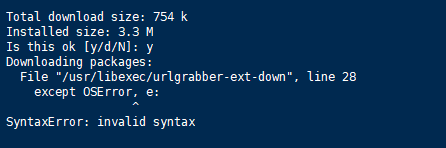
-
Windows:下载预编译包 mysqlclient Wheel,
pip install mysqlclient‑1.4.6‑cp39‑cp39‑win_amd64.whl # 替换为你的版本
-
-
连接数据库报错:
- 检查 MySQL 服务是否启动:sudo systemctl status mysql
- 确认用户权限: CREATE USER 'username'@'localhost' IDENTIFIED BY 'password'; GRANT ALL PRIVILEGES ON *.* TO 'username'@'localhost'; FLUSH PRIVILEGES;
-
连接超时:
- 在连接参数中添加 port=3306(默认端口)和 charset='utf8mb4'。
验证安装
import pymysql # 或 mysql.connector print(pymysql.__version__) # 输出版本号即成功
选择适合你项目的库即可开始操作 MySQL 数据库!

方法 3:安装 mysqlclient(高性能)
# Linux/macOS pip install mysqlclient # Windows(需预先安装编译工具) pip install mysqlclient
常见问题解决







