
上一篇
Linux系统如何安装Apache?详细教程步骤是什么?
在Linux系统中安装Apache服务器是搭建Web服务的基础操作,本文将以CentOS 7/8和Ubuntu 20.04/22.04为例,详细介绍Apache的安装、配置及优化流程,帮助用户快速完成环境部署。
安装前准备
在安装Apache之前,需确保系统满足基本要求并更新至最新状态,对于CentOS系统,执行以下命令更新系统并安装必要的编译工具:
sudo yum update -y sudo yum install -y gcc gcc-c++ make
对于Ubuntu/Debian系统,更新软件列表并安装依赖:
sudo apt update && sudo apt upgrade -y sudo apt install -y build-essential
确保系统已配置静态IP地址,并关闭防火墙或开放HTTP(80端口)和HTTPS(443端口)访问,CentOS系统可使用firewall-cmd --permanent --add-service=http和firewall-cmd --permanent --add-service=https开放端口,Ubuntu系统则通过sudo ufw allow 'Apache Full'实现。
安装Apache服务器
CentOS系统安装
CentOS系统使用yum包管理器安装Apache,执行以下命令:
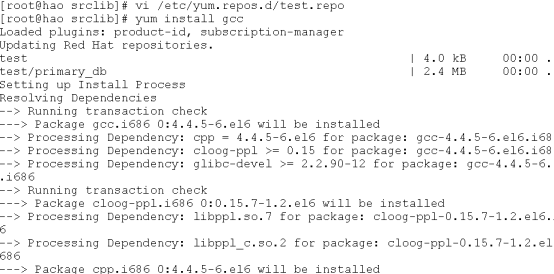
安装完成后,启动Apache服务并设置为开机自启:
sudo systemctl start httpd sudo systemctl enable httpd
Ubuntu系统安装
Ubuntu系统使用apt包管理器安装Apache,命令如下:
sudo apt install -y apache2
安装后启动服务并配置开机自启:

验证安装
在浏览器中访问服务器的IP地址(如http://192.168.1.100),若显示“Apache2 Ubuntu Default Page”或“CentOS HTTP Server Test Page”,则表示安装成功,也可通过命令行检查服务状态:
sudo systemctl status httpd # CentOS sudo systemctl status apache2 # Ubuntu
核心配置文件解析
Apache的主配置文件位于/etc/httpd/conf/httpd.conf(CentOS)或/etc/apache2/apache2.conf(Ubuntu),以下是关键配置项说明:
| 配置项 | 作用 | 示例 |
|---|---|---|
| ServerRoot | Apache安装根目录 | ServerRoot "/etc/httpd" |
| Listen | 监听端口 | Listen 80 |
| DocumentRoot | 网站根目录 | DocumentRoot "/var/www/html" |
| <Directory> | 目录权限控制 | <Directory "/var/www/html"> Options Indexes FollowSymLinks AllowOverride None Require all granted </Directory> |
| ServerName | 服务器域名 | ServerName example.com:80 |
修改配置文件后,需使用sudo apachectl configtest(CentOS)或sudo apache2ctl configtest(Ubuntu)检查语法是否正确,无误后重启服务生效。
虚拟主机配置
虚拟主机允许在同一台服务器上托管多个网站,以下以CentOS为例,配置两个域名(example1.com和example2.com)的虚拟主机:
-
创建网站目录:
sudo mkdir -p /var/www/example1.com /var/www/example2.com sudo echo "<h1>Example1.com</h1>" > /var/www/example1.com/index.html sudo echo "<h1>Example2.com</h1>" > /var/www/example2.com/index.html
-
创建虚拟主机配置文件:
-
同样方式创建example2.com.conf,修改对应域名和目录。
-
重启Apache服务:
sudo systemctl restart httpd - 关闭目录列表:在<Directory>指令中移除Indexes选项,防止目录内容被遍历。
- 限制访问IP:通过Require ip 192.168.1.0/24限制特定网段访问。
- 配置SSL证书:使用Let’s Encrypt免费证书,启用HTTPS加密(需先安装mod_ssl模块)。
- 定期更新:执行sudo yum update httpd或sudo apt update && sudo apt upgrade apache2保持软件版本最新。
- 权限问题:确保网站目录属主为apache(CentOS)或www-data(Ubuntu),可通过sudo chown -R apache:apache /var/www/html修改。
- 端口冲突:若80端口被占用,使用netstat -tulnp | grep 80查看占用进程,或修改Listen指令为其他端口。
- 日志分析:通过tail -f /var/log/httpd/error_log查看实时错误日志,定位问题根源。
Ubuntu系统需将配置文件存放在/etc/apache2/sites-available/目录,并通过a2ensite example1.com.conf启用站点。
安全优化建议
常见问题排查
通过以上步骤,即可完成Apache服务器的安装与基础配置,根据实际需求,可进一步结合PHP、MySQL等组件搭建LAMP或LNMP环境,满足动态网站部署需求。
相关文章
-

VPS性能优化教程怎么做?Making Implicit Concepts Explicit隐式概念显式化原则
-
VPS性能优化教程,Language of the Domain领域语言原则是什么?
-
VPS性能优化教程,Binding Model绑定模型实现原则是什么?
-
VPS性能优化教程怎么做?VPS性能优化方法详解
-
VPS性能优化教程怎么做?VPS优化方法详解
-
VPS性能优化教程,Refactoring Toward Deeper Insight重构深入洞察原则,VPS如何进行性能优化?
-
VPS性能优化教程:Hands-On Modelers实践建模者原则
-
AS4837青云互联悉尼VPS路由分析,青云互联悉尼VPS怎么样






